Of course! Let's break down Java classes and interfaces, from the basics to modern best practices.
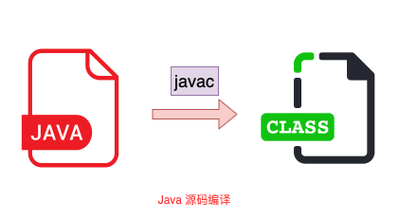
The class - The Blueprint for Objects
A class is the fundamental building block of Java. It's a blueprint or a template that defines the properties (data) and behaviors (methods) that objects of that type will have.
Think of it like a blueprint for a house:
- Properties (Fields/Variables): The number of rooms, the color of the walls, the square footage. In Java, these are called fields or instance variables.
- Behaviors (Methods): The ability to open the door, turn on the lights, lock the windows. In Java, these are called methods.
Key Components of a Class
// A class declaration
public class Car {
    // 1. Fields (Properties/State)
    // These define the data associated with a Car object.
    String color;
    int year;
    double speed;
    // 2. Constructors
    // A special method used to create and initialize an object.
    public Car(String carColor, int carYear) {
        this.color = carColor; // 'this' refers to the current object's instance
        this.year = carYear;
        this.speed = 0.0;      // Default speed is 0
    }
    // 3. Methods (Behaviors/Actions)
    // These define what a Car object can do.
    public void accelerate(double amount) {
        this.speed += amount;
        System.out.println("Accelerating to " + this.speed + " mph.");
    }
    public void brake() {
        this.speed = 0.0;
        System.out.println("Car has stopped.");
    }
    // 4. Getters and Setters (Accessors and Mutators)
    // Controlled ways to access and modify private fields.
    public String getColor() {
        return this.color;
    }
    public void setColor(String newColor) {
        this.color = newColor;
    }
}
How to Use a Class
You create an instance (or an object) of a class using the new keyword.
public class Main {
    public static void main(String[] args) {
        // Create an instance of the Car class
        Car myCar = new Car("Red", 2025);
        // Access fields and call methods using the dot (.) operator
        System.out.println("My car is " + myCar.getColor()); // Output: My car is Red
        myCar.accelerate(50.5); // Output: Accelerating to 50.5 mph.
        myCar.brake();          // Output: Car has stopped.
    }
}
The interface - A Contract
An interface is a reference type in Java, similar to a class, that can contain only constants, method signatures, default methods, static methods, and nested types. It's a way of achieving abstraction and defining a contract.

Think of it like a remote control:
- The remote has buttons (e.g.,
power(),volumeUp(),channelDown()). This is the interface—it defines what you can do. - Many different devices (TV, Sound System, Air Conditioner) can be controlled by this remote. Each device implements the interface, providing its own specific how for each button press.
An interface guarantees that any class implementing it will provide concrete implementations for all its abstract methods.
Key Components of an Interface
Before Java 8, interfaces could only have abstract methods. Since Java 8, they have become much more powerful.
// An interface declaration
public interface Drivable {
    // 1. Implicitly Public, Static, and Final Constants
    int MAX_SPEED = 120; // This is a public static final constant
    // 2. Abstract Methods (Pre-Java 8 style)
    // These are method signatures without a body. The class implementing
    // this interface MUST provide an implementation.
    void start();
    void stop();
    int getSpeed();
    // 3. Default Methods (Java 8+)
    // These methods have a default implementation. The implementing class
    // can use it as-is or override it.
    default void honk() {
        System.out.println("Beep beep!");
    }
    // 4. Static Methods (Java 8+)
    // These belong to the interface itself, not to the instances.
    // They are not inherited by the implementing class.
    static void checkLicense() {
        System.out.println("Checking driver's license...");
    }
}
How to Use an Interface
A class uses the implements keyword to "sign the contract" of an interface.
// A class that IMPLEMENTS the Drivable interface
public class Car implements Drivable {
    private int currentSpeed = 0;
    // You MUST provide implementations for all abstract methods from the interface
    @Override
    public void start() {
        System.out.println("Car started with a key turn.");
    }
    @Override
    public void stop() {
        this.currentSpeed = 0;
        System.out.println("Car has stopped.");
    }
    @Override
    public int getSpeed() {
        return this.currentSpeed;
    }
    // The class can optionally override the default method
    @Override
    public void honk() {
        System.out.println("Car says: Honk! Honk!");
    }
    // The class can have its own methods too
    public void accelerate(int amount) {
        this.currentSpeed += amount;
    }
}
You can now use the interface as a type, which is a key principle of polymorphism.
public class Main {
    public static void main(String[] args) {
        // Create an instance of the Car class
        Drivable myVehicle = new Car(); // Using the interface as the type
        // You can only call methods defined in the Drivable interface
        myVehicle.start();
        myVehicle.honk(); // Calls the overridden honk() method from Car
        Drivable.checkLicense(); // Call the static method on the interface
        // myVehicle.accelerate(50); // This will NOT compile!
        // Because 'accelerate' is not a method in the Drivable interface.
    }
}
Key Differences: class vs. interface
| Feature | class |
interface |
|---|---|---|
| Purpose | Defines a blueprint for objects with state and behavior. | Defines a contract of what a class can do. |
| Members | Can have fields, constructors, methods (abstract, concrete, static, default). | Can have constants, abstract methods, default methods, static methods. |
| Fields | Fields can be any access modifier (public, private, etc.) and can be mutable. |
Fields are implicitly public, static, and final (constants). |
| Methods | Can have concrete method implementations. | Methods are implicitly public and abstract (except default and static). |
| Inheritance | Extends one class (extends ParentClass). |
Implements one or more interfaces (implements Interface1, Interface2). |
| Constructor | Has a constructor to initialize objects. | Cannot have a constructor. |
| Keyword | class |
interface |
Modern Java: default and static Methods in Interfaces
The addition of default and static methods in Java 8 was a game-changer. It allows you to add new methods to an interface without breaking all the existing classes that implement it.
- Default Method: Provides a default implementation. Classes can choose to override it. This is great for providing optional behavior or extending an interface's functionality in a backward-compatible way.
- Static Method: Belongs to the interface itself. It's a utility method that is related to the interface's purpose but doesn't depend on the state of any implementing object. It's not inherited by the implementing class.
The abstract class - A Hybrid Concept
Sometimes you need something between a full class and a pure interface. This is where abstract classes come in.
An abstract class is a class that cannot be instantiated on its own. It's meant to be subclassed. It can have both:
- Abstract methods (no body, like in an interface).
- Concrete methods (with a body, like in a regular class).
When to Use an Abstract Class vs. an Interface
| Use Case | Choose abstract class |
Choose interface |
|---|---|---|
| Code Sharing | When you want to share code among several closely related classes. | When you want to specify the behavior of a class, but not concerned about who its ancestors are. |
| Common State | When you want to define non-static, non-final fields to be shared by subclasses. | When you want to define a contract for behavior, with no shared state between implementations. |
| Multiple Inheritance | Not possible. A class can extend only one abstract class. | Yes. A class can implement multiple interfaces. |
| Constructors | Can have |