Of course! The term "Python post input" can mean a few different things, but it most commonly refers to sending data to a web server using the HTTP POST method.
I'll cover the three most common scenarios:
- The Main Case: Making an HTTP POST Request (sending data to a web API)
- Alternative Case: Handling POST Data in a Python Web Server (receiving data sent to your own server)
- Literal Case: Reading User Input and Sending it in a POST Request (a complete script example)
The Main Case: Making an HTTP POST Request (Client-Side)
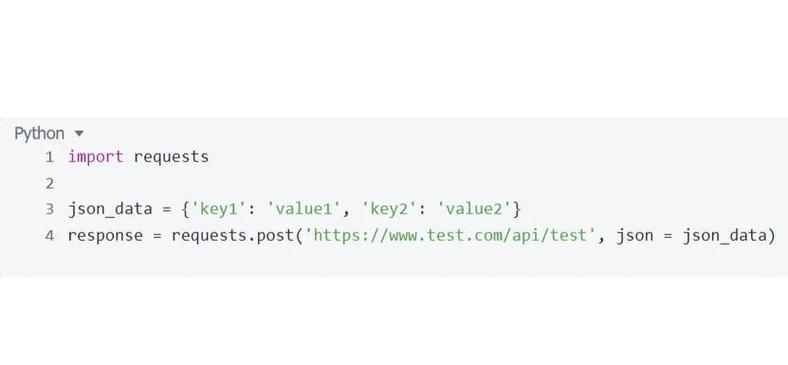
This is what most people mean. You want to send data (like a form submission, a JSON payload, or a file) to a URL. The standard library for this in Python is requests.
Using the requests Library (Recommended)
The requests library is the de-facto standard for making HTTP requests in Python because it's simple and powerful.
First, install it:
pip install requests
Example: Sending JSON Data
This is very common for modern web APIs. Let's send user data to a hypothetical API endpoint.
import requests
import json
# The URL of the API endpoint you want to send data to
url = "https://api.example.com/users"
# The data you want to send, formatted as a Python dictionary
payload = {
    "name": "John Doe",
    "email": "john.doe@example.com",
    "age": 30
}
# Set the headers to inform the server that we are sending JSON data
headers = {
    "Content-Type": "application/json"
}
try:
    # Make the POST request
    # The `json` argument automatically converts the dictionary to a JSON string
    # and sets the Content-Type header for you.
    response = requests.post(url, json=payload, headers=headers)
    # Raise an exception if the request was unsuccessful (e.g., 404, 500)
    response.raise_for_status()
    # Print the response from the server (usually in JSON format)
    print("Status Code:", response.status_code)
    print("Response Body:", response.json())
except requests.exceptions.RequestException as e:
    print(f"An error occurred: {e}")
Example: Sending Form Data
This is similar to submitting an HTML form.
import requests
url = "https://api.example.com/login"
# Data is sent as key-value pairs, just like an HTML form
form_data = {
    "username": "myuser",
    "password": "mypassword123"
}
try:
    # The `data` argument automatically sets the Content-Type to application/x-www-form-urlencoded
    response = requests.post(url, data=form_data)
    response.raise_for_status()
    print("Status Code:", response.status_code)
    print("Response Body:", response.text) # Use .text for non-JSON responses
except requests.exceptions.RequestException as e:
    print(f"An error occurred: {e}")
Using the urllib Library (Built-in, No Installation Needed)
If you can't install external libraries, Python's built-in urllib can do it, but it's more verbose.
import urllib.request
import urllib.parse
import json
url = "https://api.example.com/users"
# The data must be encoded into bytes
# First, convert the dictionary to a JSON string
payload_dict = {"name": "Jane Doe", "email": "jane.doe@example.com"}
payload_json = json.dumps(payload_dict).encode('utf-8')
# Create the request object
# We manually set the Content-Type header
req = urllib.request.Request(url, data=payload_json, method='POST')
req.add_header('Content-Type', 'application/json')
try:
    # Make the request and get the response
    with urllib.request.urlopen(req) as response:
        # Read the response data
        response_body = response.read().decode('utf-8')
        print("Status Code:", response.status)
        print("Response Body:", response_body)
except urllib.error.URLError as e:
    print(f"An error occurred: {e}")
Alternative Case: Handling POST Data in a Python Web Server
If you are building your own web server (e.g., with Flask or Django), "post input" means receiving the data that a client sends to you.
Example with Flask
Flask is a lightweight web framework. First, install it: pip install Flask.
# app.py
from flask import Flask, request, jsonify
app = Flask(__name__)
@app.route('/submit-data', methods=['POST'])
def handle_post_data():
    # Check if the request contains JSON data
    if request.is_json:
        # Get the JSON data from the request body
        data = request.get_json()
        name = data.get('name')
        email = data.get('email')
        print(f"Received JSON data: Name={name}, Email={email}")
        # You would typically process this data here (e.g., save to a database)
        return jsonify({"status": "success", "message": "Data received"}), 200
    # Check if the request contains form data
    elif request.form:
        # Get the form data
        name = request.form.get('name')
        email = request.form.get('email')
        print(f"Received Form data: Name={name}, Email={email}")
        return jsonify({"status": "success", "message": "Form data received"}), 200
    else:
        return jsonify({"status": "error", "message": "No data provided"}), 400
if __name__ == '__main__':
    app.run(debug=True)
How to test this Flask app:
-
Run the script:
python app.py -
Use
curlin a new terminal to send data:# Send JSON data curl -X POST -H "Content-Type: application/json" -d '{"name":"Alice","email":"alice@test.com"}' http://127.0.0.1:5000/submit-data # Send Form data curl -X POST -H "Content-Type: application/x-www-form-urlencoded" -d "name=Bob&email=bob@test.com" http://127.0.0.1:5000/submit-data
Literal Case: Reading User Input and Sending it in a POST Request
This combines user input from the console with sending an HTTP POST request.
import requests
def post_user_data():
    """Reads user input from the console and sends it via POST request."""
    url = "https://api.example.com/users/create"
    # 1. Get input from the user
    name = input("Enter your name: ")
    email = input("Enter your email: ")
    age = input("Enter your age: ")
    # 2. Create the payload dictionary
    # Note: age is a string from input(), we convert it to an int
    payload = {
        "name": name,
        "email": email,
        "age": int(age)
    }
    print(f"\nSending data to {url}...")
    print(f"Payload: {payload}")
    try:
        # 3. Make the POST request
        response = requests.post(url, json=payload)
        # Raise an exception for bad status codes (4xx or 5xx)
        response.raise_for_status()
        # 4. Print the server's response
        print("\n--- Server Response ---")
        print(f"Status Code: {response.status_code}")
        print("Response Body:")
        # Use .pretty_print() if the response is JSON for better formatting
        response_json = response.json()
        print(json.dumps(response_json, indent=2))
    except requests.exceptions.RequestException as e:
        print(f"\nAn error occurred: {e}")
        if e.response:
            print(f"Status Code: {e.response.status_code}")
            print(f"Response Body: {e.response.text}")
# Run the function
if __name__ == "__main__":
    post_user_data()
Summary
| Scenario | Key Concept | Tools/Libraries |
|---|---|---|
| Sending data to a web server (Client) | HTTP POST Request | requests (recommended), urllib (built-in) |
| Receiving data in your web server (Server) | Request Body Parsing | Flask, Django, FastAPI |
| Reading user input from console | input() function |
Built-in Python |