Of course! Here is a comprehensive guide to creating a Python BMI (Body Mass Index) module. We'll start with a simple version and then build it up to be more robust, reusable, and user-friendly.
What is a Python Module?
A module is simply a Python file (.py) containing definitions and statements. You can import it into other scripts to use its functions and variables. Creating a module is a great way to organize your code and avoid repetition.
Step 1: The Basic BMI Module (bmi_calculator.py)
This is the core module. It will contain the logic for calculating and categorizing BMI.
File Name: bmi_calculator.py
# bmi_calculator.py
def calculate_bmi(weight_kg, height_m):
    """
    Calculates the Body Mass Index (BMI) given weight and height.
    Args:
        weight_kg (float): Weight in kilograms.
        height_m (float): Height in meters.
    Returns:
        float: The calculated BMI.
    """
    if height_m <= 0:
        raise ValueError("Height must be a positive number.")
    if weight_kg <= 0:
        raise ValueError("Weight must be a positive number.")
    bmi = weight_kg / (height_m ** 2)
    return bmi
def get_bmi_category(bmi):
    """
    Categorizes the BMI value into a standard health category.
    Args:
        bmi (float): The calculated BMI.
    Returns:
        str: The BMI category (e.g., "Underweight", "Normal weight").
    """
    if bmi < 18.5:
        return "Underweight"
    elif 18.5 <= bmi < 25:
        return "Normal weight"
    elif 25 <= bmi < 30:
        return "Overweight"
    else:
        return "Obese"
def get_bmi_info(weight_kg, height_m):
    """
    A convenience function that calculates BMI and returns its category.
    Args:
        weight_kg (float): Weight in kilograms.
        height_m (float): Height in meters.
    Returns:
        tuple: A tuple containing the (bmi_value, category).
    """
    bmi = calculate_bmi(weight_kg, height_m)
    category = get_bmi_category(bmi)
    return bmi, category
# This block allows the module to be run directly for testing
if __name__ == "__main__":
    print("--- Testing the BMI Module ---")
    # Example 1: Normal weight
    weight1 = 70  # kg
    height1 = 1.75 # m
    bmi1, cat1 = get_bmi_info(weight1, height1)
    print(f"For {weight1}kg and {height1}m: BMI = {bmi1:.2f}, Category = {cat1}")
    # Example 2: Overweight
    weight2 = 95  # kg
    height2 = 1.80 # m
    bmi2, cat2 = get_bmi_info(weight2, height2)
    print(f"For {weight2}kg and {height2}m: BMI = {bmi2:.2f}, Category = {cat2}")
    # Example 3: Testing error handling
    try:
        get_bmi_info(70, 0)
    except ValueError as e:
        print(f"\nCaught an expected error: {e}")
Explanation of the Code:
calculate_bmi(weight_kg, height_m):- Takes weight in kilograms and height in meters.
- Performs the standard BMI calculation:
weight / (height * height). - Includes basic error checking to ensure height and weight are positive numbers.
get_bmi_category(bmi):- Takes a pre-calculated BMI value.
- Uses
if/elif/elsestatements to determine the category based on standard WHO guidelines.
get_bmi_info(weight_kg, height_m):This is a "convenience function" that combines the first two. It's often more user-friendly to call one function that gives you everything you need.
 (图片来源网络,侵删)
if __name__ == "__main__"::- This is a standard Python construct. The code inside this block will only run when the file is executed directly (e.g.,
python bmi_calculator.py), not when it's imported into another script. It's perfect for testing your module's functionality.
- This is a standard Python construct. The code inside this block will only run when the file is executed directly (e.g.,
Step 2: Using the Module in Another Script
Now, let's create a main application file that imports and uses our bmi_calculator module.
File Name: main_app.py
# main_app.py
# Import the entire module
import bmi_calculator
# --- Using the functions directly ---
print("--- Using functions directly ---")
my_weight = 68
my_height = 1.72
# Call the calculate function
my_bmi = bmi_calculator.calculate_bmi(my_weight, my_height)
print(f"Your calculated BMI is: {my_bmi:.2f}")
# Call the category function with the result
my_category = bmi_calculator.get_bmi_category(my_bmi)
print(f"Your BMI category is: {my_category}")
print("\n" + "="*30 + "\n")
# --- Using the convenience function ---
print("--- Using the convenience function ---")
# This is often cleaner as it does everything in one call
final_bmi, final_category = bmi_calculator.get_bmi_info(my_weight, my_height)
print(f"Using get_bmi_info(): Your BMI is {final_bmi:.2f} ({final_category}).")
print("\n" + "="*30 + "\n")
# --- Handling errors from the module ---
print("--- Testing error handling ---")
try:
    # This will raise a ValueError because height is not positive
    invalid_bmi = bmi_calculator.calculate_bmi(80, -1.5)
except ValueError as e:
    print(f"Successfully handled an error: {e}")
How to Run It:
- Make sure both
bmi_calculator.pyandmain_app.pyare in the same directory. - Open your terminal or command prompt.
- Run the main application:
python main_app.py
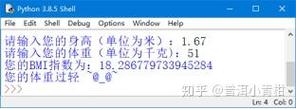
Expected Output:
--- Using functions directly ---
Your calculated BMI is: 22.99
Your BMI category is: Normal weight
==============================
--- Using the convenience function ---
Using get_bmi_info(): Your BMI is 22.99 (Normal weight).
==============================
--- Testing error handling ---
Successfully handled an error: Height must be a positive number.
Step 3: Making the Module More Flexible (Handling Imperial Units)
A more useful BMI module should be able to handle both metric (kg, m) and imperial (lbs, in) units. We can add a system argument to our functions.
Updated bmi_calculator.py (Version 2)
# bmi_calculator_v2.py
def calculate_bmi(weight, height, system="metric"):
    """
    Calculates the Body Mass Index (BMI).
    Args:
        weight (float): Weight in kilograms (metric) or pounds (imperial).
        height (float): Height in meters (metric) or inches (imperial).
        system (str): "metric" or "imperial". Defaults to "metric".
    Returns:
        float: The calculated BMI.
    """
    if system not in ["metric", "imperial"]:
        raise ValueError("System must be either 'metric' or 'imperial'.")
    if height <= 0 or weight <= 0:
        raise ValueError("Height and weight must be positive numbers.")
    if system == "metric":
        return weight / (height ** 2)
    else: # imperial
        # BMI = (weight in lbs / (height in inches)^2) * 703
        return (weight / (height ** 2)) * 703
def get_bmi_category(bmi):
    """(Same function as before)"""
    if bmi < 18.5:
        return "Underweight"
    elif 18.5 <= bmi < 25:
        return "Normal weight"
    elif 25 <= bmi < 30:
        return "Overweight"
    else:
        return "Obese"
def get_bmi_info(weight, height, system="metric"):
    """
    A convenience function that calculates BMI and returns its category.
    Args:
        weight (float): Weight in kilograms (metric) or pounds (imperial).
        height (float): Height in meters (metric) or inches (imperial).
        system (str): "metric" or "imperial". Defaults to "metric".
    Returns:
        tuple: A tuple containing the (bmi_value, category).
    """
    bmi = calculate_bmi(weight, height, system)
    category = get_bmi_category(bmi)
    return bmi, category
if __name__ == "__main__":
    print("--- Testing the Updated BMI Module ---")
    # Metric Example
    weight_metric = 70  # kg
    height_metric = 1.75 # m
    bmi_m, cat_m = get_bmi_info(weight_metric, height_metric)
    print(f"Metric: {weight_metric}kg, {height_metric}m -> BMI = {bmi_m:.2f}, Category = {cat_m}")
    # Imperial Example
    weight_imperial = 154 # lbs
    height_imperial = 69  # inches
    bmi_i, cat_i = get_bmi_info(weight_imperial, height_imperial, system="imperial")
    print(f"Imperial: {weight_imperial}lbs, {height_imperial}in -> BMI = {bmi_i:.2f}, Category = {cat_i}")
This enhanced version is much more versatile and ready to be used in a wider range of applications. You can now use it in any project that needs BMI calculations by simply importing it.