Of course! While there isn't a single, universally official "Python Tricks PDF," the concept refers to a collection of lesser-known but powerful features, idioms, and best practices that can make your code more Pythonic, concise, and efficient.
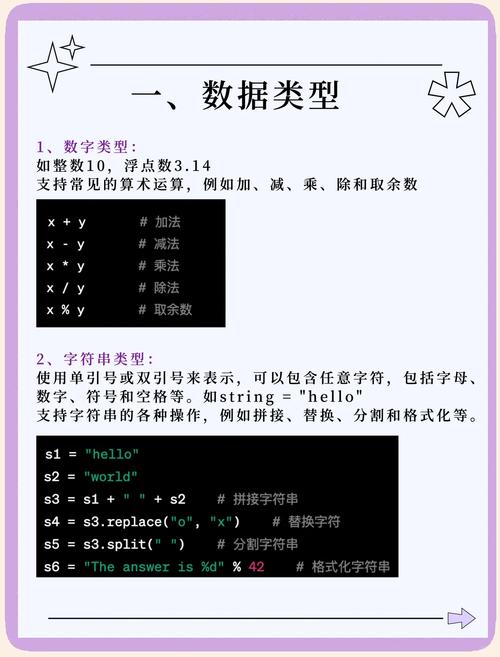
Here is a comprehensive guide structured like a PDF, covering the most popular and useful Python tricks. You can copy and paste this content into a document to create your own PDF.
The Unofficial Python Tricks Pocket Guide
Version 1.0
This guide compiles a collection of elegant, efficient, and "Pythonic" ways to solve common programming problems. It's aimed at intermediate Python developers who want to level up their skills and write cleaner, more professional code.
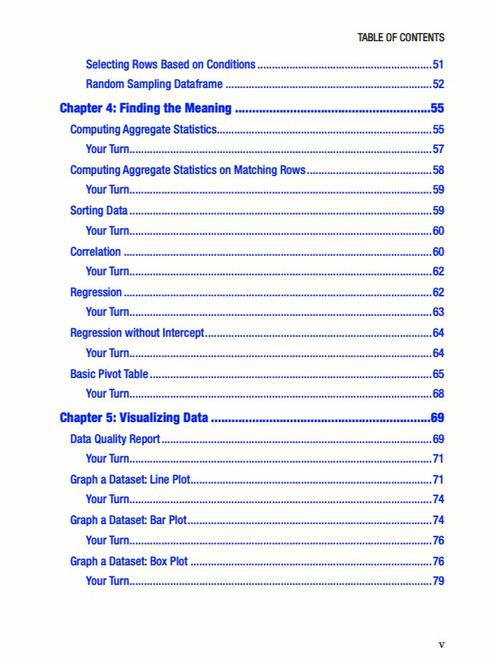
Table of Contents
-
Essential Syntax & Data Structures
 (图片来源网络,侵删)
- Trick 1: List Comprehensions (The Pythonic Loop)
- Trick 2: Dictionary Comprehensions & Unpacking
- Trick 3: Set Comprehensions for Uniqueness
- Trick 4: Walrus Operator () for Assignment in Expressions
- Trick 5: Slicing Like a Pro (Beyond
my_list[1:5]) - Trick 6: Swapping Variables in One Line
-
Function & Argument Handling
- Trick 7:
*argsand**kwargsfor Flexible Functions - Trick 8: Unpacking Function Arguments with and
- Trick 9: Using Type Hinting for Clarity
- Trick 10:
functools.lru_cachefor Memoization
- Trick 7:
-
String Manipulation
- Trick 11: f-Strings are Your Best Friend (Formatted String Literals)
- Trick 12: Multiline Strings with Triple Quotes
- Trick 13:
str.join()for Concatenation
-
Control Flow & Iteration
- Trick 14: The Ternary Conditional Operator
- Trick 15:
enumerate()for Loops with Index - Trick 16:
zip()to Iterate in Parallel - Trick 17:
itertoolsis a Treasure Trove
-
File I/O & Context Management
 (图片来源网络,侵删)
- Trick 18: The
withStatement for Resource Management - Trick 19: Reading/Writing Entire Files at Once
- Trick 18: The
-
Object-Oriented Programming (OOP)
- Trick 20:
__slots__to Reduce Memory Footprint - Trick 21: Property Decorators for Controlled Attribute Access
- Trick 20:
-
Built-in Functions & Libraries
- Trick 22:
collections.Counterfor Efficient Counting - Trick 23:
collections.defaultdictfor Missing Keys - Trick 24:
collections.namedtuplefor Lightweight Classes - Trick 25:
collections.dequefor Fast Appends/Pops - Trick 26:
map()andfilter()(Functional Approach) - Trick 27:
any()andall()for Truthy Checks
- Trick 22:
-
Idiomatic & "Pythonic" Code
- Trick 28: EAFP (Easier to Ask for Forgiveness than Permission)
- Trick 29:
isvs. (Identity vs. Equality) - Trick 30: Avoiding Mutable Default Arguments
Essential Syntax & Data Structures
Trick 1: List Comprehensions
Instead of creating a list with a for loop, use a list comprehension. It's more concise and often faster.
The Classic Loop:
squares = []
for i in range(10):
    if i % 2 == 0:
        squares.append(i * i)
print(squares)
# Output: [0, 4, 16, 36, 64]
The Pythonic Trick:
# Create a list of squares for even numbers
squares = [i * i for i in range(10) if i % 2 == 0]
print(squares)
# Output: [0, 4, 16, 36, 64]
Trick 2: Dictionary Comprehensions & Unpacking
You can create dictionaries just as easily as lists. The operator is used for unpacking dictionaries.
Dictionary Comprehension:
# Create a dictionary mapping numbers to their squares
squares_dict = {i: i * i for i in range(5)}
print(squares_dict)
# Output: {0: 0, 1: 1, 2: 4, 3: 9, 4: 16}
Dictionary Unpacking:
defaults = {'color': 'red', 'size': 'M'}
user_updates = {'color': 'blue', 'material': 'cotton'}
# Merge dictionaries, with user_updates taking precedence
final_config = {**defaults, **user_updates}
print(final_config)
# Output: {'color': 'blue', 'size': 'M', 'material': 'cotton'}
Trick 3: Set Comprehensions for Uniqueness
Need a list of unique items? A set comprehension is the perfect tool.
# Get a list of unique lengths of words
words = ['apple', 'banana', 'kiwi', 'strawberry', 'kiwi']
unique_lengths = {len(word) for word in words}
print(unique_lengths)
# Output: {6, 9, 10} (order not guaranteed)
Trick 4: Walrus Operator () for Assignment in Expressions
Available in Python 3.8+, this operator assigns a value to a variable as part of a larger expression. Perfect for while loops or conditionals.
The Classic Loop:
data = fetch_data_from_api()
while data:
    process(data)
    data = fetch_data_from_api() # Re-fetch every time
The Walrus Trick:
# Assign the result of fetch_data() to 'data' and check if it's truthy
while (data := fetch_data_from_api()):
    process(data)
Trick 5: Slicing Like a Pro
Slicing is more powerful than you might think. [start:stop:step] is the key.
my_list = [0, 1, 2, 3, 4, 5, 6, 7, 8, 9]
# Get the last 3 elements
print(my_list[-3:])
# Output: [7, 8, 9]
# Reverse the list
print(my_list[::-1])
# Output: [9, 8, 7, 6, 5, 4, 3, 2, 1, 0]
# Get every second element
print(my_list[::2])
# Output: [0, 2, 4, 6, 8]
Trick 6: Swapping Variables in One Line
Forget the temporary variable. Python makes this elegant.
The Classic Way:
a = 10
b = 20
temp = a
a = b
b = temp
The Pythonic Trick:
a, b = b, a
print(a, b) # Output: 20 10
Function & Argument Handling
*Trick 7: `argsandkwargs`
*argscollects extra positional arguments into a tuple.**kwargscollects extra keyword arguments into a dictionary.
def process_data(*args, **kwargs):
    print("Positional arguments (args):", args)
    print("Keyword arguments (kwargs):", kwargs)
process_data(1, 2, 3, name='Alice', age=30, city='New York')
Output:
Positional arguments (args): (1, 2, 3)
Keyword arguments (kwargs): {'name': 'Alice', 'age': 30, 'city': 'New York'}
Trick 8: Unpacking Function Arguments
You can unpack lists/tuples and dictionaries into function arguments.
def greet(name, greeting):
    print(f"{greeting}, {name}!")
# Unpack a list/tuple
args = ["World", "Hello"]
greet(*args)
# Unpack a dictionary
kwargs = {"name": "Python", "greeting": "Hi"}
greet(**kwargs)
Trick 9: Using Type Hinting
Type hints improve code readability and allow static analysis tools (like MyPy) to catch bugs before runtime.
from typing import List, Dict
def process_items(items: List[str]) -> Dict[str, int]:
    """Counts the length of each string in the list."""
    return {item: len(item) for item in items}
print(process_items(["apple", "banana"]))
# Output: {'apple': 5, 'banana': 6}
Trick 10: functools.lru_cache for Memoization
Caching the results of expensive function calls. The "Least Recently Used" (LRU) cache is a simple and effective way to speed up functions that are called repeatedly with the same arguments.
import time
from functools import lru_cache
@lru_cache(maxsize=128) # Cache up to 128 most recent calls
def slow_fibonacci(n):
    if n < 2:
        return n
    time.sleep(1) # Simulate a slow computation
    return slow_fibonacci(n-1) + slow_fibonacci(n-2)
# First call is slow
print(slow_fibonacci(10)) # Takes ~10 seconds
# Second call is instantaneous because it's cached
print(slow_fibonacci(10)) # Takes ~0 seconds
String Manipulation
Trick 11: f-Strings (Formatted String Literals)
f-strings are the modern, fastest, and most readable way to format strings in Python.
name = "Bob"
age = 42
print(f"Hello, my name is {name} and I am {age} years old.")
# Output: Hello, my name is Bob and I am 42 years old.
# You can even execute expressions inside!
print(f"Next year, I will be {age + 1}.")
# Output: Next year, I will be 43.
Trick 12: Multiline Strings with Triple Quotes
Use or to create strings that span multiple lines.
header = """
<html>
<head>My Page</title>
</head>
<body>
    <h1>Welcome!</h1>
</body>
</html>
"""
print(header)
Trick 13: str.join() for Concatenation
Using in a loop to concatenate strings is inefficient. Always use str.join().
The Inefficient Way:
words = ['hello', 'world', 'python']
result = ""
for word in words:
    result += word + " "
The Efficient Way:
words = ['hello', 'world', 'python']
result = " ".join(words)
print(result)
# Output: "hello world python"
Control Flow & Iteration
Trick 14: The Ternary Conditional Operator
A one-line if-else statement.
age = 18
status = "Adult" if age >= 18 else "Minor"
print(status)
# Output: Adult
Trick 15: enumerate() for Loops with Index
Need both the index and the item when looping? enumerate() is your solution.
for index, fruit in enumerate(['apple', 'banana', 'cherry']):
    print(f"Index {index}: {fruit}")
Output:
Index 0: apple
Index 1: banana
Index 2: cherry
Trick 16: zip() to Iterate in Parallel
zip() combines two or more iterables (like lists) into a single iterator of tuples.
names = ['Alice', 'Bob', 'Charlie']
scores = [85, 92, 78]
for name, score in zip(names, scores):
    print(f"{name} scored {score}.")
Output:
Alice scored 85.
Bob scored 92.
Charlie scored 78.
Trick 17: itertools is a Treasure Trove
The itertools module is a collection of fast, memory-efficient tools for working with iterators.
itertools.chain: Treat a sequence of iterables as a single iterable.itertools.product: Cartesian product of input iterables (like nested loops).itertools.groupby: Group consecutive items from an iterable that have the same key.
import itertools
# Flatten a list of lists
list_of_lists = [[1, 2], [3, 4], [5]]
flattened = list(itertools.chain.from_iterable(list_of_lists))
print(flattened)
# Output: [1, 2, 3, 4, 5]
File I/O & Context Management
Trick 18: The with Statement for Resource Management
The with statement ensures that resources are properly managed and cleaned up, even if errors occur. It's the standard way to handle files.
The Unsafe Way:
f = open('file.txt', 'r')
data = f.read()
# What if an error occurs here? The file might not close!
f.close()
The Safe & Pythonic Way:
with open('file.txt', 'r') as f:
    data = f.read()
# The file 'f' is automatically closed when the 'with' block is exited.
Trick 19: Reading/Writing Entire Files at Once
For small to medium files, reading or writing the entire content at once is simple and effective.
# Read entire file into a string
with open('file.txt', 'r') as f:
    content = f.read()
# Write a string to a file
new_content = "This is the new content."
with open('file.txt', 'w') as f:
    f.write(new_content)
Object-Oriented Programming (OOP)
Trick 20: __slots__ to Reduce Memory Footprint
By default, Python instances have a dynamic __dict__ to allow adding new attributes. This uses extra memory. If you know all the attributes of a class in advance, defining __slots__ can significantly reduce memory usage.
class Point:
    __slots__ = ['x', 'y'] # Declare allowed attributes
    def __init__(self, x, y):
        self.x = x
        self.y = y
p1 = Point(1, 2)
# p1.z = 3 # This will raise an AttributeError!
Trick 21: Property Decorators for Controlled Attribute Access
Use the @property decorator to create "managed" attributes. This allows you to add logic (like validation) when getting or setting an attribute.
class BankAccount:
    def __init__(self, balance):
        self._balance = balance # "Protected" attribute
    @property
    def balance(self):
        """The 'getter' method."""
        print("Getting balance...")
        return self._balance
    @balance.setter
    def balance(self, value):
        """The 'setter' method."""
        if value < 0:
            raise ValueError("Balance cannot be negative!")
        print("Setting balance...")
        self._balance = value
account = BankAccount(100)
print(account.balance)      # Calls the getter
account.balance = 50         # Calls the setter
# account.balance = -10     # Raises ValueError
Built-in Functions & Libraries
Trick 22: collections.Counter for Efficient Counting
A Counter is a dictionary subclass for counting hashable objects.
from collections import Counter
text = "abracadabra"
char_counts = Counter(text)
print(char_counts)
# Output: Counter({'a': 5, 'b': 2, 'r': 2, 'c': 1, 'd': 1})
# Get the most common items
print(char_counts.most_common(2))
# Output: [('a', 5), ('b', 2)]
Trick 23: collections.defaultdict for Missing Keys
A defaultdict is a dictionary that calls a factory function to supply missing values, avoiding KeyError checks.
The Classic Way:
words = ['apple', 'banana', 'apple', 'orange', 'banana', 'apple']
freq = {}
for word in words:
    if word not in freq:
        freq[word] = 0
    freq[word] += 1
The defaultdict Trick:
from collections import defaultdict
words = ['apple', 'banana', 'apple', 'orange', 'banana', 'apple']
freq = defaultdict(int) # int() returns 0
for word in words:
    freq[word] += 1
print(freq)
# Output: defaultdict(<class 'int'>, {'apple': 3, 'banana': 2, 'orange': 1})
Trick 24: collections.namedtuple for Lightweight Classes
namedtuple creates tuple subclasses with named fields. They are memory-efficient and more readable than regular tuples.
from collections import namedtuple
# Define a new tuple type called 'Point'
Point = namedtuple('Point', ['x', 'y'])
p = Point(11, y=22)
print(p)
# Output: Point(x=11, y=22)
print(p.x) # Access by field name
# Output: 11
print(p[0]) # Access by index
# Output: 11
Trick 25: collections.deque for Fast Appends/Pops
A deque (double-ended queue) is a list-like container with fast appends and pops on both ends. Ideal for queues and stacks.
from collections import deque
d = deque(['a', 'b', 'c'])
d.append('d')      # Add to the right
d.appendleft('z')  # Add to the left
print(d)
# Output: deque(['z', 'a', 'b', 'c', 'd'])
d.pop()      # Remove from the right
print(d)
# Output: deque(['z', 'a', 'b', 'c'])
d.popleft()  # Remove from the left
print(d)
# Output: deque(['a', 'b', 'c'])
Trick 26: map() and filter() (Functional Approach)
map(function, iterable): Applies a function to every item of an iterable.filter(function, iterable): Creates an iterator from elements of an iterable for which a function returns true.
# Using map to square numbers
numbers = [1, 2, 3, 4]
squared = list(map(lambda x: x**2, numbers))
print(squared)
# Output: [1, 4, 9, 16]
# Using filter to get even numbers
even_numbers = list(filter(lambda x: x % 2 == 0, numbers))
print(even_numbers)
# Output: [2, 4]
(Note: List comprehensions are often preferred for readability, but map/filter are still useful for chaining operations with libraries like itertools.)
Trick 27: any() and all() for Truthy Checks
any(iterable): ReturnsTrueif any element in the iterable is true.all(iterable): ReturnsTrueif all elements in the iterable are true.
# Check if any number in a list is positive
numbers = [-1, -5, 0, 2]
has_positive = any(n > 0 for n in numbers)
print(has_positive)
# Output: True
# Check if all numbers are positive
all_positive = all(n > 0 for n in numbers)
print(all_positive)
# Output: False
Idiomatic & "Pythonic" Code
Trick 28: EAFP (Easier to Ask for Forgiveness than Permission)
This is a core Python principle. Instead of checking if an operation is possible first (LBYL - Look Before You Leap), just try it and handle the exception if it fails.
The LBYL Way:
key = 'some_key'
my_dict = {'a': 1, 'b': 2}
if key in my_dict:
    value = my_dict[key]
    # do something with value
else:
    # handle missing key
    pass
The EAFP Way:
key = 'some_key'
my_dict = {'a': 1, 'b': 2}
try:
    value = my_dict[key]
    # do something with value
except KeyError:
    # handle missing key
    pass
Trick 29: is vs. (Identity vs. Equality)
- checks for value equality (are the contents the same?).
ischecks for object identity (are they the exact same object in memory?).
This is most relevant for singletons like None, True, and False. Always use is to compare against them.
a = [1, 2, 3]
b = [1, 2, 3]
c = a
print(a == b) # True, their contents are equal
print(a is b) # False, they are different objects in memory
print(a is c) # True, 'c' is just another name for the same object 'a'
# The correct way to check for None
my_var = None
if my_var is None:
    print("my_var is indeed None.")
Trick 30: Avoiding Mutable Default Arguments
This is a classic Python pitfall. Default arguments are evaluated once at function definition time, not each time the function is called. If you use a mutable object (like a list or dict) as a default, it will be shared across all function calls.
The Pitfall:
def add_to_list(item, my_list=[]):
    my_list.append(item)
    return my_list
print(add_to_list(1))
# Output: [1]
print(add_to_list(2))
# Output: [1, 2]  # The default list is being modified!
The Solution:
Use None as the default and create a new object inside the function if the default is used.
def add_to_list_fixed(item, my_list=None):
    if my_list is None:
        my_list = [] # Create a new list on each call
    my_list.append(item)
    return my_list
print(add_to_list_fixed(1))
# Output: [1]
print(add_to_list_fixed(2))
# Output: [2] # Now it works as expected!