Of course! In Python, setting a cookie is typically done within a web framework or a web server context, as it involves modifying the Set-Cookie HTTP header in the server's response.
I'll cover the most common scenarios:
- Flask (Popular Micro-framework)
- Django (Full-featured Framework)
- FastAPI (Modern, High-Performance Framework)
- Using Python's Standard Library (
http.cookies) for understanding the underlying mechanism.
Setting Cookies in Flask
Flask makes setting cookies very straightforward using the make_response() function.
Basic Example
You set a cookie by creating a response object and then calling the set_cookie() method on it.
from flask import Flask, make_response, request
app = Flask(__name__)
@app.route('/')
def index():
    # Create a response object
    response = make_response("Cookie has been set!")
    # Set the cookie
    # response.set_cookie(key, value, max_age, expires, path, domain, secure, httponly)
    response.set_cookie('username', 'john_doe')
    return response
if __name__ == '__main__':
    app.run(debug=True)
Explanation:
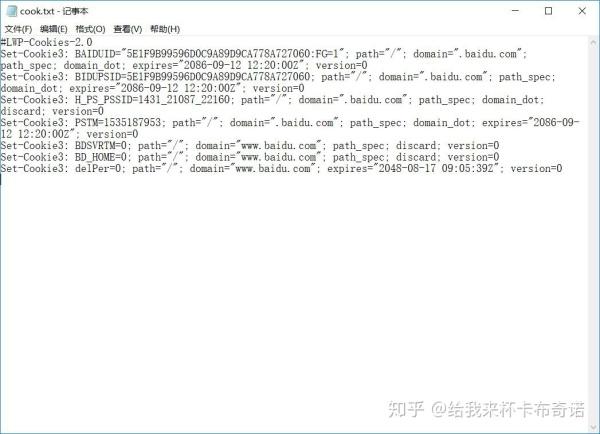
make_response("Cookie has been set!"): This creates a response object. You can't set a cookie directly on a string returned from a view function.response.set_cookie('username', 'john_doe'): This is the key part. It adds aSet-Cookieheader to the HTTP response.
More Advanced Options
The set_cookie() method has several useful parameters:
max_age: The lifetime of the cookie in seconds. If set, it overridesexpires.expires: The absolute expiration date as adatetimeobject or Unix timestamp.secure: A boolean. IfTrue, the cookie will only be sent over a secure HTTPS connection.httponly: A boolean. IfTrue, the cookie cannot be accessed by client-side JavaScript (helps prevent XSS attacks).samesite: Controls how cookies are sent in cross-site requests. Can be'Strict','Lax', or'None'.'Lax'is a common and recommended default.
from flask import Flask, make_response
from datetime import datetime, timedelta
app = Flask(__name__)
@app.route('/advanced_cookie')
def advanced_cookie():
    response = make_response("Advanced cookie set!")
    # Set a cookie that expires in 10 days, is secure, and HttpOnly
    expires = datetime.utcnow() + timedelta(days=10)
    response.set_cookie(
        'session_token',
        value='abc123xyz789',
        max_age=60 * 60 * 24 * 10,  # 10 days in seconds
        expires=expires,
        httponly=True,          # Prevents JavaScript access
        secure=True,            # Only sent over HTTPS
        samesite='Lax'          # Recommended security policy
    )
    return response
Setting Cookies in Django
Django handles cookies differently. You set them on the HttpResponse object directly.
Basic Example
from django.http import HttpResponse
from django.shortcuts import render
def set_cookie_view(request):
    # Create an HttpResponse object
    response = HttpResponse("Cookie has been set!")
    # Set the cookie using the set_cookie method
    response.set_cookie('username', 'jane_doe')
    return response
def get_cookie_view(request):
    # To read a cookie, access it from the request object
    username = request.COOKIES.get('username', 'Guest')
    return HttpResponse(f"Hello, {username}!")
Explanation:
response = HttpResponse(...): Just like in Flask, you need a response object.response.set_cookie(...): The method signature is very similar to Flask's.
More Advanced Options in Django
Django's set_cookie also supports all the standard cookie attributes.
from django.http import HttpResponse
from datetime import datetime, timedelta
def advanced_cookie_view(request):
    response = HttpResponse("Advanced cookie set!")
    # Set a cookie with various options
    response.set_cookie(
        'user_preferences',
        value='dark_mode',
        max_age=3600,             # 1 hour in seconds
        expires=datetime.utcnow() + timedelta(hours=1),
        path='/',
        domain='.example.com',    # Can be used for cross-subdomain sharing
        secure=True,
        httponly=True,
        samesite='Lax'
    )
    return response
Setting Cookies in FastAPI
FastAPI uses Starlette under the hood, and its cookie handling is very similar to Flask's.
Basic Example
from fastapi import FastAPI
from fastapi.responses import Response
app = FastAPI()
@app.get('/')
def set_cookie():
    # Create a Response object
    response = Response("Cookie has been set!")
    # Set the cookie
    response.set_cookie(key="fastapi_user", value="alice")
    return response
@app.get('/get-cookie')
def get_cookie(response: Response):
    # To read a cookie, access it from the request object (it's injected)
    # This is a placeholder for a real route that would read cookies
    # The 'response' parameter is not needed for reading, but shows the pattern
    return {"message": "Check your browser's developer tools for the cookie."}
Explanation:
Response("..."): You importResponsefromfastapi.responsesto create a response object.response.set_cookie(...): The method works just like in Flask and Django.
More Advanced Options in FastAPI
The options are identical to the other frameworks.
from fastapi import FastAPI
from fastapi.responses import Response
from datetime import datetime, timedelta
app = FastAPI()
@app.get('/advanced-fastapi-cookie')
def advanced_cookie():
    response = Response("Advanced FastAPI cookie set!")
    response.set_cookie(
        'csrf_token',
        value='a-very-secure-token',
        max_age=60 * 15,  # 15 minutes
        expires=datetime.utcnow() + timedelta(minutes=15),
        httponly=True,
        secure=True,
        samesite='strict'
    )
    return response
Understanding with Python's Standard Library (http.cookies)
If you're not using a framework and are building a simple server with libraries like http.server, you'll need to construct the Set-Cookie header manually. The http.cookies module helps with this.
The format of a Set-Cookie header is: Set-Cookie: name=value; Path=/; Max-Age=3600; HttpOnly
from http import cookies
from http.server import BaseHTTPRequestHandler, HTTPServer
class MyHandler(BaseHTTPRequestHandler):
    def do_GET(self):
        # 1. Create a SimpleCookie object
        c = cookies.SimpleCookie()
        # 2. Set the cookie value and attributes
        c["user_id"] = "12345"
        c["user_id"]["path"] = "/"           # The path for which the cookie is valid
        c["user_id"]["max-age"] = 3600       # Lifetime in seconds
        c["user_id"]["httponly"] = True      # Prevents JS access
        c["user_id"]["secure"] = True        # Only sent over HTTPS
        # 3. Get the header string from the cookie object
        # This will produce something like: "Set-Cookie: user_id=12345; Path=/; Max-Age=3600; HttpOnly; Secure"
        set_cookie_header = c.output(header='').strip()
        # 4. Send the response
        self.send_response(200)
        self.send_header("Content-type", "text/html")
        self.send_header("Set-Cookie", set_cookie_header)
        self.end_headers()
        self.wfile.write(b"Cookie has been set using the standard library!")
def run(server_class=HTTPServer, handler_class=MyHandler, port=8080):
    server_address = ('', port)
    httpd = server_class(server_address, handler_class)
    print(f"Starting server on port {port}...")
    httpd.serve_forever()
if __name__ == '__main__':
    run()
Summary and Best Practices
| Framework/Library | How to Set Cookie | Key Method | Best For |
|---|---|---|---|
| Flask | Create a Response object, then call set_cookie(). |
response.set_cookie() |
Quick web apps and APIs. |
| Django | Create an HttpResponse object, then call set_cookie(). |
response.set_cookie() |
Full-stack web applications with batteries-included features. |
| FastAPI | Create a Response object, then call set_cookie(). |
response.set_cookie() |
Modern, high-performance APIs with automatic data validation. |
http.cookies |
Manually construct the Set-Cookie header string. |
SimpleCookie().output() |
Learning, simple scripts, or custom servers without a framework. |
Security Best Practices:
- Always use
httponly=Truefor cookies that store session tokens or other sensitive data. This prevents Cross-Site Scripting (XSS) attacks from stealing the cookie. - Use
secure=Truefor any cookie that should only be transmitted over an encrypted HTTPS connection. - Use
samesite='Lax'(or'Strict'if appropriate) to mitigate Cross-Site Request Forgery (CSRF) attacks.'Lax'is a good default for most cookies. - Set
max_ageorexpiresfor session cookies. Don't rely on the browser session, as it can be unpredictable.