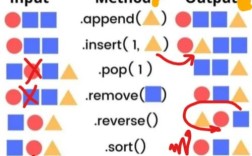
Of course! The numpy.roll() function is a highly useful tool for shifting elements in a NumPy array. It's like taking a row of people and having everyone move one spot to the right, with the person at the end wrapping around to the beginning.
Let's break it down with clear explanations and examples.
What is numpy.roll()?
numpy.roll() shifts elements along a specified axis. Elements that are shifted beyond the last position are wrapped around and re-introduced at the first position. This behavior is called circular shifting.
The Signature
numpy.roll(a, shift, axis=None)
Parameters:
a: The input array. This can be a NumPy array of any dimension (1D, 2D, 3D, etc.).shift: The number of places by which elements are shifted.- If
shiftis positive, the elements are shifted "forward" (to the right for a 1D array, or down for a 2D array's rows). - If
shiftis negative, the elements are shifted "backward" (to the left for a 1D array, or up for a 2D array's rows). - If
shiftis a tuple, it specifies the shift for each dimension (e.g.,(shift_along_axis_0, shift_along_axis_1)).
- If
axis: The axis along which to shift the elements. This is the most important parameter for multi-dimensional arrays.- If
axisisNone(the default), the array is flattened into a 1D array before shifting, and then restored to its original shape. This is often not what you want. - If
axisis an integer (e.g.,0,1,2), the shift is performed along that specific axis.
- If
Returns:
- A new array with the elements shifted. The original array is not modified.
1D Array Examples
This is the simplest case. We'll see how positive and negative shifts work.
import numpy as np
# Create a simple 1D array
arr_1d = np.array([10, 20, 30, 40, 50])
print("Original Array:\n", arr_1d)
# Original Array:
#  [10 20 30 40 50]
# --- Positive Shift (to the right) ---
# Shift elements 2 places to the right.
# The last two elements (40, 50) wrap around to the beginning.
shifted_right = np.roll(arr_1d, shift=2)
print("\nShifted Right by 2:\n", shifted_right)
# Shifted Right by 2:
#  [40 50 10 20 30]
# --- Negative Shift (to the left) ---
# Shift elements 1 place to the left.
# The first element (10) wraps around to the end.
shifted_left = np.roll(arr_1d, shift=-1)
print("\nShifted Left by 1:\n", shifted_left)
# Shifted Left by 1:
#  [20 30 40 50 10]
# --- Shift larger than array size ---
# Shifting by 5 in a 5-element array results in the same array.
shifted_by_5 = np.roll(arr_1d, shift=5)
print("\nShifted by 5 (size of array):\n", shifted_by_5)
# Shifted by 5 (size of array):
#  [10 20 30 40 50]
2D Array Examples (The Power of axis)
This is where numpy.roll() really shines. Let's create a 2D array and see how shifting along different axes produces different results.
import numpy as np
# Create a 2D array (a 3x3 matrix)
arr_2d = np.array([
    [1, 2, 3],
    [4, 5, 6],
    [7, 8, 9]
])
print("Original 2D Array:\n", arr_2d)
# Original 2D Array:
#  [[1 2 3]
#   [4 5 6]
#   [7 8 9]]
Case 1: axis=None (Default Behavior)
The array is flattened first, then shifted, then reshaped.
# Flattened array: [1, 2, 3, 4, 5, 6, 7, 8, 9]
# Shifted by 1: [9, 1, 2, 3, 4, 5, 6, 7, 8]
# Reshaped back to 3x3
shifted_none = np.roll(arr_2d, shift=1)
print("\nShifted with axis=None (default):\n", shifted_none)
# Shifted with axis=None (default):
#  [[9 1 2]
#   [3 4 5]
#   [6 7 8]]
Case 2: axis=0 (Shift Rows)
This shifts rows down (for positive shift) or up (for negative shift). Columns remain intact.
# --- Shift rows down by 1 ---
# Row 3 wraps to the top.
shifted_rows_down = np.roll(arr_2d, shift=1, axis=0)
print("\nShifted Rows Down by 1 (axis=0):\n", shifted_rows_down)
# Shifted Rows Down by 1 (axis=0):
#  [[7 8 9]
#   [1 2 3]
#   [4 5 6]]
# --- Shift rows up by 1 ---
# Row 1 wraps to the bottom.
shifted_rows_up = np.roll(arr_2d, shift=-1, axis=0)
print("\nShifted Rows Up by 1 (axis=0):\n", shifted_rows_up)
# Shifted Rows Up by 1 (axis=0):
#  [[4 5 6]
#   [7 8 9]
#   [1 2 3]]
Case 3: axis=1 (Shift Columns)
This shifts columns to the right (for positive shift) or to the left (for negative shift). Rows remain intact.
# --- Shift columns to the right by 1 ---
# The last column wraps to the left.
shifted_cols_right = np.roll(arr_2d, shift=1, axis=1)
print("\nShifted Columns Right by 1 (axis=1):\n", shifted_cols_right)
# Shifted Columns Right by 1 (axis=1):
#  [[3 1 2]
#   [6 4 5]
#   [9 7 8]]
# --- Shift columns to the left by 1 ---
# The first column wraps to the right.
shifted_cols_left = np.roll(arr_2d, shift=-1, axis=1)
print("\nShifted Columns Left by 1 (axis=1):\n", shifted_cols_left)
# Shifted Columns Left by 1:
#  [[2 3 1]
#   [5 6 4]
#   [8 9 7]]
Practical Use Case: Creating a Sliding Window View
A common task in signal processing or time-series analysis is to create overlapping windows of data. numpy.roll can be a clever way to do this.
Let's say we have a signal and we want to create a dataset where each row is a window of 3 consecutive samples.
import numpy as np
signal = np.arange(10) # [0, 1, 2, 3, 4, 5, 6, 7, 8, 9]
window_size = 3
# Create empty array to store windows
num_windows = len(signal) - window_size + 1
windows = np.zeros((num_windows, window_size))
# Fill the windows by rolling the signal
for i in range(window_size):
    # For each column of the window, shift the signal by i places to the right
    # and take the correct slice.
    # A more efficient way:
    windows[:, i] = np.roll(signal, -i)[:num_windows]
print("Original Signal:\n", signal)
print("\nCreated Windows:\n", windows)
# Original Signal:
#  [0 1 2 3 4 5 6 7 8 9]
#
# Created Windows:
#  [[0. 1. 2.]
#   [1. 2. 3.]
#   [2. 3. 4.]
#   [3. 4. 5.]
#   [4. 5. 6.]
#   [5. 6. 7.]
#   [6. 7. 8.]
#   [7. 8. 9.]]
(Note: While this works, for performance-critical applications, numpy.lib.stride_tricks.sliding_window_view is a more direct and often faster method.)
Summary Table
| Function Call | Behavior |
|---|---|
np.roll(arr, 1) |
Flattens arr, shifts right by 1, reshapes. (Usually avoid for >1D arrays) |
np.roll(arr, 1, axis=0) |
Shifts rows down by 1. Last row wraps to the top. |
np.roll(arr, -1, axis=0) |
Shifts rows up by 1. First row wraps to the bottom. |
np.roll(arr, 1, axis=1) |
Shifts columns right by 1. Last column wraps to the left. |
np.roll(arr, -1, axis=1) |
Shifts columns left by 1. First column wraps to the right. |
np.roll(arr, (1, 2), axis=(0, 1)) |
Shifts rows down by 1 and columns right by 2 simultaneously. |