Of course! This is a very common task in Python, especially when dealing with network requests, file I/O, or inter-process communication. The core idea is that JSON is a text format, while bytes is a binary format. To convert between them, you must use an encoding, almost always UTF-8.
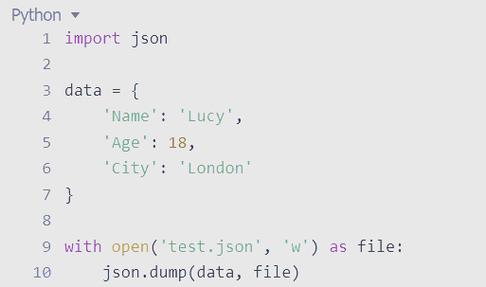
Here’s a complete guide covering all the common scenarios.
The Core Concept: Text vs. Bytes
- JSON: A standard text-based format for data interchange. It's a string.
- Python
bytes: A sequence of bytes (integers from 0-255). It's a binary representation of data. - Encoding: The process of converting a string (like a JSON string) into
bytes. The standard for JSON isutf-8. - Decoding: The process of converting
bytesback into a string.
Getting a JSON String as bytes
This is the most common scenario. You have a Python dictionary, you convert it to a JSON string, and then you need that string as bytes to send over a network or write to a binary file.
Step-by-Step Process:
- Serialize your Python object (e.g., a
dict) into a JSON string usingjson.dumps(). - Encode that JSON string into
bytesusing the.encode()method withutf-8.
Example:
import json
# 1. Your Python data (e.g., a dictionary)
data = {
    "name": "John Doe",
    "age": 30,
    "isStudent": False,
    "courses": ["History", "Math"]
}
# 2. Serialize the Python object to a JSON string
json_string = json.dumps(data, indent=4)
print(f"Type of json_string: {type(json_string)}")
print("--- JSON String ---")
print(json_string)
print("--------------------")
# 3. Encode the JSON string into bytes
json_bytes = json_string.encode('utf-8')
print(f"Type of json_bytes: {type(json_bytes)}")
print("--- JSON Bytes ---")
print(json_bytes)
print("--------------------")
Output:
Type of json_string: <class 'str'>
--- JSON String ---
{
    "name": "John Doe",
    "age": 30,
    "isStudent": false,
    "courses": [
        "History",
        "Math"
    ]
}
--------------------
Type of json_bytes: <class 'bytes'>
--- JSON Bytes ---
b'{\n    "name": "John Doe",\n    "age": 30,\n    "isStudent": false,\n    "courses": [\n        "History",\n        "Math"\n    ]\n}'
--------------------
Parsing bytes into a Python Object
This is the reverse operation. You receive bytes from a network or read them from a file, and you need to convert them back into a usable Python object (like a dict).
Step-by-Step Process:
- Decode the
bytesobject into a JSON string using the.decode()method withutf-8. - Deserialize the JSON string into a Python object using
json.loads().
Example:
Let's use the json_bytes object from the previous example.
import json
# Assume this is the bytes you received from a network or file
json_bytes = b'{\n    "name": "John Doe",\n    "age": 30,\n    "isStudent": false,\n    "courses": [\n        "History",\n        "Math"\n    ]\n}'
# 1. Decode the bytes into a JSON string
json_string = json_bytes.decode('utf-8')
print(f"Type of decoded string: {type(json_string)}")
print("--- Decoded JSON String ---")
print(json_string)
print("---------------------------")
# 2. Deserialize the JSON string into a Python dictionary
python_dict = json.loads(json_string)
print(f"Type of python_dict: {type(python_dict)}")
print("--- Resulting Python Dictionary ---")
print(python_dict)
print("---------------------------------")
# You can now use the dictionary as normal
print(f"Name: {python_dict['name']}")
print(f"First course: {python_dict['courses'][0]}")
Output:
Type of decoded string: <class 'str'>
--- Decoded JSON String ---
{
    "name": "John Doe",
    "age": 30,
    "isStudent": false,
    "courses": [
        "History",
        "Math"
    ]
}
---------------------------
Type of python_dict: <class 'dict'>
--- Resulting Python Dictionary ---
{'name': 'John Doe', 'age': 30, 'isStudent': False, 'courses': ['History', 'Math']}
---------------------------------
Name: John Doe
First course: History
Common Pitfalls & Best Practices
Pitfall 1: Trying to json.loads() on bytes Directly
This will raise a TypeError.
import json
json_bytes = b'{"key": "value"}'
# This will FAIL!
try:
    data = json.loads(json_bytes)
except TypeError as e:
    print(f"Error: {e}")
    # Correct way is to decode first:
    data = json.loads(json_bytes.decode('utf-8'))
    print(f"Correctly parsed: {data}")
Pitfall 2: Encoding Issues (Not using UTF-8)
While UTF-8 is the standard and default for JSON, you might encounter data encoded in a different way (like latin-1). If you decode with the wrong encoding, you'll get UnicodeDecodeError or corrupted text.
# A string with special characters encoded in latin-1
data_bytes = b'{"message": "H\xc3\xa9llo"}' # This is 'Héllo' encoded in UTF-8
# If you incorrectly assume it's latin-1:
try:
    incorrect_string = data_bytes.decode('latin-1')
    print(f"Incorrect decoding: {incorrect_string}") # Will show 'Héllo'
except UnicodeDecodeError:
    print("Decoding failed with latin-1")
# Correctly decoding as UTF-8:
correct_string = data_bytes.decode('utf-8')
print(f"Correct decoding: {correct_string}") # Will show 'Héllo'
Best Practice: Do it in One Line
For conciseness, you can chain the operations. This is very common in real-world code.
import json
data = {"status": "ok"}
# From Python object to bytes in one line
json_bytes = json.dumps(data).encode('utf-8')
# From bytes to Python object in one line
# (json.loads will raise a TypeError if you pass bytes)
restored_data = json.loads(json_bytes.decode('utf-8'))
print(restored_data) # Output: {'status': 'ok'}
Practical Application: Reading/Writing Files
This is where these concepts are used most frequently.
Writing JSON to a Binary File
It's crucial to open the file in binary write mode ('wb') and pass the bytes object to write().
import json
data = {"city": "New York", "population": 8400000}
# 1. Get the bytes representation
json_bytes = json.dumps(data).encode('utf-8')
# 2. Open the file in binary write mode ('wb') and write the bytes
with open('data.json', 'wb') as f:
    f.write(json_bytes)
print("File 'data.json' written successfully.")
If you check data.json, it will contain the text: {"city": "New York", "population": 8400000}.
Reading JSON from a Binary File
You must open the file in binary read mode ('rb'). The read() method will return bytes, which you then need to decode and parse.
import json
# 1. Open the file in binary read mode ('rb')
with open('data.json', 'rb') as f:
    # 2. Read the bytes from the file
    json_bytes = f.read()
# 3. Decode and parse the bytes
loaded_data = json.loads(json_bytes.decode('utf-8'))
print(f"Data read from file: {loaded_data}")
print(f"Type: {type(loaded_data)}")
Output:
Data read from file: {'city': 'New York', 'population': 8400000}
Type: <class 'dict'>