Python HTTP 请求终极指南:从零开始精通 urllib(附实战案例)
Meta 描述:
还在为 Python 发送 HTTP 请求而烦恼吗?本文是一份超详细的 Python urllib 教程,从 urllib.request 到 urllib.parse,手把手带你掌握 Python 内置 HTTP 客户端库,包含 GET/POST 请求、处理响应、处理参数、处理 Cookie 等实战案例,助你轻松应对网络爬虫和 API 调用,是 Python 程序员必备的速查宝典。
(正文开始)
引言:为什么我们离不开 HTTP 请求?
在当今的互联网时代,几乎所有的数据和服务都通过网络进行交互,作为 Python 开发者,无论是编写网络爬虫抓取公开数据,还是调用第三方 API 集成服务,亦或是实现自动化测试,发送 HTTP 请求都是一项绕不开的核心技能。
提到 Python 的 HTTP 请求库,你可能会立刻想到 requests,它确实强大且易用,但今天,我们要回归 Python 的“原生力量”——urllib,作为 Python 标准库的一部分,urllib 无需安装,稳定可靠,深入理解它不仅能让你在无网络环境或受限环境中游刃有余,更能帮助你打下坚实网络编程基础,本文将带你全面、系统地掌握 urllib 的使用方法。
初识 urllib:Python 的“瑞士军刀”
urllib 并不是一个单一的模块,而是由几个处理 URL 的子模块组成的“工具包”,在 Python 3 中,它主要包含以下四个模块:
urllib.request:核心模块,用于打开和读取 URL。urllib.error:包含urllib.request抛出的异常类。urllib.parse:用于解析 URL,拆分或合并 URL 组件。urllib.robotparser:用于解析robots.txt文件,判断网站爬取规则。
本文将重点讲解最常用的 urllib.request 和 urllib.parse。
核心实战:urllib.request 的七十二变
urllib.request 是我们执行 HTTP 请求的主力,让我们从最简单的 GET 请求开始,逐步深入。
1 发送一个最简单的 GET 请求
想象一下,你想获取百度首页的 HTML 内容,代码非常直观:
from urllib.request import urlopen
# 目标 URL
url = 'http://www.baidu.com'
# 使用 urlopen() 打开 URL,返回一个文件类对象
response = urlopen(url)
# 读取响应内容(字节流)
html_bytes = response.read()
# 将字节流解码为字符串
html_content = html_bytes.decode('utf-8')
# 打印前 500 个字符
print(html_content[:500])
# 记得关闭响应对象,释放资源
response.close()
代码解读:
from urllib.request import urlopen:导入核心函数urlopen。urlopen(url):这是最简单的请求方式,它会发起一个 GET 请求,并返回一个http.client.HTTPResponse对象,我们可以像操作文件一样操作它。response.read():读取响应体的全部内容。response.close():重要! 关闭连接,这是良好的编程习惯。
更优雅的写法:使用 with 语句
为了避免忘记 close(),推荐使用 with 语句,它会在代码块执行完毕后自动关闭资源。
from urllib.request import urlopen
url = 'http://www.baidu.com'
with urlopen(url) as response:
    html_content = response.read().decode('utf-8')
print(html_content[:500])
2 获取更多响应信息
响应对象 response 不仅仅是数据的载体,它还包含了丰富的元信息,就像 HTTP 响应头一样。
from urllib.request import urlopen
url = 'http://www.baidu.com'
with urlopen(url) as response:
    print(f"状态码: {response.status}")  # HTTP 状态码,如 200
    print(f"响应头信息:")
    print(response.headers) # 输出所有响应头
    print(f"Content-Type: {response.getheader('Content-Type')}") # 获取指定响应头
    print(f"服务器信息: {response.getheader('Server')}")
通过这些信息,你可以判断请求是否成功、内容类型、编码方式等。
3 处理 URL 参数(GET 请求)
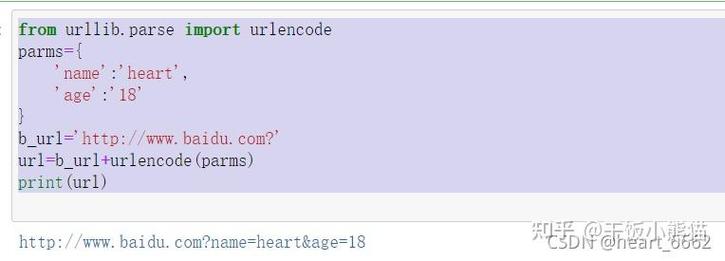
当需要向 URL 添加查询参数时,直接拼接字符串很容易出错,这时,urllib.parse 模块就派上用场了。
from urllib.request import urlopen
from urllib.parse import urlencode
# API 基础 URL
base_url = 'https://httpbin.org/get'
# 要传递的参数(字典格式)
params = {
    'name': '张三',
    'age': 25,
    'city': '北京'
}
# 使用 urlencode 将字典转换为查询字符串(如 name=张三&age=25...)
query_string = urlencode(params)
# 将查询字符串拼接到 URL 后面
# 注意:需要手动添加 '?' 分隔符
final_url = f"{base_url}?{query_string}"
print(f"最终请求 URL: {final_url}")
with urlopen(final_url) as response:
    result = response.read().decode('utf-8')
    print(result)
urlencode 的作用: 自动将字典键值对进行 URL 编码,确保特殊字符(如空格、中文)被正确处理,避免因格式错误导致请求失败。
4 发送 POST 请求
POST 请求通常用于向服务器提交数据,与 GET 请求不同,POST 数据需要作为请求体(data 参数)传递给 urlopen。
from urllib.request import urlopen, Request
from urllib.parse import urlencode
# 目标 URL(httpbin.org 是一个测试 HTTP 服务的网站)
url = 'https://httpbin.org/post'
# POST 请求的数据(字典格式)
post_data = {
    'username': 'python_dev',
    'password': '123456'
}
# 将数据编码为字节流,urllib 要求 data 参数是 bytes 类型
data_bytes = urlencode(post_data).encode('utf-8')
# 创建一个 Request 对象,并指定 data
# 注意:当 data 参数存在时,urlopen 会自动使用 POST 方法
request = Request(url, data=data_bytes)
with urlopen(request) as response:
    result = response.read().decode('utf-8')
    print(result)
代码解读:
- 我们创建了一个
Request对象,而不是直接使用urlopen。Request对象允许我们更精细地控制请求。 data参数必须是bytes类型,我们先用urlencode将字典转为字符串,再用.encode('utf-8')转为字节流。- 当
urlopen接收到带有data参数的Request对象时,它会自动将请求方法设置为POST。
5 添加请求头
很多网站会检查请求头(User-Agent)来判断请求是否来自浏览器,模拟浏览器行为是爬虫的基本操作。
from urllib.request import Request, urlopen
url = 'http://www.baidu.com'
# 自定义请求头
headers = {
    'User-Agent': 'Mozilla/5.0 (Windows NT 10.0; Win64; x64) AppleWebKit/537.36 (KHTML, like Gecko) Chrome/91.0.4472.124 Safari/537.36',
    'Accept-Language': 'zh-CN,zh;q=0.9,en;q=0.8'
}
# 创建 Request 对象,并传入 headers
request = Request(url, headers=headers)
with urlopen(request) as response:
    html_content = response.read().decode('utf-8')
    print(html_content[:500])
关键点: 通过 Request 对象的 headers 参数,我们可以轻松添加、修改或删除任何请求头。
6 处理异常
网络世界充满不确定性:服务器宕机、网络超时、URL 不存在……urllib.error 模块为我们提供了处理这些异常的工具。
from urllib.request import urlopen, Request
from urllib.error import URLError, HTTPError
url = 'http://www.example.com/non-existent-page'
try:
    with urlopen(url, timeout=5) as response: # 设置超时时间
        print(response.read().decode('utf-8'))
except HTTPError as e:
    # 处理 HTTP 错误(如 404 Not Found, 500 Server Error)
    print(f"HTTP 错误: {e.code} - {e.reason}")
except URLError as e:
    # 处理 URL 错误(如域名不存在)
    print(f"URL 错误: {e.reason}")
except Exception as e:
    # 处理其他未知错误
    print(f"发生未知错误: {e}")
HTTPError:是URLError的子类,专门处理 HTTP 协议层面的错误(4xx, 5xx)。URLError:处理更广泛的 URL 相关错误,如连接超时、找不到服务器等。- 设置
timeout参数可以有效防止程序因网络问题而无限等待。
进阶技巧:Cookie、代理与超时
1 处理 Cookie
登录后的网站通常依赖 Cookie 来维持会话状态。urllib 提供了 HTTPCookieProcessor 来处理 Cookie。
from urllib.request import Request, build_opener, urlopen
from urllib.parse import urlencode
from http.cookiejar import CookieJar
# 1. 创建一个 CookieJar 对象来存储 Cookie
cookie_jar = CookieJar()
# 2. 使用 HTTPCookieProcessor 创建一个 OpenerDirector 对象
#    它会自动处理 Cookie
opener = build_opener(HTTPCookieProcessor(cookie_jar))
# 3. 模拟登录(假设有一个登录接口)
login_url = 'https://httpbin.org/post'
login_data = {'username': 'test', 'password': 'test'}
data_bytes = urlencode(login_data).encode('utf-8')
# 使用 opener 发送登录请求,Cookie 会被自动保存
login_request = Request(login_url, data=data_bytes)
opener.open(login_request)
# 4. 访问需要登录的页面
profile_url = 'https://httpbin.org/cookies/set/freeform/hello' # 这是一个设置 Cookie 的测试 URL
# 再次使用 opener 发送请求,它会带上之前保存的 Cookie
profile_request = Request(profile_url)
response = opener.open(profile_request)
print(response.read().decode('utf-8'))
print("\n已保存的 Cookie:")
for cookie in cookie_jar:
    print(cookie)
流程: 创建 CookieJar -> 用 HTTPCookieProcessor 包装成 opener -> 用 opener 发送请求 -> Cookie 自动处理。
2 使用代理
为了隐藏真实 IP 或突破访问限制,可以使用代理服务器。
from urllib.request import ProxyHandler, build_opener, urlopen
# 代理地址(请替换为可用的代理)
proxy_address = 'http://127.0.0.1:8080' # http://user:pass@host:port
# 创建代理处理器
proxy_handler = ProxyHandler({
    'http': proxy_address,
    'https': proxy_address
})
# 使用代理处理器创建 opener
opener = build_opener(proxy_handler)
try:
    response = opener.open('http://www.baidu.com')
    print(response.read().decode('utf-8')[:500])
except Exception as e:
    print(f"代理请求失败: {e}")
urllib vs. requests:我该如何选择?
| 特性 | urllib (标准库) |
requests (第三方库) |
|---|---|---|
| 安装 | 无需安装,开箱即用 | 需要手动 pip install requests |
| API 风格 | 底层,面向对象,函数式混合 | 高度封装,简洁直观 |
| 易用性 | 较低,如 POST 请求需手动编码 data |
极高,支持 JSON、Session、文件上传等 |
| 功能 | 功能齐全,但需更多代码实现 | 功能强大,如 Session、Cookies、Hooks 等 |
| 性能 | 作为标准库,性能稳定 | 性能同样出色,社区优化好 |
| 学习曲线 | 陡峭,适合理解底层原理 | 平缓,适合快速开发 |
总结建议:
- 新手入门/快速开发: 首选
requests,它能让你用最少的代码实现最多的功能,让你专注于业务逻辑。 - 环境受限/追求稳定/学习底层: 深入学习
urllib,当你在一个不能安装第三方包的受限环境(如某些服务器、嵌入式设备)中工作时,urllib是你的唯一选择,掌握它也能让你对 HTTP 协议有更深刻的理解。
总结与展望
恭喜你!你已经从零开始,系统地学习了 Python 的 urllib 库,从简单的 GET 请求,到复杂的 POST 请求、参数处理、异常捕获、Cookie 管理和代理使用,你已经具备了使用 urllib 应付大多数 HTTP 场景的能力。
urllib 就像一位内功深厚的武林高手,虽然招式不如 requests 那样华丽,但根基扎实,威力无穷,希望本文能成为你 Python 网络编程之旅中一份有价值的参考。
下一步,你可以尝试:
- 用
urllib写一个简单的网页爬虫,抓取某个网站的标题和链接。 - 尝试调用一个你感兴趣的公开 API(如天气 API),并用
urllib发送请求获取数据。 - 将
urllib的知识与requests进行对比,感受两者在易用性上的差异。
持续实践,你将真正成为 Python 网络编程的专家!