Of course! Let's break down assertEqual in Python, which is a cornerstone of unit testing.
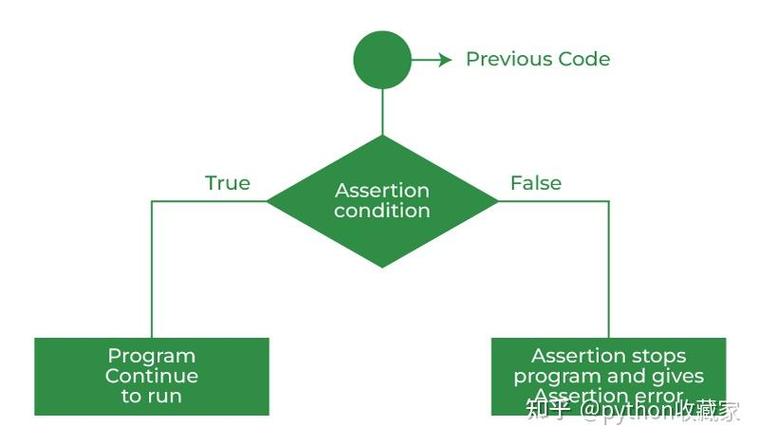
What is assertEqual?
assertEqual is a method from Python's built-in unittest framework. Its primary purpose is to check if two values are equal and to fail the test if they are not.
It's the most common assertion you'll use when writing tests to verify that your code produces the expected output.
The Basic Syntax
self.assertEqual(first, second, msg=None)
Parameters:
first: The actual value your code produced (the "result").second: The value you expected (the "expected result").msg(optional): A custom message to display if the assertion fails. If not provided,unittestwill generate a default message showing the differing values.
How It Works: The "Happy Path" vs. The "Failure Path"
Let's look at two scenarios: when the test passes and when it fails.
Test Passes (Values are Equal)
If first is equal to second, the test simply passes, and the test runner continues to the next test.
import unittest
def add(a, b):
    return a + b
class TestMathFunctions(unittest.TestCase):
    def test_add_positive_numbers(self):
        # The actual result from our function
        result = add(2, 3)
        # The expected result
        expected = 5
        # assertEqual checks if result == expected
        # Since 5 == 5, this test will PASS
        self.assertEqual(result, expected)
if __name__ == '__main__':
    unittest.main()
Running this code will produce no output (or a ), indicating a successful test.
Test Fails (Values are Not Equal)
If first is not equal to second, the test fails immediately. The test runner will stop executing this test method and report the failure, including the values that didn't match.
import unittest
def add(a, b):
    return a + b
class TestMathFunctions(unittest.TestCase):
    def test_add_positive_numbers(self):
        result = add(2, 3)
        expected = 6 # We expect 6, but the function returns 5
        # assertEqual checks if result == expected
        # Since 5 != 6, this test will FAIL
        self.assertEqual(result, expected)
if __name__ == '__main__':
    unittest.main()
Running this code will produce a failure report:
F
======================================================================
FAIL: test_add_positive_numbers (__main__.TestMathFunctions)
----------------------------------------------------------------------
Traceback (most recent call last):
  File "test_example.py", line 10, in test_add_positive_numbers
    self.assertEqual(result, expected)
AssertionError: 5 != 6
----------------------------------------------------------------------
Ran 1 test in 0.001s
FAILED (failures=1)
This output is very helpful:
F: Shows one test failed.AssertionError: 5 != 6: Clearly states the problem and the two differing values.
A Complete, Practical Example
Let's imagine we have a simple calculator.py file with functions we want to test.
calculator.py
def add(a, b):
    return a + b
def multiply(a, b):
    return a * b
def divide(a, b):
    if b == 0:
        raise ValueError("Cannot divide by zero")
    return a / b
Now, we create a test file, test_calculator.py, to test these functions.
test_calculator.py
import unittest
from calculator import add, multiply, divide
class TestCalculator(unittest.TestCase):
    # Test the 'add' function
    def test_add(self):
        self.assertEqual(add(1, 2), 3)
        self.assertEqual(add(-1, 5), 4)
        self.assertEqual(add(0, 0), 0)
    # Test the 'multiply' function
    def test_multiply(self):
        self.assertEqual(multiply(3, 4), 12)
        self.assertEqual(multiply(-2, 5), -10)
        self.assertEqual(multiply(10, 0), 0)
    # Test the 'divide' function
    def test_divide(self):
        self.assertEqual(divide(10, 2), 5.0)
        self.assertEqual(divide(9, 3), 3.0)
    # Test that a specific error is raised
    def test_divide_by_zero(self):
        # We use assertRaises to check for an exception
        with self.assertRaises(ValueError):
            divide(10, 0)
if __name__ == '__main__':
    unittest.main()
Running test_calculator.py will give you:
``....
Ran 4 tests in 0.001s
OK
The `....` indicates four tests passed, and `OK` means all tests in the suite were successful.
---
### Key Variations and Best Practices
#### 1. `assertNotEqual`
This is the logical opposite of `assertEqual`. It checks that two values are *not* equal.
```python
def test_subtract(self):
    self.assertNotEqual(10 - 3, 6) # This will PASS because 7 != 6
The msg Parameter for Better Error Messages
When testing complex objects, the default error message can be hard to read. A custom message can provide context.
def test_user_profile(self):
    user_data = {'name': 'Alice', 'role': 'admin'}
    expected_data = {'name': 'Alice', 'role': 'user'}
    # The default message is fine, but a custom one can be more descriptive
    self.assertEqual(user_data, expected_data,
                    msg="User role mismatch. Expected 'user', but got 'admin'.")
assertEqual vs. assertTrue
You might be tempted to write assertTrue(my_result == expected_result). Avoid this.
assertEqual is superior because it provides a more descriptive error message.
Bad Practice (Less Informative):
self.assertTrue(add(2, 3) == 5) # Fails with: "False is not true"
Good Practice (Highly Informative):
self.assertEqual(add(2, 3), 5) # Fails with: "5 != 6" (or whatever the actual values are)
Always prefer assertEqual for checking equality. Use assertTrue only when you need to check the "truthiness" of a single value (e.g., assertTrue(result)).
Summary
| Method | Purpose | When to Use |
|---|---|---|
assertEqual(a, b) |
Check if a is equal to b. |
This is your primary tool for verifying outputs. Use it whenever you want to confirm that a function returns the exact value you expect. |
assertNotEqual(a, b) |
Check if a is not equal to b. |
When you want to ensure a value is different from a specific, incorrect value. |
assertTrue(x) |
Check if x evaluates to True. |
When you only care if a value is "truthy" (e.g., is_not_none, is_not_empty_list). |
assertFalse(x) |
Check if x evaluates to False. |
When you only care if a value is "falsy". |