Of course! Here’s a comprehensive guide on how to URL decode in Java, covering the modern, recommended approach as well as older methods.
What is URL Decoding?
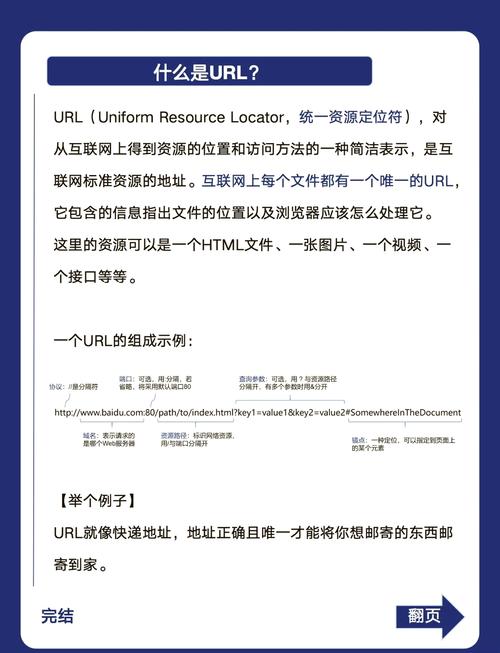
URL encoding (also called percent-encoding) is a mechanism to safely include special characters in a URL. Characters like spaces, &, , , and non-ASCII characters are converted into a followed by two hexadecimal digits.
- Encoded:
https://example.com/search?q=hello%20world&lang=en-US - Decoded:
https://example.com/search?q=hello world&lang=en-US
The decoding process is the reverse: it converts these percent-encoded sequences back to their original characters.
The Modern & Recommended Approach (Java 8+)
The best and most straightforward way to handle URL decoding in modern Java is to use the java.net.URLDecoder class. This is part of the standard Java Development Kit (JDK).
Key Method: URLDecoder.decode(String s, String charset)
This method takes two arguments:

s: The encoded string.charset: The character encoding to use (e.g.,"UTF-8"). This is crucial! You should almost always useStandardCharsets.UTF_8to avoid issues with special characters.
Complete Example
Here is a full, runnable example demonstrating how to decode strings, query parameters, and a full URL.
import java.io.UnsupportedEncodingException;
import java.net.URLDecoder;
import java.nio.charset.StandardCharsets;
import java.util.Arrays;
import java.util.HashMap;
import java.util.Map;
public class UrlDecoderExample {
    public static void main(String[] args) {
        // --- 1. Basic String Decoding ---
        String encodedString = "Hello%20World%21%20This%20is%20a%20test.";
        String decodedString = urlDecode(encodedString);
        System.out.println("Encoded String:  " + encodedString);
        System.out.println("Decoded String:  " + decodedString);
        System.out.println("----------------------------------------");
        // --- 2. Decoding Query Parameters ---
        String encodedQuery = "name=John%20Doe&city=New%20York&role=admin%40example.com";
        String decodedQuery = urlDecode(encodedQuery);
        System.out.println("Encoded Query:   " + encodedQuery);
        System.out.println("Decoded Query:   " + decodedQuery);
        // Parse the decoded query string into a map
        Map<String, String> params = parseQueryParams(decodedQuery);
        System.out.println("Parsed Parameters: " + params);
        System.out.println("----------------------------------------");
        // --- 3. Decoding a Full URL ---
        // Note: You cannot decode the entire URL. You must decode the path and query parts separately.
        String fullUrl = "https://example.com/api/search?q=java%20programming&filter=on%26off";
        try {
            // Decode the query part
            String queryPart = fullUrl.substring(fullUrl.indexOf('?') + 1);
            String decodedQueryPart = urlDecode(queryPart);
            String finalUrl = fullUrl.substring(0, fullUrl.indexOf('?') + 1) + decodedQueryPart;
            System.out.println("Original URL:     " + fullUrl);
            System.out.println("Decoded URL:     " + finalUrl);
        } catch (StringIndexOutOfBoundsException e) {
            System.out.println("The URL did not contain a query string to decode.");
        }
    }
    /**
     * Safely decodes a URL-encoded string using UTF-8.
     * @param encoded The URL-encoded string.
     * @return The decoded string.
     */
    public static String urlDecode(String encoded) {
        if (encoded == null) {
            return null;
        }
        try {
            return URLDecoder.decode(encoded, StandardCharsets.UTF_8.name());
        } catch (UnsupportedEncodingException e) {
            // This exception should never be thrown because UTF-8 is a standard charset.
            throw new RuntimeException("UTF-8 encoding not supported!", e);
        }
    }
    /**
     * Parses a simple query string (e.g., "key1=val1&key2=val2") into a map.
     * @param query The query string to parse.
     * @return A Map of key-value pairs.
     */
    public static Map<String, String> parseQueryParams(String query) {
        Map<String, String> params = new HashMap<>();
        if (query == null || query.isEmpty()) {
            return params;
        }
        Arrays.stream(query.split("&"))
              .forEach(pair -> {
                  String[] keyValue = pair.split("=", 2); // Split only on the first '='
                  if (keyValue.length == 2) {
                      params.put(keyValue[0], keyValue[1]);
                  } else {
                      // Handle keys without values, e.g., "flag"
                      params.put(keyValue[0], "");
                  }
              });
        return params;
    }
}
Output of the Example:
Encoded String:  Hello%20World%21%20This%20is%20a%20test.
Decoded String:  Hello World! This is a test.
----------------------------------------
Encoded Query:   name=John%20Doe&city=New%20York&role=admin%40example.com
Decoded Query:   name=John Doe&city=New York&role=admin@example.com
Parsed Parameters: {name=John Doe, city=New York, role=admin@example.com}
----------------------------------------
Original URL:     https://example.com/api/search?q=java%20programming&filter=on%26off
Decoded URL:     https://example.com/api/search?q=java programming&filter=on&off
Handling the Sign
A common point of confusion is the character. In the application/x-www-form-urlencoded format (used for query strings and form data), a is used to represent a space.
The good news is that URLDecoder.decode() handles this automatically for you. It will correctly convert to a space.
String encodedWithPlus = "query=Java+Tutorial";
String decoded = URLDecoder.decode(encodedWithPlus, StandardCharsets.UTF_8.name());
System.out.println(decoded); // Output: query=Java Tutorial
Alternative for Servlets (Javax)
If you are working in a Java web application using the older javax.servlet API (common in Java EE or older Spring projects), you might encounter javax.servlet.http.HttpServletRequest. This interface has a convenient method to get decoded parameters.
This method automatically handles decoding based on the request's character encoding.
// Inside a Servlet or a Controller in an older Spring MVC app
import javax.servlet.http.HttpServletRequest;
// ...
public void doGet(HttpServletRequest request) {
    // The getParameter() method automatically decodes the parameter value
    // using the character encoding of the request.
    String searchQuery = request.getParameter("q");
    // If the request was: ...?q=java%20programming
    // Then searchQuery will be: "java programming"
    System.out.println("Decoded 'q' parameter: " + searchQuery);
}
The "Old" Way (Not Recommended)
Before Java 7, URLDecoder.decode() was part of the java.net package but had a significant flaw: it did not require a character encoding. This led to inconsistent behavior across different systems and security vulnerabilities.
// OLD AND BROKEN WAY - DO NOT USE!
String oldEncoded = "caf%C3%A9";
// This uses the platform's default charset, which can be anything (e.g., ISO-8859-1, Cp1252)
// On a US Windows machine, this might fail to decode 'é' correctly.
String oldDecoded = URLDecoder.decode(oldEncoded);
This approach is deprecated and should be avoided. Always specify the charset, especially UTF-8.
Summary & Best Practices
| Method | When to Use | Key Takeaway |
|---|---|---|
java.net.URLDecoder.decode(s, StandardCharsets.UTF_8.name()) |
General purpose, modern Java (8+). This is the recommended way for decoding strings, paths, and query parameters. | Always specify the charset as UTF-8. |
request.getParameter("key") |
Inside a javax.servlet web application. |
The servlet container handles decoding for you automatically. |
java.net.URI |
When you need to parse, resolve, and normalize a URL into its components (scheme, host, path, query, etc.). | Use URI.getQuery() to get the query string, then decode it with URLDecoder. |
Key Best Practices:
- Always Specify the Charset: Use
StandardCharsets.UTF_8to ensure consistent behavior across all platforms. - Don't Decode the Whole URL: A URL has strict structure. Decode only the parts that are encoded, typically the path and the query string.
- Use for Spaces in Forms: Remember that in form data (
application/x-www-form-urlencoded), represents a space.URLDecoderhandles this correctly. - Handle Exceptions: While
UnsupportedEncodingExceptionis unlikely forUTF-8, it's good practice to handle it or wrap it in aRuntimeException.