Python 3 的字符串本质
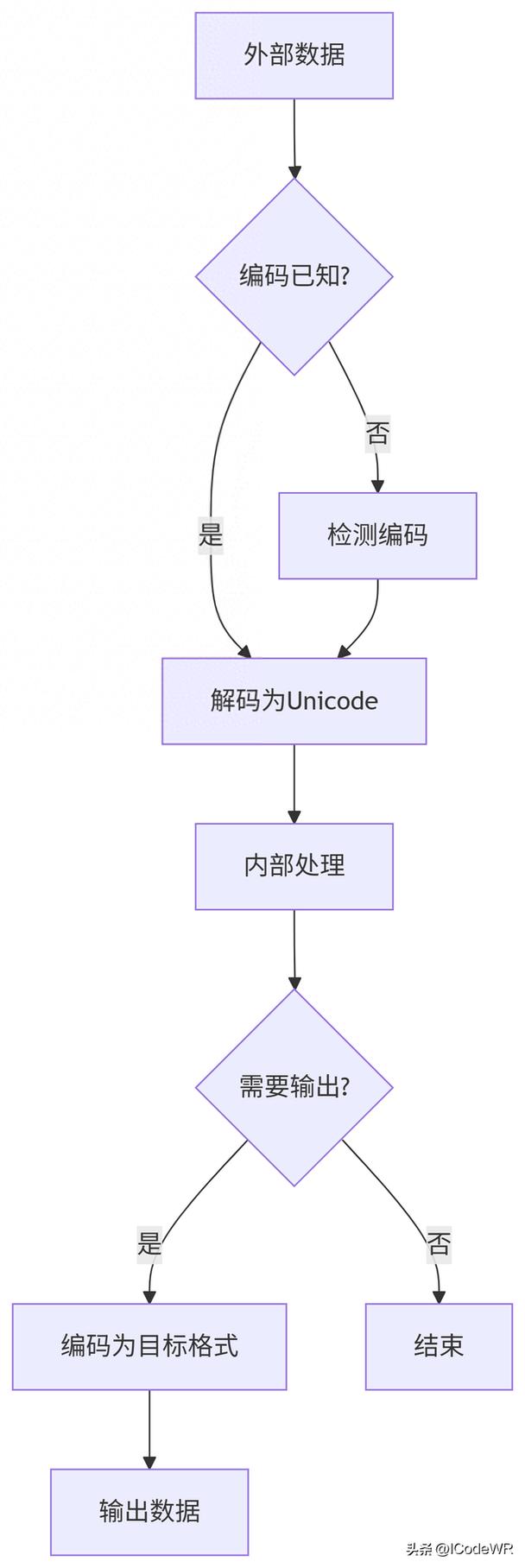
首先要理解一个最关键的概念:在 Python 3 中,字符串(str)类型本身就是 Unicode 字符串。
(图片来源网络,侵删)
这意味着你不需要像在 Python 2 中那样进行“Unicode 转字符串”的转换,当你写一个字符串字面量时,Python 就会将其存储为 Unicode。
# 这是一个 Python 3 字符串,它内部就是 Unicode
my_unicode_string = "你好,世界!Hello, World!"
# 你可以检查它的类型
print(type(my_unicode_string))  # 输出: <class 'str'>
你真正需要处理的情况通常是以下两种:
- 从其他编码(如 UTF-8, GBK)的字节流(
bytes)解码成 Unicode 字符串(str)。 - 将 Unicode 字符串(
str)编码成特定编码的字节流(bytes),以便存储或传输。
将字节流解码为 Unicode 字符串(bytes -> str)
当你从文件、网络或数据库中读取数据时,你得到的是字节流(bytes)类型,而不是字符串,你需要将其解码成 Python 的 str 类型。
方法:使用 .decode() 方法
.decode() 方法用于将 bytes 对象转换为 str 对象。
(图片来源网络,侵删)
语法:
bytes_object.decode(encoding='utf-8', errors='strict')
encoding: 指定字节流使用的编码,如'utf-8','gbk','ascii'等,如果不指定,Python 3 默认使用'utf-8'。errors: 指定解码错误时的处理方式,常用值有:'strict'(默认): 遇到无法解码的字节会抛出UnicodeDecodeError。'ignore': 忽略无法解码的字节。'replace': 将无法解码的字节替换成一个占位符(通常是 )。
示例:
假设你有一个 UTF-8 编码的字节流。
# 这是一个 UTF-8 编码的字节流
utf8_bytes = b'\xe4\xbd\xa0\xe5\xa5\xbd'  # 这是 "你好" 的 UTF-8 编码
# 1. 正确解码(使用正确的编码)
# 将 bytes 转换为 str
my_string = utf8_bytes.decode('utf-8')
print(my_string)          # 输出: 你好
print(type(my_string))    # 输出: <class 'str'>
# 2. 错误解码(使用错误的编码)
# 如果你用 'ascii' 解码 UTF-8 字节,会出错
try:
    utf8_bytes.decode('ascii')
except UnicodeDecodeError as e:
    print(f"解码失败: {e}")
    # 输出: 解码失败: 'ascii' codec can't decode byte 0xe4 in position 0: ordinal not in range(128)
# 3. 使用 errors='replace' 处理错误
# 将无法解码的字节替换为 �
replaced_string = utf8_bytes.decode('ascii', errors='replace')
print(replaced_string)   # 输出: ����
将 Unicode 字符串编码为字节流(str -> bytes)
当你需要将字符串写入文件、发送到网络或进行其他需要二进制数据的操作时,你需要将其编码成字节流。
方法:使用 .encode() 方法
.encode() 方法用于将 str 对象转换为 bytes 对象。
语法:
str_object.encode(encoding='utf-8', errors='strict')
参数与 .decode() 类似。
示例:
# 这是一个 Python 3 的 Unicode 字符串
my_string = "你好"
# 1. 将字符串编码为 UTF-8 字节流
utf8_bytes = my_string.encode('utf-8')
print(utf8_bytes)        # 输出: b'\xe4\xbd\xa0\xe5\xa5\xbd'
print(type(utf8_bytes))  # 输出: <class 'bytes'>
# 2. 将字符串编码为 GBK 字节流(另一种常见的中文编码)
gbk_bytes = my_string.encode('gbk')
print(gbk_bytes)        # 输出: b'\xc4\xe3\xba\xc3'
print(type(gbk_bytes))  # 输出: <class 'bytes'>
# 3. 将字符串编码为 ASCII 字节流
# ASCII 编码不支持中文字符,会报错
try:
    my_string.encode('ascii')
except UnicodeEncodeError as e:
    print(f"编码失败: {e}")
    # 输出: 编码失败: 'ascii' codec can't encode characters in position 0-1: ordinal not in range(128)
# 4. 使用 errors='replace' 处理错误
replaced_bytes = my_string.encode('ascii', errors='replace')
print(replaced_bytes)   # 输出: b'??'
总结与最佳实践
| 操作 | 方法 | 输入类型 | 输出类型 | 描述 |
|---|---|---|---|---|
| 解码 | my_bytes.decode('utf-8') |
bytes |
str |
将字节流(如从文件读取)转换为 Python 的 Unicode 字符串。 |
| 编码 | my_str.encode('utf-8') |
str |
bytes |
将 Unicode 字符串转换为字节流(如写入文件或网络传输)。 |
最佳实践建议:
- 在代码内部,统一使用
str类型。 所有字符串处理、逻辑运算都在str层面完成。 - 在输入/输出(I/O)的边界进行编码和解码。
- 读取文件/网络数据时:立即使用
.decode()将bytes转为str。 - 写入文件/发送网络数据时:在最后一步使用
.encode()将str转为bytes。
- 读取文件/网络数据时:立即使用
- 优先使用 UTF-8 编码。 UTF-8 是目前事实上的标准,它可以表示地球上几乎所有的字符,并且与 ASCII 兼容,是跨平台、跨语言最安全的选择。
完整示例:读写文件
# --- 写入文件 ---
content_to_write = "你好,Python 世界!"
# 1. 将字符串编码为 UTF-8 字节
bytes_to_write = content_to_write.encode('utf-8')
# 2. 以二进制模式 ('wb') 写入文件
with open('my_file.txt', 'wb') as f:
    f.write(bytes_to_write)
print("文件已写入。")
# --- 读取文件 ---
# 1. 以二进制模式 ('rb') 读取文件,得到字节流
with open('my_file.txt', 'rb') as f:
    bytes_read = f.read()
# 2. 将字节流解码为字符串
content_read = bytes_read.decode('utf-8')
print(f"文件内容: {content_read}")
print(f"类型: {type(content_read)}")
这个例子清晰地展示了在 I/O 操作的两端,encode 和 decode 是如何协同工作的,记住这个模式,你就能轻松处理所有与 Unicode 相关的问题。