
Of course! In Python, there isn't a function called writeline(). This is a common point of confusion for developers coming from other languages like C# or PHP, which do have a WriteLine method.
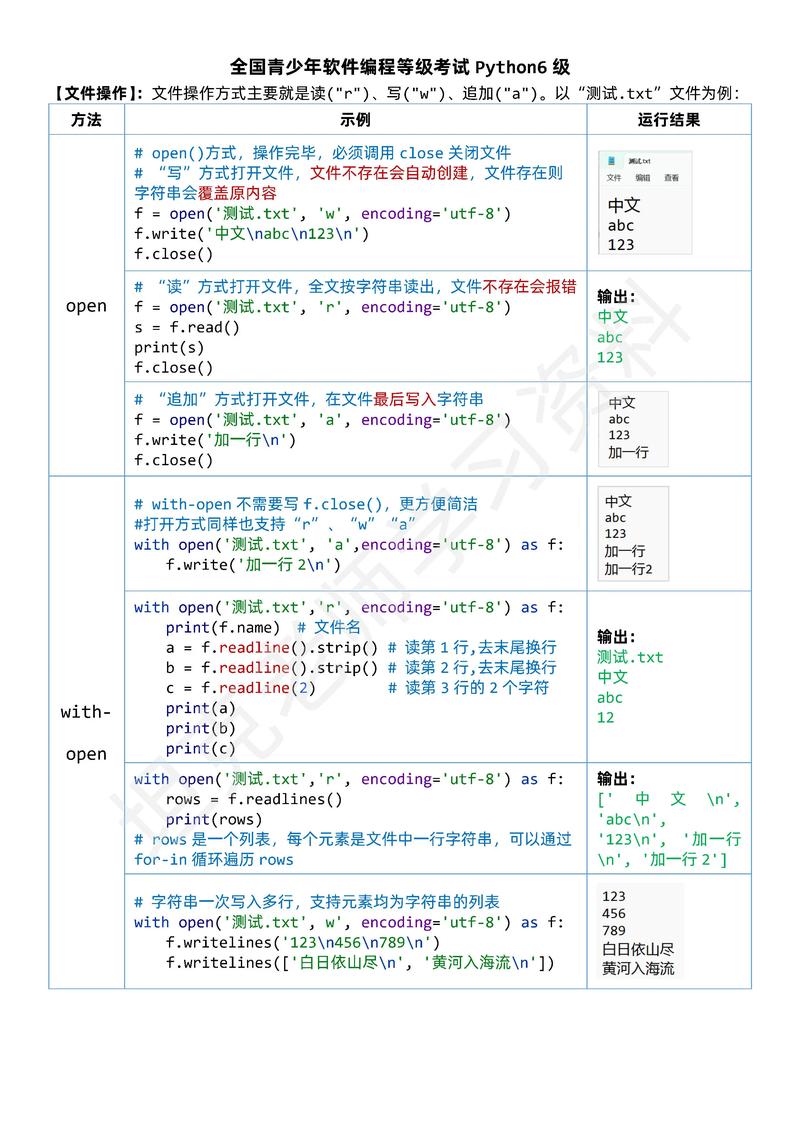
In Python, the standard way to write a line of text to a file is by using the write() method and then explicitly adding a newline character (\n).
Here’s a complete guide covering the correct methods, why writeline() doesn't exist, and best practices.
The Short Answer: How to Write a Line in Python
To write a line to a file, you use the file.write() method and append a newline character \n at the end of your string.
# The string you want to write, including the newline character
line_to_write = "This is a line of text.\n"
# Open the file in 'write' mode ('w')
# This will create the file if it doesn't exist, or overwrite it if it does.
with open("my_file.txt", "w") as f:
    f.write(line_to_write)
Why with open(...)?
The with statement is the recommended way to handle files in Python. It automatically takes care of closing the file for you, even if errors occur.
Detailed Explanation and Best Practices
Let's break down the different scenarios for writing to a file.
Writing a Single Line
As shown above, you simply concatenate \n to your string.
line = "Hello, Python!"
with open("greeting.txt", "w") as f:
    f.write(line + "\n") # The + "\n" is crucial
Writing Multiple Lines
If you have a list of lines, you can loop through them and write each one.
lines = [
    "First line of the file.",
    "Second line of the file.",
    "And a third line for good measure."
]
with open("multiline.txt", "w") as f:
    for line in lines:
        f.write(line + "\n")
The Easiest Way: writelines()
Python has a method called writelines() which is perfect for writing a list of strings. A common misconception is that writelines() adds newlines for you. It does not! You must add the newline character to each string in your list beforehand.
lines = [
    "This is using writelines().",
    "Notice the newline is part of the string.",
    "This is more efficient than a loop for large lists."
]
with open("writelines_example.txt", "w") as f:
    f.writelines(lines) # Writes each string from the list to the file
To make writelines() behave like a "write line" function, you can use a list comprehension:
lines = ["Line A", "Line B", "Line C"]
with open("writelines_with_newlines.txt", "w") as f:
    # Add a newline to each element in the list before writing
    f.writelines([line + "\n" for line in lines])
The "Pythonic" Way: print()
For many cases, especially when dealing with console-like output or when you want to write data that isn't strictly a string, the print() function is the most convenient and "Pythonic" way to write a line. When you redirect its output to a file, print() automatically adds the newline for you.
The file argument in print() is key here.
lines = ["Using the print function is very clean.", "No manual \\n needed!"]
with open("print_example.txt", "w") as f:
    for line in lines:
        print(line, file=f) # The print function adds the newline
This is often preferred for its readability and simplicity.
Why Doesn't Python Have a writeline() Method?
The Python philosophy, often summarized in "The Zen of Python" (import this), emphasizes simplicity and "one obvious way to do it."
- Simplicity: Having a single
write()method that writes exactly what you give it is simpler than having two methods (writeandwriteline) that behave almost identically. - Explicit is better than implicit: By forcing you to add
\n, Python makes the action explicit. You are clearly telling the file, "I want to write this string, and then I want to move to the next line." This avoids ambiguity. - Flexibility: What if you don't want a newline at the end of the last line? With
write(), you have full control. Ifwriteline()existed, you'd have to usewrite()anyway for that special case.
Summary: Which Method Should You Use?
| Method | What it Does | When to Use It |
|---|---|---|
file.write(string) |
Writes the exact string provided to the file. | The fundamental method. Use it when you need precise control over what is written. Remember to add \n for newlines. |
file.writelines(list_of_strings) |
Writes each string from the list to the file in sequence. | Best for writing a large list of strings to a file efficiently. Remember to add \n to each string in the list. |
print(line, file=f) |
Writes the line to the file object f. |
Highly recommended. The most readable and convenient way to write lines. It automatically adds a newline and handles different data types (like numbers) by converting them to strings. |
Final Recommendation: For writing lines of text to a file, print(line, file=f) is often the best choice due to its clarity and automatic handling of newlines. If you are writing a large pre-existing list of strings, f.writelines([s + "\n" for s in my_list]) is a very efficient and idiomatic pattern.











