Of course! Welcome to the exciting world of Python. This guide is designed for complete rookies, so we'll start from the very beginning and build up your confidence step-by-step.
What is Python?
Think of Python as a set of instructions you write for a computer. It's a high-level programming language, which means it's designed to be easy for humans to read and write. It's like giving the computer simple, English-like commands to perform tasks.
Python is incredibly versatile and is used for:
- Web Development (websites like Instagram and Spotify use it)
- Data Science & Machine Learning (analyzing data and building AI)
- Automation (writing scripts to do boring, repetitive tasks for you)
- Game Development (creating simple 2D games)
- And much more!
Step 1: Setting Up Your Toolkit (Installation)
Before you can write Python code, you need a couple of things.
The Python Interpreter
This is the program that actually reads your Python code and tells the computer what to do.
- Go to the official Python website: python.org
- Click on the "Downloads" tab. You'll see a button for the latest version.
- Download the installer for your operating system (Windows, Mac, or Linux).
- IMPORTANT: During installation on Windows, make sure to check the box that says "Add Python to PATH". This makes it much easier to use Python from your command line.
A Code Editor
This is where you'll write your code. A good code editor is like a super-powered notepad that helps you by coloring your code and finding mistakes.
- For Beginners: Thonny. It comes bundled with the standard Python installer on Windows and is fantastic because it's simple and shows you exactly what your code is doing.
- For Everyone Else: Visual Studio Code (VS Code). It's free, powerful, and used by professionals all over the world. You'll need to install it separately from code.visualstudio.com.
Step 2: Your First Program - "Hello, World!"
Every programmer's first program is to make the computer display the text "Hello, World!". It's a tradition!
-
Open your code editor (Thonny or VS Code).
-
Create a new file.
 (图片来源网络,侵删)
 -
Type the following line of code:
print("Hello, World!") -
Save the file with a name like
hello.py. The.pyextension tells the computer this is a Python file. -
Run the code. In Thonny, you just click the "Run" button. In VS Code, you might need to open a terminal and type
python hello.py.
What happened? The computer displayed Hello, World! on the screen. Congratulations, you've just written your first program!
Step 3: The Basic Building Blocks
Now let's learn the fundamental concepts that make up almost any program.
Variables
Variables are like labeled boxes where you can store information. You can put things in them, change what's inside, and use that information later.
# Storing text (a string)
name = "Alice"
greeting = "Hello, "
# Storing numbers (an integer)
age = 30
# Storing a number with a decimal (a float)
height = 5.6
Data Types
You just saw a few data types. Let's clarify them:
- String (
str): Text. Always in double quotes () or single quotes (). - Integer (
int): Whole numbers (e.g.,10,-5,0). - Float (
float): Numbers with a decimal point (e.g.,14,-0.5).
Comments
Comments are notes for humans. The computer ignores them. They are super useful for explaining what your code does.
# This is a single-line comment. It starts with a hash symbol.
# This variable stores the user's score
score = 100
"""
This is a multi-line comment.
You can use it for longer explanations.
"""
Input and Output
We already used print() to output information. Now let's get input from the user.
The input() function pauses the program and waits for the user to type something and press Enter.
# Ask the user for their name
user_name = input("What is your name? ")
# Print a personalized greeting
print("Nice to meet you, " + user_name + "!")
Basic Math
Python can do math! The symbols are mostly what you expect.
- for addition
- for subtraction
- for multiplication
- for division
- for exponents (e.g.,
2**3is 2 to the power of 3, which is 8)
x = 10
y = 3
print(x + y)  # Output: 13
print(x * y)  # Output: 30
print(x / y)  # Output: 3.333...
print(x ** y) # Output: 1000
Step 4: Making Decisions with if, elif, and else
Programs need to be able to make choices. This is done with if statements. They check if a condition is True or False.
age = 18
if age >= 18:
    print("You are old enough to vote.")
else:
    print("You are not old enough to vote yet.")
Let's make it a bit more complex with elif (else if):
score = 85
if score >= 90:
    print("Grade: A")
elif score >= 80:
    print("Grade: B")
elif score >= 70:
    print("Grade: C")
else:
    print("Grade: F")
Step 5: Repeating Tasks with Loops
What if you want to do something over and over again? That's what loops are for.
The for Loop
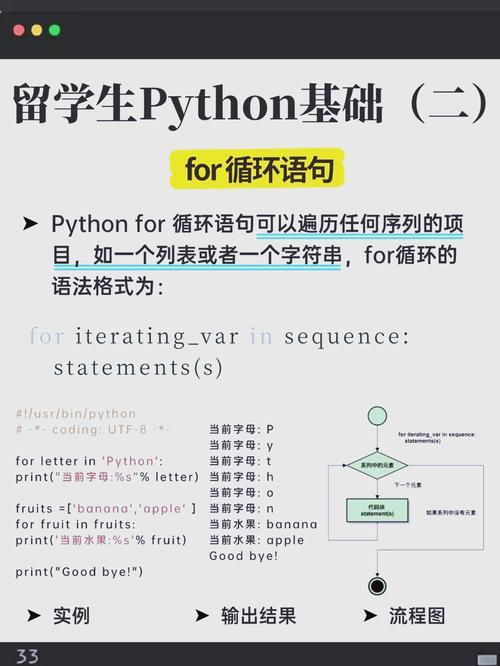
A for loop is perfect for going through a list of items.
fruits = ["apple", "banana", "cherry"]
# Go through each item in the 'fruits' list
for fruit in fruits:
    print(f"I like to eat {fruit}s.")
The while Loop
A while loop continues to run as long as a certain condition is True.
count = 0
# Keep looping as long as 'count' is less than 5
while count < 5:
    print(f"The count is: {count}")
    count = count + 1 # IMPORTANT: You must change the variable to avoid an infinite loop!
Step 6: Organizing Code with Functions
A function is a reusable block of code that performs a specific task. It's like a mini-program inside your main program. This makes your code cleaner and less repetitive.
We define a function using the def keyword.
# This function takes one argument (a name) and returns a greeting
def greet(name):
    return "Hello, " + name + "!"
# Now we can use our function over and over
print(greet("Bob"))
print(greet("Charlie"))
Step 7: A Simple Project: Number Guessing Game
Let's put everything we've learned together into a fun, simple game.
Goal: The computer picks a secret number, and the player has to guess it.
import random  # We need this to pick a random number
def number_guessing_game():
    # 1. Set up the game
    secret_number = random.randint(1, 20)
    guesses_taken = 0
    print("Hello! What is your name?")
    player_name = input()
    print(f"Well, {player_name}, I am thinking of a number between 1 and 20.")
    print("Take a guess.")
    # 2. The main game loop
    while guesses_taken < 6:
        guess = input()
        guess = int(guess) # Convert the user's text input into a number
        guesses_taken = guesses_taken + 1
        if guess < secret_number:
            print("Your guess is too low.")
        elif guess > secret_number:
            print("Your guess is too high.")
        else:
            # This is the correct guess!
            break # Exit the loop
    # 3. The end of the game
    if guess == secret_number:
        print(f"Good job, {player_name}! You guessed my number in {guesses_taken} guesses!")
    else:
        print(f"Nope. The number I was thinking of was {secret_number}.")
# Start the game
number_guessing_game()
Next Steps for a Rookie
You've learned the absolute basics! Now what?
- Practice, Practice, Practice! Try to write small programs.
- A calculator that adds two numbers.
- A program that converts miles to kilometers.
- A program that asks for your favorite color and prints it back in a sentence.
- Learn about Data Structures: We used a simple list (
fruits = [...]). Next, learn about Dictionaries (key-value pairs, like a real dictionary) and Tuples (lists that can't be changed). - Explore Libraries: Python's power comes from its vast library of pre-written code. For example, the
requestslibrary is used to get data from websites. - Find a Tutorial: Follow a structured online course or tutorial. Websites like freeCodeCamp, Codecademy, and Coursera have excellent Python courses for beginners.
Welcome to the journey of programming! Be patient with yourself, have fun, and don't be afraid to make mistakes—they're the best way to learn.