Of course. Converting a double to a float in Java is a common task, but it comes with a critical warning about precision loss.

Here's a complete guide covering the methods, the risks, and best practices.
The Core Problem: Precision Loss
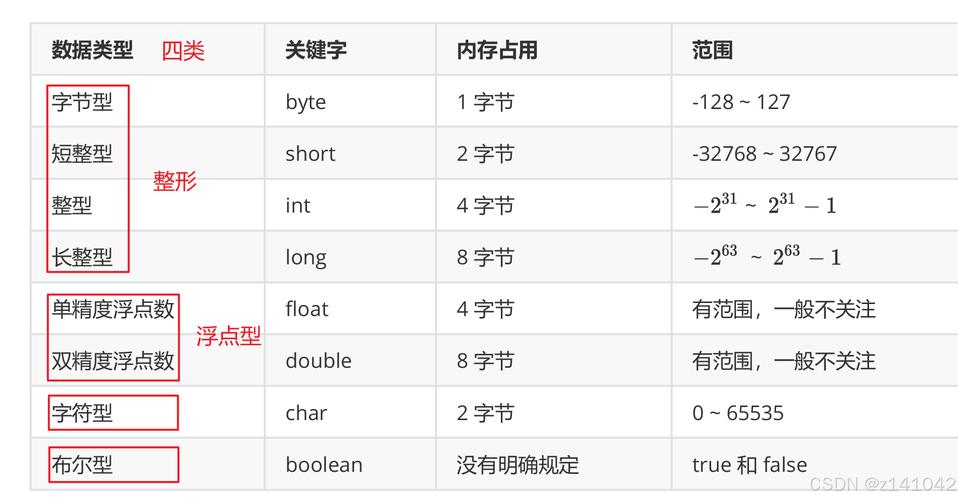
A double (64-bit) has a much larger precision (about 15-17 decimal digits) than a float (32-bit, about 6-9 decimal digits). When you convert a double to a float, you are trying to fit a more precise number into a less precise container. This will almost always result in one of two things:
- Rounding: The number is rounded to the closest possible
floatvalue. - Truncation: The extra precision is simply cut off.
Java will not throw an exception by default if the value is too large or loses precision. This is a "silent" conversion, which can lead to subtle bugs.
Method 1: Explicit Casting (The Direct Way)
This is the most common and direct method. You use the cast operator (float) to tell the compiler you are aware of the potential data loss.

public class DoubleToFloatExample {
    public static void main(String[] args) {
        double myDouble = 123.456789012345;
        // Cast the double to a float
        float myFloat = (float) myDouble;
        System.out.println("Original double: " + myDouble);
        System.out.println("Converted float: " + myFloat);
        // Notice the loss of precision
        // double: 123.456789012345
        // float:  123.45679
    }
}
Output:
Original double: 123.456789012345
Converted float: 123.45679
As you can see, the float value is a rounded version of the double.
Method 2: Using the Float Wrapper Class (The Object-Oriented Way)
You can also use the static valueOf method from the Float class. This method takes a double as an argument and returns a Float object.
public class DoubleToFloatWrapper {
    public static void main(String[] args) {
        double myDouble = 987.654321098765;
        // Use Float.valueOf() to get a Float object
        Float myFloatObject = Float.valueOf(myDouble);
        // You can get the primitive float value with .floatValue()
        float myPrimitiveFloat = myFloatObject.floatValue();
        System.out.println("Original double: " + myDouble);
        System.out.println("Float object: " + myFloatObject);
        System.out.println("Primitive float: " + myPrimitiveFloat);
    }
}
Output:
Original double: 987.654321098765
Float object: 987.6543
Primitive float: 987.6543
This method achieves the same result as casting but returns an Float object instead of a primitive float. The conversion logic (and precision loss) is identical.
The Critical Danger: Converting Large Doubles
The real danger isn't just with decimal places; it's with numbers that are too large to be represented by a float.
A float can only accurately represent numbers up to about 4 x 10^38. If your double is larger than this, the value will become infinity.
public class DoubleToFloatOverflow {
    public static void main(String[] args) {
        // A double value that is too large for a float
        double largeDouble = 1.0e40; // 1.0 * 10^40
        System.out.println("Original double: " + largeDouble);
        // Cast to float
        float overflowedFloat = (float) largeDouble;
        System.out.println("Converted float: " + overflowedFloat);
        System.out.println("Is the float infinite? " + Float.isInfinite(overflowedFloat));
    }
}
Output:
Original double: 1.0E40
Converted float: Infinity
Is the float infinite? true
This silent conversion to Infinity can completely break your calculations without you realizing it.
How to Check for Precision Loss (The Safe Way)
Since Java doesn't warn you about precision loss, you must check for it yourself. The best way is to convert the float back to a double and compare it with the original double.
public class SafeConversion {
    public static void main(String[] args) {
        double originalDouble = 3.141592653589793;
        // Convert to float
        float convertedFloat = (float) originalDouble;
        // Convert the float back to a double
        double reconstructedDouble = (double) convertedFloat;
        // Compare the original and reconstructed doubles
        if (originalDouble == reconstructedDouble) {
            System.out.println("No precision loss detected.");
        } else {
            System.out.println("Warning: Precision loss occurred!");
            System.out.println("Original double: " + originalDouble);
            System.out.println("Reconstructed double: " + reconstructedDouble);
        }
    }
}
Output:
Warning: Precision loss occurred!
Original double: 3.141592653589793
Reconstructed double: 3.1415927
Summary and Best Practices
| Method | Example | When to Use | Key Considerations |
|---|---|---|---|
| Explicit Casting | float f = (double)d; |
Most common. When you need a primitive float and are aware of the precision limits. |
Silent failure. Can lose precision or overflow to Infinity. Use with caution. |
Float.valueOf() |
Float f = Float.valueOf(d); |
When you specifically need an Float object instead of a primitive. |
Same precision and overflow risks as casting. Just returns an object. |
| Constructor | Float f = new Float(d); |
Older style. Float.valueOf() is generally preferred as it can cache values. |
Same risks. valueOf() is more modern. |
Best Practices:
- Be Aware of the Risk: Always remember that
doubletofloatis a lossy conversion. - Check for Overflow: If your
doublevalue could be very large (e.g., from a calculation or user input), check if it's within the range of afloatbefore converting.if (myDouble > Float.MAX_VALUE || myDouble < -Float.MAX_VALUE) { System.out.println("Error: Value is too large for a float!"); // Handle the error appropriately } else { float myFloat = (float) myDouble; } - Verify Precision: If precision is critical (e.g., financial calculations), avoid converting to
floataltogether. Stick withdoubleor useBigDecimal. If you must convert, use the "round-trip" check (convert back todouble) to see if data was lost. - Document Your Code: If you perform a
doubletofloatconversion, add a comment explaining why it's safe or what the expected precision loss is. This helps future maintainers.