Of course! This is a great topic that covers a significant piece of web history.
Let's break down the relationship between HTML and Java Applets, from their golden age to their modern-day obsolescence.
What Was a Java Applet?
A Java Applet was a small, application-like program that was written in the Java programming language. It was designed to be embedded inside a web page and run in the user's web browser.
Key Characteristics:
- Client-Side: It ran directly on the user's computer, not on the web server.
- Sandboxed: For security, it ran in a restricted environment (the "sandbox") that prevented it from accessing the local file system, network connections (other than the server it came from), or other sensitive system resources.
- Interactive: It could provide rich, interactive content that was impossible with plain HTML, like animations, games, and complex graphical user interfaces (GUIs).
How Did HTML and Java Applets Work Together?
The HTML part was simple. You used the <applet> tag to tell the web browser: "Hey, load this Java program and display it right here on the page."
The HTML: The <applet> Tag
The core of the integration was the now-deprecated <applet> tag. It required a few key attributes:
code: The filename of the compiled Java class (the.classfile).widthandheight: The dimensions of the applet's display area on the page.archive: (Optional) A.jarfile containing the applet and all its dependencies. This was much more efficient than loading many small files.
A Simple Example
Here’s what a basic HTML file with an applet looked like.
index.html
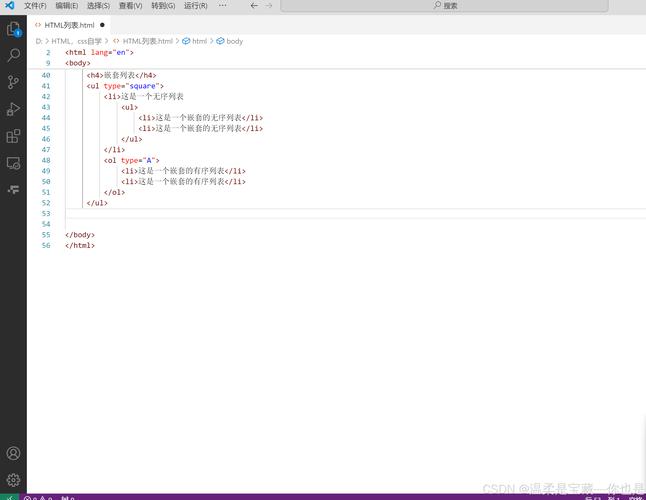
<!DOCTYPE html>
<html>
<head>My First Applet Page</title>
</head>
<body>
    <h1>Welcome to the Applet Era!</h1>
    <p>Below is a simple "Hello, World!" applet.</p>
    <!--
      The APPLET tag tells the browser where to find the Java code
      and how much space to give it on the page.
    -->
    <applet code="HelloWorldApplet.class" width="300" height="100">
        <!--
          This text is shown to users who have browsers that
          do not support Java applets or have Java disabled.
        -->
        Your browser does not support Java applets.
    </applet>
</body>
</html>
The Java Code: The Applet Class
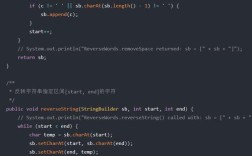
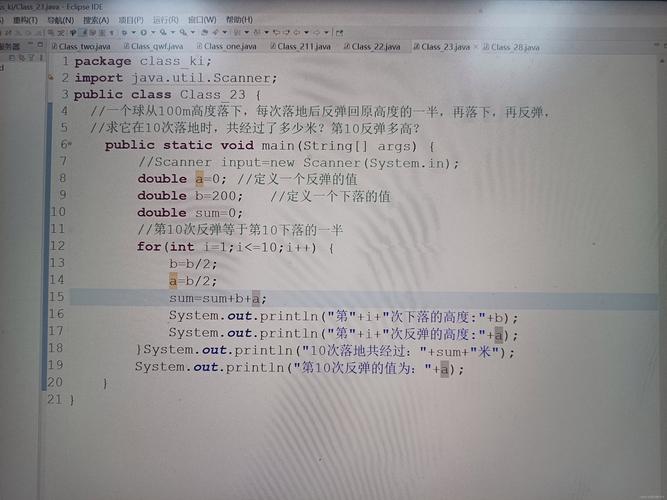
On the server, you would have a Java file that extended the java.applet.Applet class. This class provided the lifecycle methods (init, start, stop, destroy) and the graphics context (paint) needed to run in a browser.
HelloWorldApplet.java
import java.applet.Applet;
import java.awt.Graphics; // The Abstract Window Toolkit for drawing
// The class must be public and extend Applet
public class HelloWorldApplet extends Applet {
    // The paint method is called automatically by the browser
    // to draw the applet's content.
    @Override
    public void paint(Graphics g) {
        // The g object is the graphics context.
        // We use it to draw text at a specific (x, y) coordinate.
        g.drawString("Hello, Web World!", 50, 50);
    }
}
How it all connected:
- You would compile
HelloWorldApplet.javato produceHelloWorldApplet.class. - You would upload
index.htmlandHelloWorldApplet.classto your web server. - A user with a Java-enabled browser (like old versions of Internet Explorer or Firefox) would visit
index.html. - The browser would see the
<applet>tag, download the.classfile, and the Java Virtual Machine (JVM) inside the browser would execute the code, drawing "Hello, Web World!" inside the 300x100 pixel box.
The Golden Age and Why It Disappeared
Applets were revolutionary in the late 1990s and early 2000s. They brought real interactivity to the web before technologies like JavaScript and Flash matured. You could find them everywhere:
- Online chess games.
- 3D model viewers.
- Complex scientific data visualizations.
- Interactive chat rooms.
However, a combination of factors led to their demise:
-
Security Vulnerabilities: The sandbox, while a good idea, had flaws. Over the years, numerous critical security exploits were discovered in Java's browser plugin. Because applets ran with the user's permissions (within the sandbox), these vulnerabilities could be used by malicious websites to steal data or install malware on a user's computer. This made Java a huge security target.
-
Performance and User Experience: Applets were often slow to load because the user had to download the Java Runtime Environment (JRE) or the JVM for the browser. The "Java Loading..." coffee cup icon became a symbol of a slow, clunky web experience.
-
The Rise of Alternatives: Technologies that didn't require a separate plugin and were easier for web developers to use began to dominate:
- JavaScript: Evolved from a simple scripting language into a powerful platform (with frameworks like jQuery, Angular, React) capable of creating rich, interactive web applications directly in the browser.
- Adobe Flash: Offered similar functionality to applets but became dominant due to better developer tools and adoption. (Flash itself is now also obsolete for similar security reasons).
- HTML5, CSS3, and Web APIs: These technologies introduced native support for video, audio, canvas (for 2D graphics), and WebGL (for 3D graphics), making plugins of all kinds unnecessary.
-
Plugin Deprecation: Browser makers started actively removing support for the Java plugin.
- Google Chrome disabled it in 2025 and removed it completely in 2025.
- Mozilla Firefox disabled it in 2025 and removed it in 2025.
- Microsoft Edge never supported it.
- Apple Safari dropped support with macOS 10.12 (Sierra).
Modern Web Development: The Successors
Today, you cannot run Java Applets in any mainstream web browser. The <applet> tag is obsolete and ignored.
If you need interactive content, you use modern web technologies:
| Feature | Old Way (Java Applet) | Modern Way (Web Stack) |
|---|---|---|
| Language | Java | JavaScript, HTML, CSS |
| Execution | In a browser plugin (JVM) | Natively in the browser's JavaScript engine |
| Graphics | java.awt.Graphics, java.awt |
HTML <canvas>, SVG, CSS animations |
| 3D Graphics | Java3D (library) | WebGL (JavaScript API) |
| Audio/Video | Custom libraries | HTML <audio>, <video> tags |
| Installation | Download and run a .class or .jar |
Just visit a URL. No installation needed. |
| Security | Sandboxed, but historically insecure | Sandboxed via browser security policies (CORS, Same-Origin) |
Is There Any Way to Run Java on the Web Today?
Yes, but it's fundamentally different from applets. The modern approach is to run Java on a server and have the browser (running JavaScript) communicate with it.
This is the foundation of modern web applications.
- Frontend (Browser): Built with HTML, CSS, and JavaScript (often using frameworks like React, Vue, or Angular). This is what the user sees and interacts with.
- Backend (Server): A Java application runs on a server. It handles business logic, database interactions, and complex computations.
- Communication: The frontend and backend communicate over the network using APIs, typically REST APIs or WebSockets.
Example: When you use a web-based email client:
- You click "Inbox" in your browser (Frontend).
- JavaScript in your browser sends a request to the server's API (e.g.,
GET /api/messages). - A Java application on the server receives the request, fetches the emails from the database.
- The server sends the email data back to your browser, usually in JSON format.
- JavaScript receives the data and dynamically updates the inbox on your screen.
This model is far more secure, scalable, and performant than the old applet model.
Summary
| Aspect | Java Applets | Modern Web (HTML/JS) |
|---|---|---|
| What it is | A Java program running in the browser. | A collection of technologies (HTML, CSS, JS) running natively in the browser. |
| HTML Role | The <applet> tag embeds the Java code. |
HTML defines the structure and content of the page. |
| Java Role | The language for the client-side application logic. | The language for the server-side application logic. |
| Status | Obsolete. Dead and gone. | Standard. The foundation of the modern web. |
In short, the dream of Java Applets—rich, interactive client-side applications—was realized, but by a different stack. HTML and Java now work together in a client-server model, which is the dominant architecture for web development today.