Of course! This is a fundamental concept in Python, especially when dealing with text. Let's break it down from the basics to more practical examples.
The Core Idea: What is Encoding?
Think of your computer's memory as a grid of empty boxes. To store text, you need a way to decide which letter goes into which box.
-
Unicode: This is a giant, universal library that assigns a unique number (a "code point") to every character in every language, emoji, and symbol. For example:
A->U+0041- ->
U+20AC 你->U+4F60- ->
U+1F60A
-
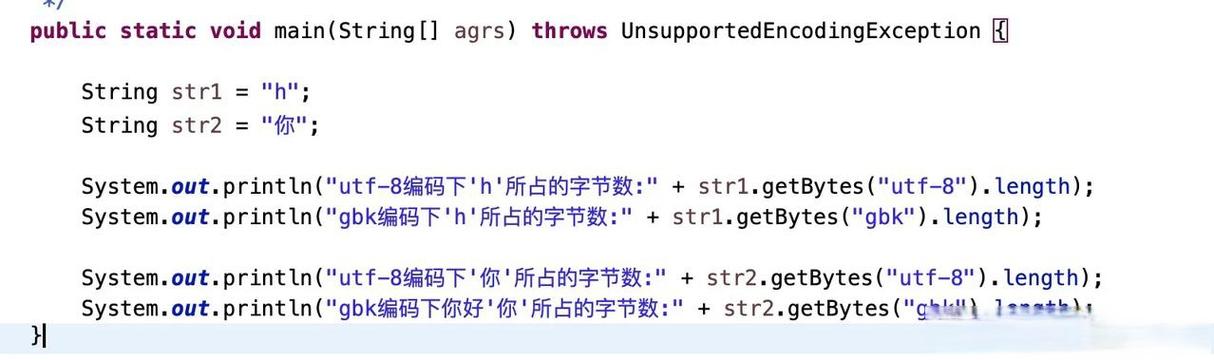
Encoding (like UTF-8): This is the set of rules for how to store those Unicode numbers in the computer's memory. UTF-8 is the most popular encoding. Its main advantage is that it's "variable-width":
- Basic English characters (A-Z, 0-9) take up 1 byte, just like in older encodings (like ASCII).
- Characters with accents or symbols (like or ) take up 2 bytes.
- Characters for most other languages (like Chinese, Arabic) take up 3 bytes.
- Emoji and other rare characters take up 4 bytes.
In short: Unicode is the "list of characters," and UTF-8 is the "storage format."
Strings in Python 3: The str Type
This is the most important point to remember: In Python 3, all strings are Unicode strings by default.
When you write my_string = "hello 你好 😊", Python stores this as a sequence of Unicode code points internally. You don't have to worry about encoding at this stage.
# This is a Python string object, a sequence of Unicode characters.
my_string = "hello 你好 😊"
# The `str` type represents Unicode text.
print(type(my_string))  # <class 'str'>
# You can see the internal Unicode code points using `ord()`
for char in my_string:
    print(f"Character: '{char}', Unicode Code Point: U+{ord(char):04X}")
Output:
Character: 'h', Unicode Code Point: U+0068
Character: 'e', Unicode Code Point: U+0065
Character: 'l', Unicode Code Point: U+006C
Character: 'l', Unicode Code Point: U+006C
Character: 'o', Unicode Code Point: U+006F
Character: ' ', Unicode Code Point: U+0020
Character: '你', Unicode Code Point: U+4F60
Character: '好', Unicode Code Point: U+597D
Character: ' ', Unicode Code Point: U+0020
Character: '😊', Unicode Code Point: U+1F60A
As you can see, Python handles the 你, 好, and characters seamlessly.

The "Encode" Operation: str -> bytes
You need to "encode" a string into bytes when you want to do something with it that isn't "in-memory text processing." Common examples include:
- Writing to a file.
- Sending data over a network (like a web request).
- Storing it in a database.
The method you use is .encode().
Syntax: your_string.encode(encoding='utf-8')
my_string = "hello 你好 😊"
# Encode the string into a bytes object using UTF-8
my_bytes = my_string.encode('utf-8')
print(f"Original string: {my_string}")
print(f"Type of original: {type(my_string)}")
print("-" * 20)
print(f"Encoded bytes: {my_bytes}")
print(f"Type of encoded: {type(my_bytes)}")
Output:
Original string: hello 你好 😊
Type of original: <class 'str'>
--------------------
Encoded bytes: b'hello \xe4\xbd\xa0\xe5\xa5\xbd \xf0\x9f\x98\x8a'
Type of encoded: <class 'bytes'>
Key Observations:
- The output starts with
b'...'. This is the syntax for abytesliteral in Python. - The English characters
helloare still readable because their UTF-8 representation is the same as ASCII. - The Chinese characters
你好and the emoji are represented by sequences of backslash-escaped numbers (like\xe4\xbd\xa0). These are the byte values that UTF-8 uses to represent those characters.
The "Decode" Operation: bytes -> str
This is the reverse process. You need to "decode" bytes back into a string when you receive them from an external source (like reading a file or getting a response from a website).
The method you use is .decode().
Syntax: your_bytes_object.decode(encoding='utf-8')
# Let's use the bytes object from the previous example
my_bytes = b'hello \xe4\xbd\xa0\xe5\xa5\xbd \xf0\x9f\x98\x8a'
# Decode the bytes back into a string, assuming they are UTF-8 encoded
my_string_again = my_bytes.decode('utf-8')
print(f"Original bytes: {my_bytes}")
print(f"Type of original: {type(my_bytes)}")
print("-" * 20)
print(f"Decoded string: {my_string_again}")
print(f"Type of decoded: {type(my_string_again)}")
Output:
Original bytes: b'hello \xe4\xbd\xa0\xe5\xa5\xbd \xf0\x9f\x98\x8a'
Type of original: <class 'bytes'>
--------------------
Decoded string: hello 你好 😊
Type of decoded: <class 'str'>
The text is perfectly restored!
Practical Examples: Reading and Writing Files
This is where encoding becomes critical. When you open a file, you must tell Python how to interpret the bytes it's reading.
Writing to a File
You must encode the string before writing it.
my_string = "This file contains special characters: ñ, é, 你, 😊"
# Use a 'with' block for safe file handling
# The 'w' mode means "write". The 'encoding=' argument is crucial.
with open("my_utf8_file.txt", "w", encoding="utf-8") as f:
    f.write(my_string)
print("File 'my_utf8_file.txt' written successfully.")
If you don't specify encoding="utf-8", Python will use the system's default encoding, which can cause errors or data corruption on other systems.
Reading from a File
You must decode the bytes as you read them.
# The 'r' mode means "read". The 'encoding=' argument is crucial here too.
with open("my_utf8_file.txt", "r", encoding="utf-8") as f:
    # When you read, Python automatically decodes the bytes into a string for you
    content = f.read()
print(f"Content read from file: {content}")
print(f"Type of content: {type(content)}")
Output:
Content read from file: This file contains special characters: ñ, é, 你, 😊
Type of content: <class 'str'>
Common Pitfalls and Best Practices
-
Always Specify Encoding: When opening files, making network requests (e.g., with the
requestslibrary), or using database connectors, always explicitly specifyencoding='utf-8'. Don't rely on system defaults. -
What if the Encoding is Wrong? If you try to read a UTF-8 file with the wrong encoding (e.g.,
encoding="latin-1"), you'll get aUnicodeDecodeError.# This will likely fail or produce gibberish try: with open("my_utf8_file.txt", "r", encoding="latin-1") as f: wrong_content = f.read() print(f"Wrongly decoded content: {wrong_content}") except UnicodeDecodeError as e: print(f"Error: {e}")Output:
Error: 'utf-8' codec can't decode byte 0xc3 in position 40: invalid continuation byte -
The
bPrefix is for Literals: Thebprefix is only used when you write a literalbytesobject in your code (e.g.,b"hello"). You don't add it to a variable that already holds bytes.my_string = "hello" my_bytes = my_string.encode('utf-8') # Correct # my_bytes is already a bytes object. This is wrong: # wrong_bytes = bmy_bytes # SyntaxError
Summary Table
| Operation | Method | Input Type | Output Type | When to Use |
|---|---|---|---|---|
| Encode | .encode('utf-8') |
str (Unicode) |
bytes |
Before writing to a file, sending over a network, or storing. |
| Decode | .decode('utf-8') |
bytes |
str (Unicode) |
After reading from a file, receiving from a network, or loading. |