Of course! Converting things to a String[] (a string array) in Java is a common task. The method you use depends entirely on what you're starting with.

Here’s a comprehensive guide covering the most common scenarios, from simple to more complex.
Quick Answer: The Most Common Cases
If you're in a hurry, here are the solutions for the most frequent conversions.
| Starting With | Java Code Example |
|---|---|
A List<String> |
String[] array = list.toArray(new String[0]); |
An Array of another type (e.g., int[]) |
String[] array = Arrays.stream(intArray).mapToObj(String::valueOf).toArray(String[]::new); (Java 8+) |
A String with a delimiter |
String[] array = myString.split(","); |
Detailed Examples with Explanations
Let's break down each common scenario with full, runnable examples.
Converting a List<String> to a String[]
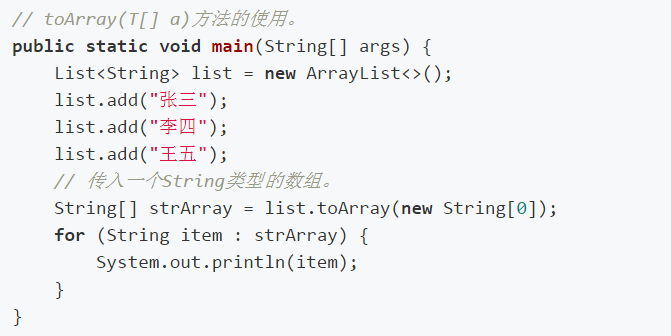
This is a very common task. The List interface has a built-in method for this.

Key Method: list.toArray(T[] array)
You need to provide an array as an argument. The list will populate this array with its elements. A common and efficient trick is to pass a zero-sized array of the correct type. Java's reflection will then create a new array of the correct size for you.
Example:
import java.util.Arrays;
import java.util.List;
import java.util.ArrayList;
public class ListToStringArray {
    public static void main(String[] args) {
        // 1. Create a List of Strings
        List<String> namesList = new ArrayList<>(Arrays.asList("Alice", "Bob", "Charlie", "David"));
        // 2. Convert the List to a String array
        // The new String[0] tells the toArray method to create a new array
        // of the correct size to hold all the elements from the list.
        String[] namesArray = namesList.toArray(new String[0]);
        // 3. Print the result to verify
        System.out.println("Original List: " + namesList);
        System.out.println("Converted Array: " + Arrays.toString(namesArray));
    }
}
Output:
Original List: [Alice, Bob, Charlie, David]
Converted Array: [Alice, Bob, Charlie, David]
Converting an Array of Primitives (e.g., int[]) to a String[]
You cannot directly cast an int[] to a String[]. You must convert each primitive element to its String representation. The modern way to do this is using Java 8 Streams.
Key Method: Arrays.stream(array).mapToObj(String::valueOf).toArray(String[]::new)
Arrays.stream(intArray): Creates a stream ofintvalues..mapToObj(String::valueOf): Converts eachintin the stream to aString.String.valueOf()is a static method reference that's perfect for this..toArray(String[]::new): Collects the stream ofStrings into a newString[]array.String[]::newis a constructor reference that tellstoArrayhow to create the final array.
Example:
import java.util.Arrays;
public class PrimitiveArrayToStringArray {
    public static void main(String[] args) {
        // 1. An array of primitive ints
        int numbers[] = {1, 2, 3, 10, 25};
        // 2. Convert the int[] to a String[]
        String[] numberStrings = Arrays.stream(numbers)
                                      .mapToObj(String::valueOf)
                                      .toArray(String[]::new);
        // 3. Print the result
        System.out.println("Original int[]: " + Arrays.toString(numbers));
        System.out.println("Converted String[]: " + Arrays.toString(numberStrings));
    }
}
Output:
Original int[]: [1, 2, 3, 10, 25]
Converted String[]: [1, 2, 3, 10, 25]
Converting a Single String to a String[]
This usually means splitting the string into multiple substrings based on a delimiter.
Key Method: String.split(String regex)
This method takes a regular expression as a delimiter and returns an array of strings.
Example:
import java.util.Arrays;
public class StringToStringArray {
    public static void main(String[] args) {
        // 1. A comma-separated string
        String csvData = "apple,banana,cherry,date";
        // 2. Split the string by the comma delimiter
        String[] fruits = csvData.split(",");
        // 3. Print the result
        System.out.println("Original String: " + csvData);
        System.out.println("Split String[]: " + Arrays.toString(fruits));
        // Another example with a different delimiter (space)
        String sentence = "This is a simple sentence";
        String[] words = sentence.split(" ");
        System.out.println("\nOriginal String: " + sentence);
        System.out.println("Split String[]: " + Arrays.toString(words));
    }
}
Output:
Original String: apple,banana,cherry,date
Split String[]: [apple, banana, cherry, date]
Original String: This is a simple sentence
Split String[]: [This, is, a, simple, sentence]
Converting a Custom Object to a String[]
This is a more advanced case. You typically want to convert an array of custom objects into an array of their String representations (e.g., their names or IDs).
The best way is to use Streams again, this time mapping each object to a string.
Key Method: Arrays.stream(objectArray).map(Object::toString).toArray(String[]::new)
You need to ensure your custom class has a meaningful toString() method, or you can provide a specific method reference (e.g., User::getName).
Example:
import java.util.Arrays;
// A simple custom class
class User {
    private int id;
    private String name;
    public User(int id, String name) {
        this.id = id;
        this.name = name;
    }
    public String getName() {
        return name;
    }
    @Override
    public String toString() {
        return "User{id=" + id + ", name='" + name + "'}";
    }
}
public class ObjectArrayToStringArray {
    public static void main(String[] args) {
        // 1. An array of custom User objects
        User[] users = {
            new User(101, "Alice"),
            new User(102, "Bob"),
            new User(103, "Charlie")
        };
        // Option A: Convert to an array of the full toString() representation
        String[] userStrings = Arrays.stream(users)
                                     .map(Object::toString) // or User::toString
                                     .toArray(String[]::new);
        System.out.println("Array of full toString() output:");
        System.out.println(Arrays.toString(userStrings));
        // Output: [User{id=101, name='Alice'}, User{id=102, name='Bob'}, User{id=103, name='Charlie'}]
        // Option B: Convert to an array of just the names (more common)
        String[] userNames = Arrays.stream(users)
                                   .map(User::getName) // Method reference to the getName() method
                                   .toArray(String[]::new);
        System.out.println("\nArray of user names:");
        System.out.println(Arrays.toString(userNames));
        // Output: [Alice, Bob, Charlie]
    }
}
Summary Table
| Starting Point | Method / Code Snippet | Notes |
|---|---|---|
List<String> |
list.toArray(new String[0]); |
The standard, idiomatic way. |
int[] (or other primitives) |
Arrays.stream(arr).mapToObj(String::valueOf).toArray(String[]::new); |
Modern Java 8+ approach. Avoids manual loops. |
String with delimiter |
myString.split(","); |
Splits the string into an array of substrings. |
| Array of Objects | Arrays.stream(arr).map(Object::toString).toArray(String[]::new); |
Requires a toString() method on the objects. |
| Array of Objects (specific field) | Arrays.stream(arr).map(MyClass::getMyField).toArray(String[]::new); |
Use a method reference to get a specific property. |