Of course! In Python, deleting items from a list is a common task. There are several ways to do it, each with its own use case. Let's break them down.
Here's a quick reference table, followed by detailed explanations and examples.
| Method | What It Does | When to Use It |
|---|---|---|
del list[index] |
Deletes the item at a specific index by its position. | When you know the index of the item you want to remove. |
list.pop([index]) |
Removes and returns the item at a specific index. | When you need to use the value you're removing, or just remove the last item. |
list.remove(value) |
Removes the first occurrence of a specific value. | When you know the value of the item, but not its index. |
| List Comprehension | Creates a new list with items that meet a certain condition. | When you want to remove items based on a condition (e.g., "all numbers greater than 10"). |
clear() |
Removes all items from the list. | When you want to empty the list completely. |
del Statement
The del statement removes an item at a specific index. It's a very direct and efficient way to delete by position. If you don't provide an index, it will delete the entire list.
Syntax:
del list_name[index]
Example:
my_list = ['apple', 'banana', 'cherry', 'date', 'elderberry']
# Delete the item at index 2 ('cherry')
del my_list[2]
print(my_list)
# Output: ['apple', 'banana', 'date', 'elderberry']
# You can also use slicing to delete a range of items
del my_list[1:3] # Deletes from index 1 up to (but not including) index 3
print(my_list)
# Output: ['apple', 'elderberry']
# Deleting the entire list
del my_list
# print(my_list) # This would cause a NameError because my_list no longer exists
list.pop() Method
The pop() method removes an item from a list and returns it. This is its key difference from del.
- If you provide an index,
pop()will remove and return the item at that index. - If you don't provide an index,
pop()will remove and return the last item in the list (this makes it very efficient for a stack-like structure).
Syntax:
removed_item = list_name.pop([index])
Example:
my_list = ['apple', 'banana', 'cherry', 'date']
# Remove and return the item at index 1 ('banana')
removed_fruit = my_list.pop(1)
print(f"Removed item: {removed_fruit}")
print(f"List after pop: {my_list}")
# Output:
# Removed item: banana
# List after pop: ['apple', 'cherry', 'date']
# Remove and return the last item ('date')
last_fruit = my_list.pop()
print(f"Removed item: {last_fruit}")
print(f"List after pop: {my_list}")
# Output:
# Removed item: date
# List after pop: ['apple', 'cherry']
list.remove() Method
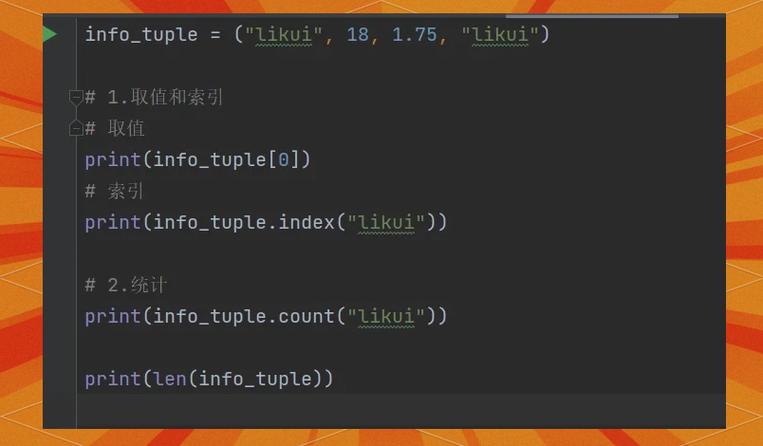
The remove() method deletes the first occurrence of a specific value. It does not return the item (it returns None). If the value is not in the list, it will raise a ValueError.
Syntax:
list_name.remove(value)
Example:
my_list = ['apple', 'banana', 'cherry', 'banana', 'date']
# Remove the first occurrence of 'banana'
my_list.remove('banana')
print(my_list)
# Output: ['apple', 'cherry', 'banana', 'date']
# Trying to remove a value that doesn't exist will cause an error
# my_list.remove('grape') # Raises ValueError: list.remove(x): x not in list
List Comprehension (Conditional Removal)
This is the most "Pythonic" way to remove items based on a condition. It doesn't actually delete items from the original list. Instead, it creates a new list containing only the items you want to keep.
This is generally the safest and most readable method for complex conditions.
Syntax:
new_list = [item for item in old_list if condition]
Example:
my_list = [1, 2, 3, 4, 5, 6, 7, 8, 9, 10]
# Create a new list with only the even numbers (remove odds)
even_numbers = [num for num in my_list if num % 2 == 0]
print(even_numbers)
# Output: [2, 4, 6, 8, 10]
# To modify the original list, you can reassign it
my_list = [num for num in my_list if num % 2 == 0]
print(my_list)
# Output: [2, 4, 6, 8, 10]
# Remove all items less than or equal to 5
my_list = [num for num in my_list if num > 5]
print(my_list)
# Output: [6, 8, 10]
list.clear() Method
If you want to remove all items from a list, making it empty, the clear() method is the best choice. It modifies the list in-place.
Syntax:
list_name.clear()
Example:
my_list = [1, 2, 3, 4, 5]
print(f"List before clear: {my_list}")
my_list.clear()
print(f"List after clear: {my_list}")
# Output:
# List before clear: [1, 2, 3, 4, 5]
# List after clear: []
Summary and Key Takeaways
| Your Goal | Best Method |
|---|---|
| I know the index of the item to delete. | del my_list[i] or my_list.pop(i) |
| I need to get the value of the item I'm deleting. | my_list.pop(i) or my_list.pop() |
| I know the value of the item to delete. | my_list.remove(value) |
| I need to delete items based on a condition (e.g., "all items > 10"). | List Comprehension [x for x in my_list if x > 10] |
| I want to delete everything from the list. | my_list.clear() |
Common Pitfall: Modifying a List While Iterating Over It
A very common mistake for beginners is trying to delete items from a list while looping through it with a for loop. This can lead to skipped items or errors because the list's length is changing as you iterate.
Bad Example (Will cause issues):
numbers = [1, 2, 3, 4, 5, 6, 7, 8, 9]
for i in range(len(numbers)):
    if numbers[i] % 2 == 0:
        del numbers[i] # This can cause an IndexError or skip items
print(numbers)
Good Solution 1: Iterate Backwards
If you must use del and a loop, iterate from the end of the list to the beginning. This way, deleting an item doesn't affect the index of the items you haven't checked yet.
numbers = [1, 2, 3, 4, 5, 6, 7, 8, 9]
for i in range(len(numbers) - 1, -1, -1): # Loop from last index to 0
    if numbers[i] % 2 == 0:
        del numbers[i]
print(numbers)
# Output: [1, 3, 5, 7, 9]
Good Solution 2: Use List Comprehension (Recommended) This is the cleanest and most Pythonic way.
numbers = [1, 2, 3, 4, 5, 6, 7, 8, 9]
numbers = [x for x in numbers if x % 2 != 0] # Keep only the odd numbers
print(numbers)
# Output: [1, 3, 5, 7, 9]