Of course! This is a fundamental concept in Python for understanding variable scope and program introspection. Let's break down globals() and dir() in detail, including their differences, how they work together, and best practices.
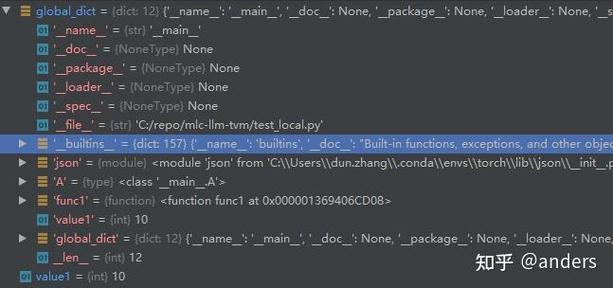
globals(): The Dictionary of the Global Scope
The built-in function globals() returns a dictionary that represents the current global symbol table. In simple terms, it's a live snapshot of all the variables, functions, classes, and other objects that exist in the global scope of your program.
Key Characteristics of globals()
- Returns a Dictionary: You get a
dictobject. - Live and Mutable: This dictionary is a live view of the global scope. If you modify the dictionary, you modify the global scope, and vice-versa.
- Keys are Strings: The keys in the dictionary are the names of the global objects as strings.
- Values are the Objects: The values are the actual objects (the variable values, function definitions, etc.) that those names point to.
How to Use globals()
Example 1: Inspecting the Global Scope
Let's see what's in the global scope by default and after we define some variables.
# By default, in a fresh Python interpreter, globals() contains some built-ins
print("--- Initial globals() ---")
initial_globals = globals()
print(f"Number of items in global scope: {len(initial_globals)}")
# print(initial_globals) # This can be very long!
print("-" * 25)
# Define some variables in the global scope
my_global_var = "I am a global variable"
ANOTHER_VAR = 123
a_list = [1, 2, 3]
def my_global_function():
    return "I am a global function"
print("\n--- globals() after defining variables ---")
# Now, let's check our new variables are in there
current_globals = globals()
print(f"Is 'my_global_var' in globals()? {'my_global_var' in current_globals}")
print(f"Value of 'my_global_var': {current_globals['my_global_var']}")
print(f"Is 'my_global_function' in globals()? {'my_global_function' in current_globals}")
print(f"Type of 'my_global_function': {current_globals['my_global_function']}")
Example 2: Modifying the Global Scope with globals()
This is a powerful but often discouraged feature. You can add or change global variables by manipulating the globals() dictionary.
def add_a_new_global_var():
    # This function adds a new variable to the global scope
    # by modifying the globals() dictionary.
    globals()['new_var_from_function'] = "I was added via globals()"
add_a_new_global_var()
print(f"\n--- After modifying globals() from a function ---")
print(f"The new variable exists: {'new_var_from_function' in globals()}")
print(f"Its value is: {new_var_from_function}")
When to use globals()?
- Debugging: To inspect all available global variables and their types/values at a specific point in your code.
- Dynamic Variable Creation: In rare, advanced scenarios where you need to create variable names programmatically (e.g., based on user input or configuration files). This is generally considered poor practice as it makes code hard to read and maintain.
- Metaprogramming: For advanced introspection and manipulation of a module's contents.
dir(): The List of Names in a Scope or Object
The built-in function dir() returns a list of strings representing the names defined in a specific scope or the attributes and methods of an object.
Key Characteristics of dir()
- Returns a List: You get a
listof strings. - Scope or Object: You can call it with no arguments (
dir()) to get the names in the local scope, or with an argument (dir(object)) to get the attributes of that object. - Introspection Tool: Its primary purpose is to "see inside" an object or scope and find out what it contains.
- Not Live (in the same way):
dir()returns a list at the moment it's called. If you add a new attribute to an object,dir()won't reflect that change until you call it again.
How to Use dir()
Example 1: dir() with No Argument (Local Scope)
When called without an argument, dir() lists the names in the local scope.
# In a function's local scope
def my_function():
    local_var = 10
    local_func = lambda: "hello"
    print(f"--- Local scope inside my_function() ---")
    print(dir())
    print("-" * 40)
# In the global scope
print("--- Global scope (before calling function) ---")
print(dir()) # Shows global names
print("-" * 40)
my_function()
Example 2: dir() on an Object
This is one of the most common uses. Let's see what attributes and methods a string object has.
my_string = "hello world"
print(f"\n--- dir() on a string object ---")
string_attributes = dir(my_string)
print(f"Number of attributes/methods: {len(string_attributes)}")
print("First 10 attributes:", string_attributes[:10])
# You can use this to find and use methods dynamically
if 'upper' in string_attributes:
    print(f"\nUsing 'upper' method: {my_string.upper()}")
Example 3: dir() on a Module
dir() is incredibly useful for exploring modules you've imported.
import math
print(f"\n--- dir() on the 'math' module ---")
math_attributes = dir(math)
print("Some attributes from the math module:")
print([attr for attr in math_attributes if not attr.startswith('_')])
When to use dir()?
- Exploration: When you import a new module or work with an object of an unknown class and want to see what it can do (what methods and attributes it has).
- Interactive Coding: In a Python REPL or Jupyter Notebook,
dir()is your best friend for discovery. - Dynamic Code: When you need to write code that works with objects based on their available attributes, rather than their specific type.
globals() vs. dir(): Key Differences
This table summarizes the crucial distinctions:
| Feature | globals() |
dir() |
|---|---|---|
| Primary Purpose | To access the global symbol table (the variables). | To list the names (attributes, methods, variables) in a scope or of an object. |
| Return Type | dict (a dictionary) |
list (a list of strings) |
| Content | Maps name (string) -> object (value). | Contains only a list of name (strings). |
| Scope | Only the global scope. | Can be used for local scope (no args) or any object (dir(obj)). |
| Mutability | The returned dictionary is live and mutable. Modifying it modifies the global scope. | The returned list is a static snapshot. Modifying the list doesn't affect the object/scope. |
| Analogy | A detailed address book with names and phone numbers. | A simple index or table of contents listing all the chapter titles. |
How They Work Together
You can combine them for powerful introspection. For example, you can use globals() to get the actual objects and dir() to inspect a specific object you find there.
import math
# Get the global scope dictionary
g = globals()
# Find the 'math' module object in the global scope
math_object = g['math']
# Now, use dir() to inspect the attributes of that math object
print(f"\n--- Combining globals() and dir() ---")
print(f"Found 'math' object in globals(): {math_object}")
print("\nAttributes of the 'math' object (from dir()):")
print(dir(math_object))
Summary and Best Practices
- Use
globals()for debugging when you need to see the actual values of all global variables. Avoid using it to dynamically create or modify variables in production code. - Use
dir()for exploration when you have an object or module and want to know what it contains. It's your go-to tool for interactive discovery. - Prefer explicit code: Instead of
globals()['my_var'], just usemy_var. Instead of dynamically creating variables withglobals()['var_' + name], use a dictionary:my_dict['var_' + name] = value. This is much clearer and safer. - Understand scope: Remember that
dir()without arguments gives you the local scope, whileglobals()only ever gives you the global scope. This is a common point of confusion.