
Java Base64 图片解码指南
在Java中,可以使用java.util.Base64类来解码Base64编码的图片数据,以下是几种常见的实现方法:
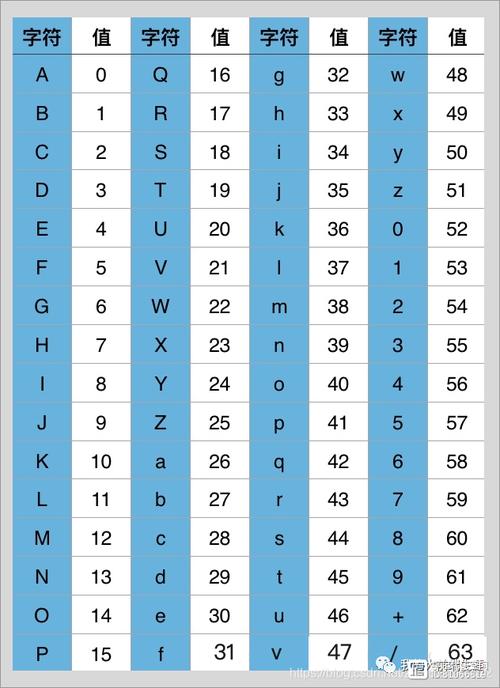
(图片来源网络,侵删)
使用Java 8+的Base64 API
import java.io.*;
import java.util.Base64;
import java.nio.file.Files;
import java.nio.file.Path;
import java.nio.file.Paths;
public class Base64ImageDecoder {
    public static void main(String[] args) {
        // 示例Base64编码的图片数据(这里用字符串代替,实际应用中可能是从文件或数据库获取)
        String base64Image = "iVBORw0KGgoAAAANSUhEUgAAAAEAAAABCAYAAAAfFcSJAAAADUlEQVR42mNkYPhfDwAChwGA60e6kgAAAABJRU5ErkJggg==";
        // 解码并保存图片
        decodeAndSaveImage(base64Image, "decoded_image.png");
    }
    public static void decodeAndSaveImage(String base64Image, String outputPath) {
        try {
            // 去除Base64编码前缀(如果有)
            if (base64Image.contains(",")) {
                base64Image = base64Image.split(",")[1];
            }
            // 解码Base64
            byte[] imageBytes = Base64.getDecoder().decode(base64Image);
            // 写入文件
            Path path = Paths.get(outputPath);
            Files.write(path, imageBytes);
            System.out.println("图片已成功保存到: " + outputPath);
        } catch (IOException e) {
            System.err.println("解码或保存图片时出错: " + e.getMessage());
        } catch (IllegalArgumentException e) {
            System.err.println("无效的Base64编码: " + e.getMessage());
        }
    }
}
处理包含MIME类型前缀的Base64字符串
有些Base64编码的图片字符串会包含MIME类型前缀,如:
data:image/png;base64,iVBORw0KGgoAAAANSUhEUg...
public static void decodeImageWithPrefix(String base64WithPrefix, String outputPath) {
    try {
        // 分割获取实际的Base64数据
        String[] parts = base64WithPrefix.split(",");
        String base64Image = parts[1];
        // 解码并保存
        byte[] imageBytes = Base64.getDecoder().decode(base64Image);
        Files.write(Paths.get(outputPath), imageBytes);
        System.out.println("图片已成功保存到: " + outputPath);
    } catch (IOException e) {
        System.err.println("处理图片时出错: " + e.getMessage());
    }
}
从文件读取Base64并解码
如果Base64数据存储在文件中:
public static void decodeBase64FromFile(String inputPath, String outputPath) {
    try {
        // 读取Base64文件内容
        String base64Image = new String(Files.readAllBytes(Paths.get(inputPath)));
        // 解码并保存
        byte[] imageBytes = Base64.getDecoder().decode(base64Image);
        Files.write(Paths.get(outputPath), imageBytes);
        System.out.println("图片已成功保存到: " + outputPath);
    } catch (IOException e) {
        System.err.println("处理文件时出错: " + e.getMessage());
    }
}
注意事项
-
内存考虑:对于大图片,直接解码到内存可能会导致内存问题,可以考虑使用流式处理。
-
错误处理:Base64解码可能会抛出
IllegalArgumentException,应妥善处理。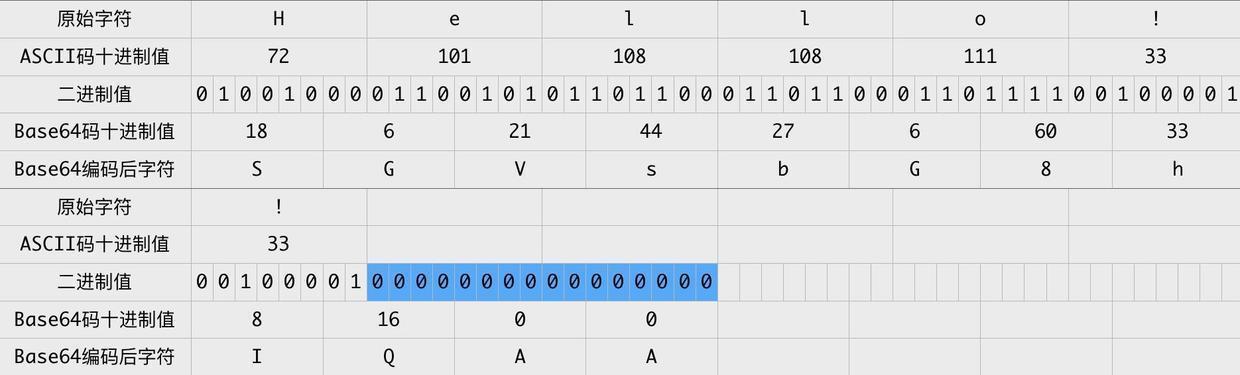 (图片来源网络,侵删)
 -
性能:如果需要高性能处理,可以考虑使用第三方库如Apache Commons Codec。
-
图片格式:确保解码后的数据是有效的图片格式,否则保存的文件可能无法打开。
-
Base64前缀:处理包含前缀的Base64字符串时,正确分割数据部分。
使用第三方库(Apache Commons Codec)示例
import org.apache.commons.codec.binary.Base64;
import org.apache.commons.io.IOUtils;
// 解码
byte[] imageBytes = Base64.decodeBase64(base64ImageString);
// 保存
FileOutputStream fileOutputStream = new FileOutputStream("output.jpg");
IOUtils.write(imageBytes, fileOutputStream);
fileOutputStream.close();
方法提供了在Java中解码Base64图片的不同实现方式,您可以根据具体需求选择最适合的方案。


