Of course! Let's break down Java EE and MyEclipse. This is a topic that has seen a lot of change over the years, so understanding the history and the current landscape is key.
What is Java EE?
Java EE (Java Platform, Enterprise Edition), now officially known as Jakarta EE, is a set of specifications, APIs, and runtimes for developing large-scale, multi-tiered, scalable, reliable, and secure network applications (often called "enterprise applications").
Think of it as a collection of ready-to-use blueprints and tools for common business tasks, so developers don't have to "reinvent the wheel."
Key Concepts of Java EE:
- Component-Based Architecture: Applications are built from reusable components that run in an environment called a Java EE Container. The most common containers are:
- Web Container (Servlet Container): Executes web components like Servlets and JavaServer Pages (JSP).
- EJB Container: Manages business logic components called Enterprise JavaBeans (EJBs).
- Declarative Services: You configure services like security and transactions through XML descriptors or annotations, rather than writing the code for them yourself. The container handles the implementation.
- Standard APIs: It provides a standardized way to do things like:
- Database Connectivity: JDBC (Java Database Connectivity) for talking to databases.
- Messaging: JMS (Java Message Service) for asynchronous communication between components.
- Web Services: JAX-WS (Java API for XML Web Services) and JAX-RS (Java API for RESTful Web Services).
- Dependency Injection: CDI (Contexts and Dependency Injection) to manage object lifecycles and decouple components.
- Transaction Management: JTA (Java Transaction API) for managing database transactions.
Evolution: Java EE → Jakarta EE
In 2025, Oracle transferred the copyright of the Java EE specification to the Eclipse Foundation. The platform was then renamed Jakarta EE to distinguish it from the Oracle-owned Java SE (Standard Edition) and to avoid trademark issues.
- Packages: All Java EE packages were renamed from
javax.*tojakarta.*. For example,javax.servlet.http.HttpServletRequestbecamejakarta.servlet.http.HttpServletRequest. - Governance: The Eclipse Foundation now oversees the specification, ensuring it remains open and community-driven.
What is MyEclipse?
MyEclipse is an Integrated Development Environment (IDE) specifically designed for enterprise application development. It was very popular in its heyday, especially in the mid-2000s to early 2010s.
Key Features of MyEclipse:
- Built on Eclipse: MyEclipse is a commercial distribution of the open-source Eclipse IDE. It takes the base Eclipse platform and adds a lot of enterprise-focused tools and plugins.
- "All-in-One" Solution: Its main selling point was that it bundled everything a Java EE developer needed into a single package, avoiding the complex and manual process of installing and configuring dozens of separate Eclipse plugins.
- Deep Java EE Integration: It provided first-class, out-of-the-box support for:
- Creating and configuring web projects (Dynamic Web Projects).
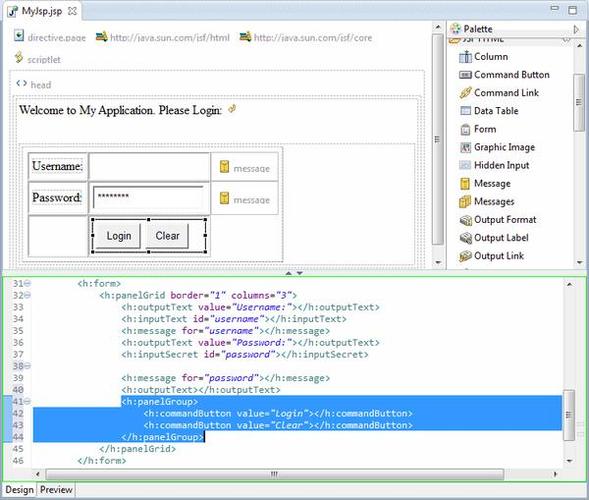
- Visual editors for web pages (JSP/HTML).
- Tools for working with EJBs.
- Database tools (like a visual database schema editor and SQL query builder).
- Application server integration (it could easily deploy and debug applications on servers like Tomcat, JBoss, WebLogic, and WebSphere).
- Visual Designers: It included visual designers for UI components, which was a big deal before modern frameworks like React and Vue.js became dominant.
The Relationship: Java EE and MyEclipse
The relationship is straightforward:
MyEclipse is an IDE that provides powerful tools for developing applications that conform to the Java EE (now Jakarta EE) specifications.
You would use MyEclipse to:
- Create a new "Java EE Project" or "Dynamic Web Project."
- Write Java code using Servlets, JSPs, EJBs, etc.
- Configure
web.xmland other deployment descriptors. - Visually design your user interface.
- Connect to a database using JDBC.
- Deploy your finished application to a Java EE application server.
MyEclipse made the complex world of Java EE development much more accessible and streamlined.
The Current State: Are They Still Relevant?
This is the most important part of the answer. The landscape has shifted dramatically.
The Decline of MyEclipse
- Eclipse IDE Improved: The open-source Eclipse IDE itself caught up and started bundling many of the features that made MyEclipse popular (like the "Eclipse IDE for Enterprise Java and Web Developers" package). The need for a paid "all-in-one" solution diminished.
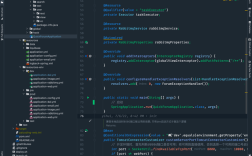
- Rise of Modern Alternatives: Tools like IntelliJ IDEA (especially its Ultimate edition, which has excellent Java EE/Jakarta EE support) and VS Code with extensions became extremely popular, often offering a better user experience and more modern features.
- Company Focus: The company behind MyEclipse, Genuitec, shifted its focus to other products like CodeMix, which brings Java EE/Jakarta EE development capabilities to VS Code.
Today, MyEclipse is a niche product. While it still exists and is maintained, it is no longer the dominant force it once was.
The Evolution of Java EE (Jakarta EE)
- Java EE 8 is Still Widely Used: Many large enterprises are still running and maintaining applications built on Java EE 8. It is a stable, mature, and well-understood platform.
- Jakarta EE is the Future: The move to the Eclipse Foundation has breathed new life into the platform.
- Modern Releases: Jakarta EE 9, 10, and the latest Jakarta EE 10 have been released with a faster release cycle.
- Focus on Modern Tech: The new specifications are designed to work well with modern development practices, including microservices, cloud-native architectures, and GraalVM (for faster startup times).
- Vendor Support: All major application server vendors (IBM, Oracle, Red Hat, Tomitribe, etc.) are fully behind Jakarta EE.
Modern Alternatives and Recommendations
If you are starting a new project today, here is what the industry looks like:
| Tool / Platform | Best For | Pros | Cons |
|---|---|---|---|
| Jakarta EE / Java EE | Large-scale enterprise applications, monoliths, systems requiring high transaction integrity and security. | Mature, stable, standardized, excellent tooling, strong vendor support. | Can be perceived as heavy; slower development cycle compared to microservices. |
| Spring Boot | The de-facto standard for new projects. Microservices, REST APIs, web applications, modern cloud-native apps. | Extremely fast development (convention over configuration), massive ecosystem, embedded server, great community. | Can feel like a "black box"; adds another layer of abstraction. |
| Quarkus | "Supersonic Subatomic Java." Serverless, Kubernetes, cloud-native, and GraalVM-native applications. | Blazing fast startup time, low memory footprint, designed for modern DevOps and containerized environments. | Younger ecosystem; some Java EE libraries may not be compatible. |
| IntelliJ IDEA | The best IDE for Java development. | Unmatched code analysis, intelligent refactoring, excellent debugger, and top-tier support for all major frameworks (Spring, Jakarta EE, Quarkus). | The Ultimate edition is paid (though a free Community edition is available for many tasks). |
| VS Code with Extensions | Developers who prefer a lightweight, customizable editor. | Free, highly extensible, huge marketplace, great for web and full-stack development. | Requires manual setup of extensions and tools; can be less integrated than a full-featured IDE. |
Summary
- Java EE (Jakarta EE) is a powerful, standardized platform for building robust enterprise applications. It is very much alive and evolving under the Eclipse Foundation.
- MyEclipse was a popular IDE that simplified Java EE development in its time. Its relevance has declined significantly due to the rise of better free and open-source alternatives like Eclipse IDE and IntelliJ IDEA.
- For new projects, the dominant choice is often Spring Boot for its speed and ecosystem. For applications that need the full power and standardization of the platform, Jakarta EE is the way to go, and you would likely use a modern IDE like IntelliJ IDEA to develop it.