Of course! Using Python's requests library is a fundamental skill for many Capture The Flag (CTF) challenges, especially in the "Web" category. It allows you to programmatically interact with websites, APIs, and services in ways that are impossible or tedious with a standard web browser.

Here’s a comprehensive guide on how to use requests for CTFs, broken down from the basics to advanced techniques.
The Basics: Making Your First Request
The core of the requests library is the requests.get() (or post(), put(), etc.) function, which sends an HTTP request to a server.
import requests
# The URL of the CTF challenge
url = "http://example.com/challenge1"
# Send a GET request
response = requests.get(url)
# Check if the request was successful (status code 200)
if response.status_code == 200:
    print("Success!")
    # Print the raw content of the response
    print(response.text)
else:
    print(f"Request failed with status code: {response.status_code}")
Handling Common CTF Scenarios
CTF challenges often require more than a simple GET request. Here are the most common scenarios and how to handle them.
Scenario A: Handling Cookies
Many challenges use cookies to track your session or state (e.g., levels of a challenge).
import requests
# The URL of the challenge
url = "http://example.com/login"
# First, we might need to log in to get a session cookie
login_data = {
    'username': 'admin',
    'password': 'password123' # Often found in the source code or hints
}
# Send a POST request with login data
# The session object will automatically handle cookies for us
with requests.Session() as session:
    # The login request sets the cookie
    session.post(url, data=login_data)
    # Now, make a GET request to the protected page
    # The session object automatically includes the cookie
    response = session.get("http://example.com/protected_page")
    if "flag" in response.text:
        print("Flag found!")
        print(response.text)
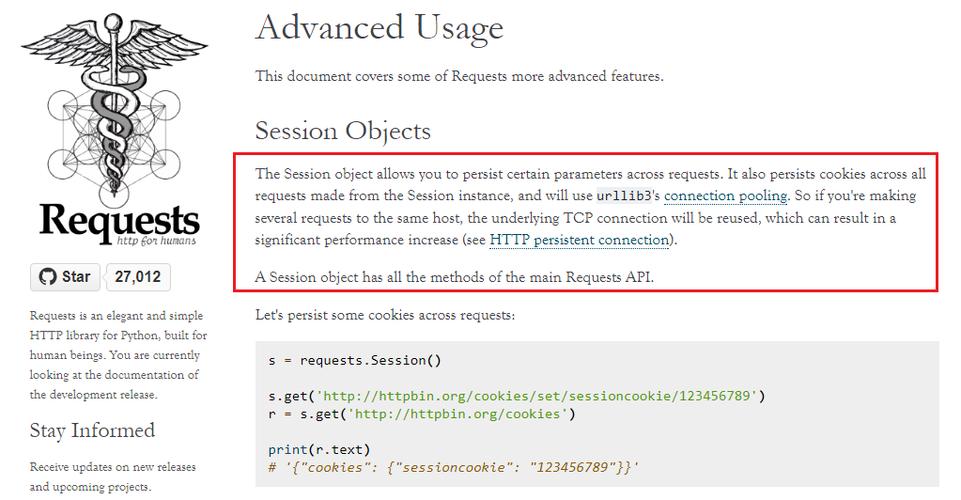
Key Concept: Using a requests.Session() object is highly recommended. It persists parameters across requests and, most importantly, automatically handles cookies for you.
Scenario B: Sending POST Data
Challenges often require you to submit a form via a POST request.
import requests
url = "http://example.com/submit"
# The data to send in the POST request
# The form field names ('answer', 'id') are found by inspecting the HTML form
data_to_send = {
    'answer': 'the_secret_password',
    'id': '42'
}
response = requests.post(url, data=data_to_send)
print(response.text)
Scenario C: Dealing with Headers
Sometimes, a challenge requires specific HTTP headers to be present, like User-Agent, Referer, or a custom header.
import requests
url = "http://example.com/secret_page"
# Define the headers
headers = {
    'User-Agent': 'Mozilla/5.0 (Windows NT 10.0; Win64; x64) AppleWebKit/537.36 (KHTML, like Gecko) Chrome/91.0.4472.124 Safari/537.36',
    'Accept-Language': 'en-US,en;q=0.9',
    'X-Flag': 'give_me_the_flag' # A custom header required by the challenge
}
# Send the request with the custom headers
response = requests.get(url, headers=headers)
print(response.text)
Scenario D: Basic Authentication
Some protected resources use Basic Auth. requests has a built-in helper for this.
import requests
from requests.auth import HTTPBasicAuth
url = "http://example.com/protected"
# Provide the username and password
auth = HTTPBasicAuth('admin', 'super_secret_password')
response = requests.get(url, auth=auth)
print(response.text)
Advanced Techniques for CTFs
This is where you solve the more complex challenges.
Technique 1: Bruteforcing
When you need to guess a password, token, or directory, you can automate it with a loop.
import requests
import string
url = "http://example.com/login"
# We'll try to guess the password
charset = string.ascii_letters + string.digits # a-z, A-Z, 0-9
password_length = 8 # Common length for CTFs
# This is a simple example. For longer passwords, more advanced techniques are needed.
# This is for illustration purposes and can be very slow.
# In a real CTF, you'd use tools like Burp Suite or a more optimized script.
# Example: Bruteforcing a directory
wordlist = ['admin', 'login', 'index.html', 'robots.txt', 'backup.php']
for path in wordlist:
    target_url = f"{url.rstrip('/')}/{path}"
    try:
        response = requests.get(target_url, timeout=5)
        if response.status_code == 200:
            print(f"[+] Found: {target_url}")
    except requests.exceptions.RequestException:
        continue
Technique 2: Handling Redirects
Some challenges will redirect you multiple times before revealing the flag. requests handles this by default, but you can control it.
import requests
url = "http://example.com/redirect_me_to_the_flag"
# allow_redirects=True is the default, but good to be explicit
response = requests.get(url, allow_redirects=True)
# The final URL after all redirects
print(f"Final URL: {response.url}")
print(f"Final Response: {response.text}")
# To NOT follow redirects (sometimes useful for debugging)
# response = requests.get(url, allow_redirects=False)
# print(f"Redirect status code: {response.status_code}")
# print(f"Location header: {response.headers['Location']}")
Technique 3: Dealing with Anti-CSRF Tokens
Modern web apps use CSRF tokens to prevent Cross-Site Request Forgery. You often need to fetch a token from a page and send it back with your request.
import requests
import re
url = "http://example.com/profile"
# First, get the page to find the CSRF token
response = requests.get(url)
html_content = response.text
# Use regex to find the token. The pattern depends on the website.
# Example: <input type="hidden" name="csrf_token" value="a1b2c3d4e5f6...">
csrf_token_match = re.search(r'name="csrf_token"\s+value="([^"]+)"', html_content)
if not csrf_token_match:
    print("Could not find CSRF token!")
    exit()
csrf_token = csrf_token_match.group(1)
print(f"Found CSRF Token: {csrf_token}")
# Now, use this token in a POST request
data_to_send = {
    'username': 'hacker',
    'email': 'new_email@example.com',
    'csrf_token': csrf_token # Include the token
}
response = requests.post(url, data=data_to_send)
if "Email updated successfully" in response.text:
    print("Action successful!")
    # Look for the flag in the response
    if "flag{" in response.text:
        print("Flag found in response!")
else:
    print("Action failed.")
Technique 4: Interacting with APIs (JSON)
Challenges often expose an API that you need to query.
import requests
import json
# The API endpoint
url = "http://example.com/api/user/1"
# Send a GET request to the API
response = requests.get(url)
# Check if the response is valid JSON
try:
    data = response.json() # .json() parses the response text into a Python dict
    print("API Response (JSON):")
    # Pretty print the JSON
    print(json.dumps(data, indent=2))
    # Access specific data from the JSON
    user_id = data.get('id')
    username = data.get('username')
    print(f"\nUser ID: {user_id}, Username: {username}")
    # Example: POSTing JSON data
    new_data = {"score": 1000}
    post_response = requests.post(url, json=new_data) # The 'json' argument automatically sets the Content-Type header
    print(f"\nPOST Response: {post_response.text}")
except json.JSONDecodeError:
    print("Response was not valid JSON.")
    print(response.text)
Pro-Tips for CTF Scripting
-
Set a Timeout: Always set a
timeoutin your requests to prevent your script from hanging indefinitely on a slow server.response = requests.get(url, timeout=10) # 10 second timeout
-
Inspect Everything: When a challenge isn't working, inspect the response headers, cookies, and the full HTML source. The flag or a clue is often hidden there.
print("Headers:", response.headers) print("Cookies:", response.cookies.get_dict()) -
Use Environment Variables for Secrets: Never hardcode credentials or URLs in your final script. Use environment variables.
import os url = os.environ.get('CTF_URL') -
Error Handling: Wrap your requests in
try...exceptblocks to handle network errors gracefully.try: response = requests.get(url, timeout=10) response.raise_for_status() # Raises an HTTPError for bad responses (4xx or 5xx) except requests.exceptions.RequestException as e: print(f"An error occurred: {e}") -
Learn with
curl: Before writing a Python script, test the request manually withcurlon the command line. It's great for quickly figuring out the exact headers, data, and cookies needed. Once you have the workingcurlcommand, translating it to Python is much easier.Example
curlcommand:curl -X POST http://example.com/login -d "username=admin&password=pass" -H "X-MyHeader: value" -b "session_id=abc123"
By mastering these requests techniques, you'll be well-equipped to tackle a vast majority of web-based CTF challenges. Happy hacking