Of course! This is a very common and important topic in Java development. Let's break down how to do RPC (Remote Procedure Call) with Protocol Buffers in Java, from the basic concepts to a complete, runnable example.
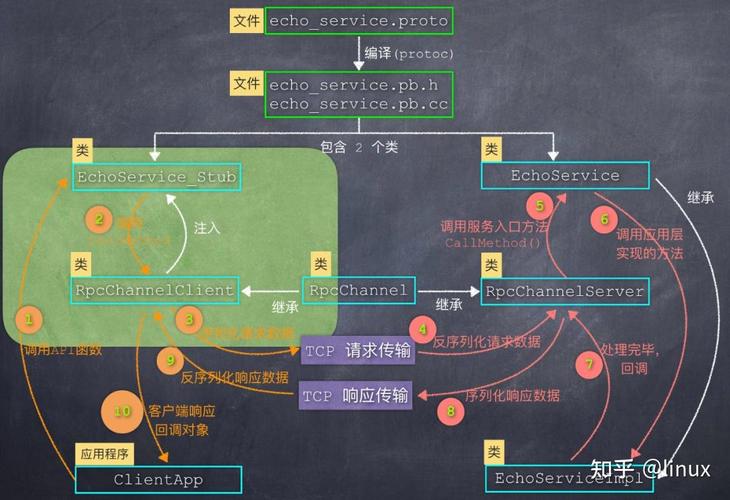
The Big Picture: Why Protobuf for RPC?
Before we dive into code, let's understand the "why".
- Efficiency: Protobuf messages are binary and highly compact. They are much smaller and faster to serialize/deserialize than text-based formats like JSON or XML. This is crucial for network communication.
- Strict Schema: The
.protofile acts as a strict contract between the client and server. Both sides are generated from the same file, eliminating "works on my machine" errors and ensuring data consistency. - Language Agnostic: You can define your service once in a
.protofile and generate client and server code in multiple languages (Java, Python, Go, C++, etc.).
The Core Components of Protobuf RPC
To build an RPC system with Protobuf, you'll typically use one of two main approaches:
- gRPC (Google RPC): This is the modern, recommended, and most popular way to do Protobuf RPC. It's a high-performance, open-source framework that uses Protobuf as its Interface Definition Language (IDL). It handles the low-level networking, serialization, and concurrency for you.
- Manual Socket/HTTP Server: You can use Protobuf's
MessageLiteto serialize/deserialize data and send it over a raw TCP socket or an HTTP server you build yourself. This is a great learning exercise but is not recommended for production as you have to handle all the complex details of networking, threading, and error handling yourself.
This guide will focus on gRPC, as it's the industry standard.
Step-by-Step Guide: Building a gRPC Service in Java
We will create a simple "Greeter" service. The client will send a HelloRequest message, and the server will respond with a HelloReply message.
Step 1: Set Up Your Project (Maven)
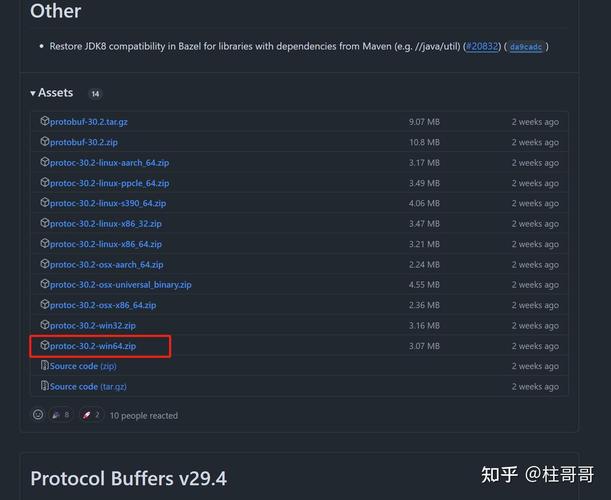
We'll use Maven to manage dependencies. You need three main things:
- Protobuf compiler (
protoc). - gRPC Java libraries.
- A plugin to run
protocfrom Maven and generate the Java code.
Add this to your pom.xml:
<project>
  ...
  <properties>
    <project.build.sourceEncoding>UTF-8</project.build.sourceEncoding>
    <maven.compiler.source>11</maven.compiler.source>
    <maven.compiler.target>11</maven.compiler.target>
    <grpc.version>1.58.0</grpc.version>
    <protobuf.version>3.24.4</protobuf.version>
    <protoc.version>3.24.4</protoc.version>
  </properties>
  <dependencies>
    <!-- gRPC dependencies -->
    <dependency>
      <groupId>io.grpc</groupId>
      <artifactId>grpc-netty-shaded</artifactId>
      <version>${grpc.version}</version>
    </dependency>
    <dependency>
      <groupId>io.grpc</groupId>
      <artifactId>grpc-protobuf</artifactId>
      <version>${grpc.version}</version>
    </dependency>
    <dependency>
      <groupId>io.grpc</groupId>
      <artifactId>grpc-stub</artifactId>
      <version>${grpc.version}</version>
    </dependency>
    <!-- For Java 9+ compatibility, you might need this -->
    <dependency>
      <groupId>org.apache.tomcat</groupId>
      <artifactId>annotations-api</artifactId>
      <version>6.0.53</version>
      <scope>provided</scope>
    </dependency>
  </dependencies>
  <build>
    <extensions>
      <extension>
        <groupId>kr.motd.maven</groupId>
        <artifactId>os-maven-plugin</artifactId>
        <version>1.7.0</version>
      </extension>
    </extensions>
    <plugins>
      <!-- Plugin to compile .proto files -->
      <plugin>
        <groupId>org.xolstice.maven.plugins</groupId>
        <artifactId>protobuf-maven-plugin</artifactId>
        <version>0.6.1</version>
        <configuration>
          <protocArtifact>com.google.protobuf:protoc:${protoc.version}:exe:${os.detected.classifier}</protocArtifact>
          <pluginId>grpc-java</pluginId>
          <pluginArtifact>io.grpc:protoc-gen-grpc-java:${grpc.version}:exe:${os.detected.classifier}</pluginArtifact>
        </configuration>
        <executions>
          <execution>
            <goals>
              <goal>compile</goal>
              <goal>compile-custom</goal>
            </goals>
          </execution>
        </executions>
      </plugin>
    </plugins>
  </build>
</project>
Step 2: Define the Service in a .proto File
Create a directory src/main/proto and inside it, create a file named greeter.proto.
src/main/proto/greeter.proto
syntax = "proto3";
// The package name for the generated Java classes
option java_package = "com.example.grpc";
option java_multiple_files = true;
// Define the service
service Greeter {
  // A simple RPC call
  rpc SayHello (HelloRequest) returns (HelloReply) {}
}
// The request message containing the user's name
message HelloRequest {
  string name = 1;
}
// The response message containing the greeting
message HelloReply {
  string message = 1;
}
Step 3: Generate the Java Code
Now, run the Maven build command. The protobuf-maven-plugin will automatically find your .proto file, execute protoc, and generate the necessary Java classes.
mvn clean compile
After running this, you will find the generated code in target/generated-sources/protobuf/java/:
GreeterGrpc.java: Contains the base class for your server and the client-side stub.HelloRequest.javaandHelloReply.java: The Java classes for your data messages.
Step 4: Implement the Server
Create a Java class that implements the service logic. You'll extend the generated GreeterGrpc.GreeterImplBase class.
src/main/java/com/example/grpc/GrpcServer.java
package com.example.grpc;
import io.grpc.Server;
import io.grpc.ServerBuilder;
import io.grpc.stub.StreamObserver;
import java.io.IOException;
public class GrpcServer {
    private Server server;
    private void start() throws IOException {
        // The port you want to run the server on
        int port = 50051;
        server = ServerBuilder.forPort(port)
                .addService(new GreeterImpl())
                .build()
                .start();
        System.out.println("Server started, listening on " + port);
        // Add a shutdown hook
        Runtime.getRuntime().addShutdownHook(new Thread(() -> {
            System.out.println("Shutting down gRPC server since JVM is shutting down");
            if (server != null) {
                server.shutdown();
            }
        }));
    }
    private void blockUntilShutdown() throws InterruptedException {
        if (server != null) {
            server.awaitTermination();
        }
    }
    // Implement the Greeter service
    static class GreeterImpl extends GreeterGrpc.GreeterImplBase {
        @Override
        public void sayHello(HelloRequest request, StreamObserver<HelloReply> responseObserver) {
            String name = request.getName();
            String message = "Hello " + name;
            HelloReply reply = HelloReply.newBuilder().setMessage(message).build();
            // Send the response
            responseObserver.onNext(reply);
            // Signal that the request has been completed
            responseObserver.onCompleted();
        }
    }
    public static void main(String[] args) throws IOException, InterruptedException {
        final GrpcServer server = new GrpcServer();
        server.start();
        server.blockUntilShutdown();
    }
}
Step 5: Implement the Client
The client will use the generated GreeterGrpc.GreeterBlockingStub (for simple, synchronous calls) to make a request to the server.
src/main/java/com/example/grpc/GrpcClient.java
package com.example.grpc;
import io.grpc.ManagedChannel;
import io.grpc.ManagedChannelBuilder;
public class GrpcClient {
    public static void main(String[] args) {
        // The channel is the abstraction for a connection to a service endpoint.
        String target = "localhost:50051";
        ManagedChannel channel = ManagedChannelBuilder.forTarget(target)
                // Channels are secure by default (via SSL/TLS). For testing, we disable it.
                .usePlaintext()
                .build();
        try {
            // Create a blocking stub (synchronous calls)
            GreeterGrpc.GreeterBlockingStub blockingStub = GreeterGrpc.newBlockingStub(channel);
            // Prepare the request
            HelloRequest request = HelloRequest.newBuilder().setName("gRPC World").build();
            // Call the RPC and get the response
            HelloReply response = blockingStub.sayHello(request);
            // Print the response
            System.out.println("Response from server: " + response.getMessage());
        } finally {
            // Managed channels should be shut down when they are no longer needed.
            channel.shutdown();
        }
    }
}
Step 6: Run the Application
-
Run the Server:
mvn exec:java -Dexec.mainClass="com.example.grpc.GrpcServer"
You should see:
Server started, listening on 50051 -
Run the Client (in a new terminal):
mvn exec:java -Dexec.mainClass="com.example.grpc.GrpcClient"
You should see:
Response from server: Hello gRPC World
Congratulations! You have successfully built and run a gRPC application in Java.
Advanced gRPC Concepts
gRPC supports more than just simple, unary RPC calls. The .proto file defines the type of interaction:
-
Server Streaming RPC: The client sends a single request to the server, and the server streams back multiple messages.
rpc LotsOfReplies (HelloRequest) returns (stream HelloReply) {}The server would implement
lotsOfRepliesand callresponseObserver.onNext()multiple times before callingonCompleted(). -
Client Streaming RPC: The client streams multiple messages to the server, and the server responds with a single message.
rpc LotsOfGreetings (stream HelloRequest) returns (HelloReply) {}The server would implement
lotsOfGreetingsand iterate over therequestObserver's stream to receive messages. It then sends a single reply at the end. -
Bidirectional Streaming RPC: Both the client and server can send messages to each other independently, in any order. The streams are independent.
rpc BidiHello (stream HelloRequest) returns (stream HelloReply) {}This is useful for chat applications or real-time data feeds.
Summary
| Feature | Description |
|---|---|
| Core Idea | Use Protobuf as a language-agnostic contract to define RPC services and data structures. |
| Recommended Tool | gRPC. It's a high-performance, complete framework that handles the complexities of RPC. |
| Workflow | Define service and messages in a .proto file. 2. Generate client/server code from the .proto file. 3. Implement the server logic by extending the generated base class. 4. Create a client that uses the generated stub to make calls. |
| Maven Setup | Use protobuf-maven-plugin to automate code generation during the build process. |