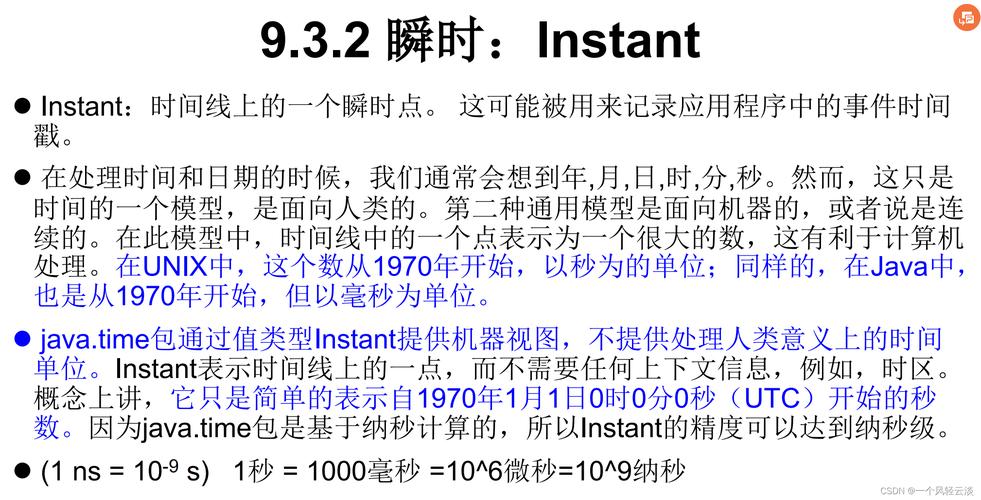
Of course! In Java, handling date and time has evolved significantly. The modern and recommended way is to use the java.time package, introduced in Java 8.
Let's break down how to work with yyyy-MM-dd HH (Year, Month, Day, Hour) using both the modern java.time API and the older java.util.Date / SimpleDateFormat for legacy code.
The Modern Way: java.time (Java 8 and later)
This is the best practice. The classes are immutable, thread-safe, and much easier to use.
Key Classes:
LocalDateTime: Represents a date and time without a time zone (e.g.,2025-10-27T15:30). This is perfect for representing a specific moment in a local context, like a meeting time.DateTimeFormatter: Used for parsing and formatting dates and times. This is the replacement forSimpleDateFormat.ZonedDateTime: Represents a date and time with a specific time zone (e.g.,2025-10-27T15:30-07:00[America/Los_Angeles]). Use this if the time zone is important.
Example: Formatting a LocalDateTime to a String
This is the most common task: creating a string like "2025-10-27 15".
import java.time.LocalDateTime;
import java.time.format.DateTimeFormatter;
public class ModernDateTimeExample {
    public static void main(String[] args) {
        // 1. Get the current date and time
        LocalDateTime now = LocalDateTime.now();
        // 2. Define the desired format pattern
        // yyyy = 4-digit year
        // MM = 2-digit month (uppercase M is month, lowercase m is minute)
        // dd = 2-digit day
        // HH = 2-digit hour in 24-hour format (0-23)
        // hh = 2-digit hour in 12-hour format (1-12)
        DateTimeFormatter formatter = DateTimeFormatter.ofPattern("yyyy-MM-dd HH");
        // 3. Format the LocalDateTime object into a String
        String formattedDateTime = now.format(formatter);
        System.out.println("Current LocalDateTime: " + now);
        System.out.println("Formatted String:      " + formattedDateTime); // e.g., "2025-10-27 15"
    }
}
Example: Parsing a String into a LocalDateTime
This is the reverse operation: converting a string like "2025-12-25 23" back into a date-time object.

import java.time.LocalDateTime;
import java.time.format.DateTimeFormatter;
import java.time.format.DateTimeParseException;
public class ParsingDateTimeExample {
    public static void main(String[] args) {
        String dateTimeString = "2025-12-25 23";
        DateTimeFormatter formatter = DateTimeFormatter.ofPattern("yyyy-MM-dd HH");
        try {
            // Parse the string into a LocalDateTime object
            LocalDateTime parsedDateTime = LocalDateTime.parse(dateTimeString, formatter);
            System.out.println("Input String: " + dateTimeString);
            System.out.println("Parsed LocalDateTime: " + parsedDateTime); // e.g., "2025-12-25T23:00"
            // You can now easily get individual components
            System.out.println("Year: " + parsedDateTime.getYear());
            System.out.println("Month: " + parsedDateTime.getMonth());
            System.out.println("Hour: " + parsedDateTime.getHour());
        } catch (DateTimeParseException e) {
            System.err.println("Error: Could not parse date-time string. Invalid format.");
        }
    }
}
The Legacy Way: java.util.Date and SimpleDateFormat
Before Java 8, this was the standard, but it has significant drawbacks:
Dateis mutable.Datehas confusing timezone and year/month handling (months are 0-indexed!).SimpleDateFormatis not thread-safe, which can cause issues in multi-threaded applications.
Use this only when maintaining old code.
Key Classes:
java.util.Date: Represents an instant on the timeline.java.text.SimpleDateFormat: Used for parsing and formatting. Remember: Not thread-safe!
Example: Formatting a Date to a String
import java.text.SimpleDateFormat;
import java.util.Date;
public class LegacyDateTimeExample {
    public static void main(String[] args) {
        // 1. Get the current date and time
        Date now = new Date();
        // 2. Create a SimpleDateFormat instance
        // IMPORTANT: Not thread-safe! Create a new instance for each use or synchronize.
        SimpleDateFormat formatter = new SimpleDateFormat("yyyy-MM-dd HH");
        // 3. Format the Date object into a String
        String formattedDateTime = formatter.format(now);
        System.out.println("Current Date: " + now);
        System.out.println("Formatted String: " + formattedDateTime); // e.g., "2025-10-27 15"
    }
}
Example: Parsing a String into a Date
import java.text.ParseException;
import java.text.SimpleDateFormat;
import java.util.Date;
public class LegacyParsingExample {
    public static void main(String[] args) {
        String dateTimeString = "2025-12-25 23";
        SimpleDateFormat formatter = new SimpleDateFormat("yyyy-MM-dd HH");
        try {
            // Parse the string into a Date object
            Date parsedDate = formatter.parse(dateTimeString);
            System.out.println("Input String: " + dateTimeString);
            System.out.println("Parsed Date: " + parsedDate); // e.g., "Wed Dec 25 23:00:00 GMT 2025"
        } catch (ParseException e) {
            System.err.println("Error: Could not parse date-time string. Invalid format.");
        }
    }
}
Summary and Comparison
| Feature | java.time (Modern) |
java.util.Date (Legacy) |
|---|---|---|
| Core Class | LocalDateTime, ZonedDateTime |
java.util.Date |
| Formatter | DateTimeFormatter (thread-safe) |
SimpleDateFormat (NOT thread-safe) |
| Immutability | Yes, all classes are immutable. | No, Date is mutable. |
| API Clarity | Excellent. Methods are intuitive (getYear(), getMonth()). |
Poor. Months are 0-indexed. Mixed date/time concepts. |
| Time Zone | Explicit with ZonedDateTime. |
Implicit and often confusing. |
| Recommendation | Use for all new Java 8+ code. | Only for maintaining legacy Java 7 or older code. |
Quick Cheat Sheet
| To get... | java.time (Modern) |
java.util.Date (Legacy) |
|---|---|---|
| Current Date/Time | LocalDateTime.now() |
new Date() |
| Format to String | dateTime.format(formatter) |
formatter.format(date) |
| Parse from String | LocalDateTime.parse(str, formatter) |
formatter.parse(str) |
| Get Year | dateTime.getYear() |
date.getYear() + 1900 |
| Get Month (1-12) | dateTime.getMonthValue() |
date.getMonth() + 1 |
| Get Day (1-31) | dateTime.getDayOfMonth() |
date.getDate() |
| Get Hour (0-23) | dateTime.getHour() |
date.getHours() |
Final advice: Always prefer the java.time package for any new development. It's safer, clearer, and the future of date-time handling in Java.