str.replace() 方法可以通过第三个参数 count 来指定替换的次数,如果不提供 count 参数,它会替换字符串中所有匹配的子串。
(图片来源网络,侵删)
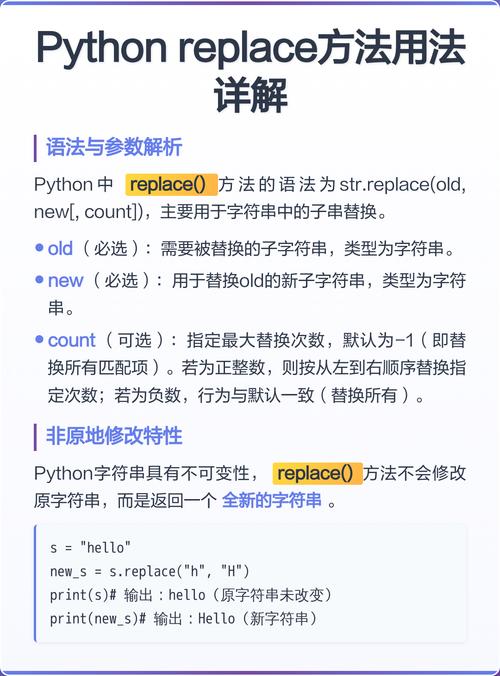
str.replace() 方法的基本语法
str.replace(old, new[, count])
参数说明:
old: 你想要被替换的子字符串。new: 你用来替换old的新子字符串。count(可选): 一个整数,表示最多替换多少次,如果省略此参数,则会替换所有匹配项。
返回值:
该方法会返回一个新的字符串,原始字符串不会被修改(因为字符串在 Python 中是不可变的)。
使用 count 参数控制替换次数
这是你问题的核心,让我们通过几个例子来理解 count 的作用。
(图片来源网络,侵删)
示例 1:不使用 count 参数(替换所有)
这是默认行为,会替换字符串中所有出现的 old。
text = "apple banana apple cherry apple"
new_text = text.replace("apple", "orange")
print(f"原始字符串: {text}")
print(f"替换后字符串: {new_text}")
print(f"替换次数: 3") # "apple" 出现了3次
# 输出:
# 原始字符串: apple banana apple cherry apple
# 替换后字符串: orange banana orange cherry orange
# 替换次数: 3
示例 2:使用 count 参数(限制替换次数)
我们使用 count 参数来限制替换的次数。
场景:只替换前 2 次
text = "apple banana apple cherry apple"
new_text = text.replace("apple", "orange", 2) # 只替换前2次
print(f"原始字符串: {text}")
print(f"替换后字符串: {new_text}")
print(f"实际替换次数: 2")
# 输出:
# 原始字符串: apple banana apple cherry apple
# 替换后字符串: orange banana orange cherry apple
# 实际替换次数: 2
可以看到,只有前两个 "apple" 被替换成了 "orange",第三个 "apple" 保持不变。
(图片来源网络,侵删)
场景:只替换前 1 次
text = "hello world, hello python, hello everyone"
new_text = text.replace("hello", "hi", 1)
print(f"原始字符串: {text}")
print(f"替换后字符串: {new_text}")
# 输出:
# 原始字符串: hello world, hello python, hello everyone
# 替换后字符串: hi world, hello python, hello everyone
场景:指定的 count 大于实际出现次数
如果你指定的 count 比字符串中 old 实际出现的次数还要大,replace 方法会非常“智能”,它不会报错,而是替换掉所有它能找到的 old,也就是等同于不使用 count 参数的情况。
text = "one two three"
# "two" 只出现了一次,但我们指定要替换 5 次
new_text = text.replace("two", "TWO", 5)
print(f"原始字符串: {text}")
print(f"替换后字符串: {new_text}")
print(f"实际替换次数: 1") # 即使指定了5次,也只能替换1次
# 输出:
# 原始字符串: one two three
# 替换后字符串: one TWO three
# 实际替换次数: 1
一个常见的陷阱:count 不能是负数
如果你尝试传入一个负数作为 count,Python 会抛出 ValueError。
text = "apple banana apple"
try:
    new_text = text.replace("apple", "orange", -1)
except ValueError as e:
    print(f"错误: {e}")
# 输出:
# 错: count should be non-negative
如何获取实际替换的次数?
str.replace() 方法本身不返回替换次数,它只返回替换后的新字符串,如果你想知道到底替换了多少次,你需要自己计算。
最简单的方法是使用 str.count() 方法来计算 old 子串在原始字符串中出现的次数。
场景:替换前 N 次,并知道替换了多少
text = "apple apple apple apple"
old_substring = "apple"
new_substring = "orange"
replace_limit = 2
# 1. 计算原始字符串中 old_substring 的总出现次数
total_occurrences = text.count(old_substring)
print(f"'{old_substring}' 总共出现了 {total_occurrences} 次")
# 2. 执行替换
new_text = text.replace(old_substring, new_substring, replace_limit)
# 3. 计算实际替换的次数
# replace_limit 小于总出现次数,则实际替换次数就是 replace_limit
# 否则,实际替换次数就是总出现次数
actual_replacements = min(replace_limit, total_occurrences)
print(f"替换后字符串: {new_text}")
print(f"实际替换次数: {actual_replacements}")
# 输出:
# 'apple' 总共出现了 4 次
# 替换后字符串: orange orange apple apple
# 实际替换次数: 2
| 用法 | 描述 | 示例 |
|---|---|---|
s.replace("a", "b") |
替换所有匹配项 | "aaa".replace("a", "b") -> "bbb" |
s.replace("a", "b", N) |
最多替换 N 次 | "aaa".replace("a", "b", 2) -> "bba" |
s.replace("a", "b", 0) |
替换 0 次,即不进行任何替换,返回原字符串 | "aaa".replace("a", "b", 0) -> "aaa" |
N > 实际次数 |
替换所有匹配项(等同于不写 count) |
"aaa".replace("a", "b", 5) -> "bbb" |
N < 0 |
抛出 ValueError |
"aaa".replace("a", "b", -1) -> 错误 |
str.replace() 总是返回一个新的字符串,原始字符串保持不变,如果你需要知道替换的次数,请使用 str.count() 进行辅助计算。