Of course! The Comparator in Java is a crucial interface for defining custom ordering. It's a powerful tool that allows you to sort collections of objects in any way you can imagine, not just the natural order defined by the object's class.
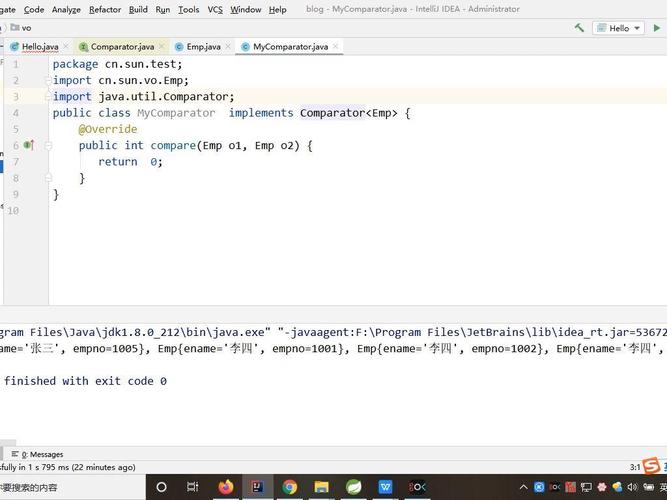
Let's break it down from the basics to advanced usage.
What is a Comparator?
A Comparator is a functional interface (meaning it has a single abstract method) that represents a comparison function. It imposes a total ordering on a collection of objects.
Think of it like a judge for a competition. The judge (Comparator) doesn't change the competitors (Objects), but they decide who comes in first, second, third, etc., based on specific rules.
Why Do We Need Comparator?
By default, objects can only be sorted if their class implements the Comparable interface (e.g., String, Integer, Date). This defines the object's "natural order."
But what if you need to sort the same collection of objects in different ways?
- Example: A
Personclass might be sorted by name (natural order), but you might also want to sort them by age, or by city, or by salary.
This is where Comparator shines. It lets you define multiple, independent sorting strategies without modifying the original class.
Key Methods in the Comparator Interface
The most important method is:
int compare(T obj1, T obj2): Compares two objects.- It returns an int.
- Negative (
obj1 < obj2):obj1should come beforeobj2. - Zero (
obj1 == obj2): The two objects are considered equal in terms of order. - Positive (
obj1 > obj2):obj1should come afterobj2.
How to Use a Comparator
There are three main ways to create and use a Comparator:

A. The Classic Way: Anonymous Inner Class
This is the traditional approach, common in Java 7 and earlier. It's verbose but very clear.
import java.util.ArrayList;
import java.util.Collections;
import java.util.Comparator;
import java.util.List;
class Person {
    String name;
    int age;
    public Person(String name, int age) {
        this.name = name;
        this.age = age;
    }
    @Override
    public String toString() {
        return name + " (" + age + ")";
    }
}
public class ComparatorClassicExample {
    public static void main(String[] args) {
        List<Person> people = new ArrayList<>();
        people.add(new Person("Alice", 30));
        people.add(new Person("Charlie", 25));
        people.add(new Person("Bob", 30));
        // Sort by name using an anonymous inner class
        Collections.sort(people, new Comparator<Person>() {
            @Override
            public int compare(Person p1, Person p2) {
                return p1.name.compareTo(p2.name);
            }
        });
        System.out.println("Sorted by name: " + people);
        // Output: Sorted by name: [Alice (30), Bob (30), Charlie (25)]
    }
}
B. The Modern Way: Lambda Expressions (Java 8+)
This is the most common and concise way to write Comparators today. The code is much cleaner.
The compare method takes two arguments and returns an int, which perfectly matches the signature of a lambda expression (T, T) -> int.
import java.util.ArrayList;
import java.util.Collections;
import java.util.List;
class Person { /* ... same Person class as above ... */ }
public class ComparatorLambdaExample {
    public static void main(String[] args) {
        List<Person> people = new ArrayList<>();
        people.add(new Person("Alice", 30));
        people.add(new Person("Charlie", 25));
        people.add(new Person("Bob", 30));
        // Sort by name using a lambda expression
        Collections.sort(people, (p1, p2) -> p1.name.compareTo(p2.name));
        System.out.println("Sorted by name: " + people);
        // Output: Sorted by name: [Alice (30), Bob (30), Charlie (25)]
        // Sort by age using a lambda expression
        Collections.sort(people, (p1, p2) -> Integer.compare(p1.age, p2.age));
        System.out.println("Sorted by age: " + people);
        // Output: Sorted by age: [Charlie (25), Alice (30), Bob (30)]
    }
}
C. The Modern Way: Method References (Java 8+)
If your Comparator logic is as simple as calling a single method on the object, you can use a method reference for even cleaner code.
import java.util.ArrayList;
import java.util.Collections;
import java.util.List;
class Person { /* ... same Person class as above ... */ }
public class ComparatorMethodReferenceExample {
    public static void main(String[] args) {
        List<Person> people = new ArrayList<>();
        people.add(new Person("Alice", 30));
        people.add(new Person("Charlie", 25));
        people.add(new Person("Bob", 30));
        // Sort by name using a method reference
        // Equivalent to: (p1, p2) -> p1.name.compareTo(p2.name)
        Collections.sort(people, Comparator.comparing(Person::getName));
        System.out.println("Sorted by name: " + people);
        // Output: Sorted by name: [Alice (30), Bob (30), Charlie (25)]
        // Sort by age using a method reference
        // Equivalent to: (p1, p2) -> Integer.compare(p1.age, p2.age)
        Collections.sort(people, Comparator.comparing(Person::getAge));
        System.out.println("Sorted by age: " + people);
        // Output: Sorted by age: [Charlie (25), Alice (30), Bob (30)]
    }
}
Note: I added getName() and getAge() methods to the Person class for this example to work.
Advanced Comparator Chaining
A huge advantage of Comparator is the ability to chain them. This allows for complex sorting logic like "sort by primary key, then by secondary key."
The Comparator interface provides static methods for this:
thenComparing(Comparator other): If the first comparison returns 0 (equal), it uses theothercomparator to break the tie.
Example: Sorting by Age, then by Name
import java.util.ArrayList;
import java.util.Collections;
import java.util.Comparator;
import java.util.List;
class Person { /* ... same Person class as above ... */ }
public class ComparatorChainingExample {
    public static void main(String[] args) {
        List<Person> people = new ArrayList<>();
        people.add(new Person("Alice", 30));
        people.add(new Person("Charlie", 25));
        people.add(new Person("Bob", 30)); // Same age as Alice
        // Chain comparators:
        // 1. Primary sort: by age (ascending)
        // 2. Secondary sort: by name (ascending) if ages are the same
        Comparator<Person> byAgeThenByName = Comparator.comparing(Person::getAge)
                                                      .thenComparing(Person::getName);
        Collections.sort(people, byAgeThenByName);
        System.out.println("Sorted by age, then by name: " + people);
        // Output: Sorted by age, then by name: [Charlie (25), Alice (30), Bob (30)]
    }
}
Other Useful Static Methods in Comparator
The Comparator class is packed with helpful static utility methods:
-
reversed(): Returns a comparator that imposes the reverse ordering of the original one.// Sort by age in descending order Comparator<Person> byAgeDesc = Comparator.comparing(Person::getAge).reversed();
-
nullsFirst(Comparator other): Returns a comparator that considersnullvalues to be less than non-null values. If both arenull, they are equal. If one isnulland the other isn't, the non-null is greater. If neither isnull, it uses theothercomparator.// Sort by name, but put null names first Comparator<Person> withNullsFirst = Comparator.nullsFirst(Comparator.comparing(Person::getName));
-
nullsLast(Comparator other): Same asnullsFirst, but considersnullvalues to be greater.// Sort by name, but put null names last Comparator<Person> withNullsLast = Comparator.nullsLast(Comparator.comparing(Person::getName));
-
naturalOrder()/reverseOrder(): For objects that have a natural order (e.g.,String,Integer).List<Integer> numbers = List.of(3, 1, 4, 1, 5); numbers.sort(Comparator.naturalOrder()); // Sorts ascending: [1, 1, 3, 4, 5] numbers.sort(Comparator.reverseOrder()); // Sorts descending: [5, 4, 3, 1, 1]
Comparator vs. Comparable
This is a very common interview question. Here’s a quick comparison:
| Feature | Comparator |
Comparable |
|---|---|---|
| Location | A separate interface (java.util.Comparator). |
Part of the class being sorted (java.lang.Comparable). |
| Purpose | To define multiple, external sorting strategies. | To define the single, natural sort order for a class. |
| Implementation | Implemented in a separate class or as a lambda. | Implemented within the class itself. |
| Method | compare(T obj1, T obj2) |
compareTo(T other) |
| When to Use | When you need to sort objects in different ways, or when you can't modify the source class (e.g., sorting a String by length). |
When there is a single, obvious "natural" way to sort objects of that class (e.g., String alphabetically, Date chronologically). |
Example:
// Comparable Person (defines its own natural order)
class ComparablePerson implements Comparable<ComparablePerson> {
    String name;
    int age;
    @Override
    public int compareTo(ComparablePerson other) {
        // Natural order is by name
        return this.name.compareTo(other.name);
    }
}
// You can still use a Comparator on a Comparable object
List<ComparablePerson> people = ...;
people.sort(Comparator.comparing(ComparablePerson::getAge)); // Sort by age, overriding natural order
Summary
| Method | Description | Example |
|---|---|---|
| Lambda | The most flexible and common way. | (p1, p2) -> p1.age - p2.age |
| Method Ref | Clean for simple, single-method logic. | Comparator.comparing(Person::getName) |
| Anonymous Class | The classic, verbose way. | new Comparator<Person>() { ... } |
| Chaining | For complex sorting (primary, secondary keys). | comparing(...).thenComparing(...) |
| Utility Methods | For common needs like reversing or handling nulls. | reversed(), nullsFirst(...) |