Of course! Let's dive deep into Java's Iterator. It's a fundamental concept in Java Collections Framework.
What is an Iterator?
An Iterator is an object that enables you to traverse through a collection (like a List, Set, or Map) and access its elements one by one. Think of it as a "cursor" that points to an element in the collection.
Its primary purpose is to provide a standard, uniform way to iterate over elements of any collection, regardless of its specific implementation (e.g., ArrayList, LinkedList, HashSet). This is a core principle of good design: programming to an interface, not an implementation.
The Core Methods of Iterator
The java.util.Iterator interface defines three essential methods:
-
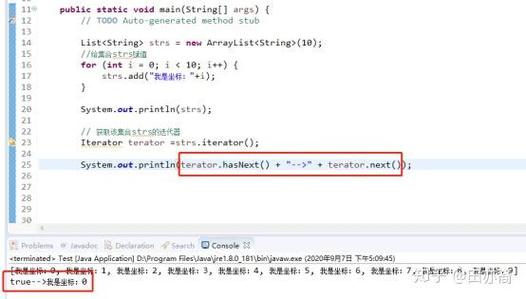
boolean hasNext() (图片来源网络,侵删)
- Returns
trueif the iteration has more elements. In other words, it checks if the cursor has a next element to move to. - It does not move the cursor forward.
- Returns
-
E next()- Returns the next element in the iteration.
- It moves the cursor forward by one position.
- Throws a
NoSuchElementExceptionif there are no more elements.
-
void remove()- Removes from the collection the last element returned by
next(). - This is an optional operation. Some iterators do not support it (e.g., iterators for
ImmutableList). - It can only be called once after each call to
next(). Callingremove()without a precedingnext()will throw anIllegalStateException.
- Removes from the collection the last element returned by
How to Use an Iterator (Code Example)
Let's see it in action with an ArrayList.
import java.util.ArrayList;
import java.util.Iterator;
import java.util.List;
public class IteratorExample {
    public static void main(String[] args) {
        // 1. Create a collection
        List<String> fruits = new ArrayList<>();
        fruits.add("Apple");
        fruits.add("Banana");
        fruits.add("Cherry");
        fruits.add("Date");
        System.out.println("Original List: " + fruits);
        // 2. Get an iterator for the collection
        // The iterator() method is part of the Collection interface.
        Iterator<String> iterator = fruits.iterator();
        // 3. Use the iterator to traverse the list
        System.out.println("\n--- Traversing with Iterator ---");
        while (iterator.hasNext()) {
            String fruit = iterator.next();
            System.out.println("Current fruit: " + fruit);
            // Example of using the remove() method
            if ("Banana".equals(fruit)) {
                System.out.println(" -> Removing Banana...");
                iterator.remove(); // Removes the last element returned by next()
            }
        }
        System.out.println("\nList after removal: " + fruits);
    }
}
Output:
Original List: [Apple, Banana, Cherry, Date]
--- Traversing with Iterator ---
Current fruit: Apple
Current fruit: Banana
 -> Removing Banana...
Current fruit: Cherry
Current fruit: Date
List after removal: [Apple, Cherry, Date]
Iterator vs. for-each Loop
You might be more familiar with the enhanced for-each loop. It's important to understand the difference.
| Feature | Iterator |
for-each Loop |
|---|---|---|
| How it Works | Explicitly uses the Iterator interface under the hood. |
Syntactic sugar that compiles down to using an Iterator. |
| Removal | Can safely remove elements from the collection during iteration using iterator.remove(). |
Cannot remove elements. Attempting to do so will throw a ConcurrentModificationException. |
| Flexibility | Gives you access to the Iterator object itself, allowing you to call remove() and check hasNext() at any point. |
More concise and readable for simple traversal. Less flexible. |
| Exception | If you modify the collection directly (e.g., list.remove("Apple")) while using an iterator, you will get a ConcurrentModificationException. |
Same as above. |
Why ConcurrentModificationException?
Most collections use a mechanism called fail-fast. When you create an iterator, the collection keeps a "snapshot" of its expected state (a modification count). If the collection is modified in any way other than through the iterator's own remove() method, the iterator detects this mismatch on its next call to next() or hasNext() and throws the exception to prevent unpredictable behavior.
Iterator vs. ListIterator
ListIterator is a more powerful sub-interface of Iterator that is available only for lists (List).
| Feature | Iterator |
ListIterator |
|---|---|---|
| Applicability | Works on all Collection types. |
Works only on List types. |
| Direction | Forward only. | Bidirectional. Can move forward and backward. |
| Methods | hasNext(), next(), remove() |
hasNext(), next(), hasPrevious(), previous(), add(E), set(E), remove() |
| Add/Set | Cannot add or set elements. | Can add elements at the current cursor position with add(E) and replace the last element with set(E). |
Example of ListIterator:
import java.util.List;
import java.util.ListIterator;
import java.util.ArrayList;
public class ListIteratorExample {
    public static void main(String[] args) {
        List<String> names = new ArrayList<>();
        names.add("Alice");
        names.add("Bob");
        names.add("Charlie");
        ListIterator<String> listIterator = names.listIterator();
        // Move forward
        System.out.println("Moving forward:");
        while (listIterator.hasNext()) {
            String name = listIterator.next();
            System.out.println(name);
        }
        // Move backward
        System.out.println("\nMoving backward:");
        while (listIterator.hasPrevious()) {
            String name = listIterator.previous();
            System.out.println(name);
        }
    }
}
Output:
Moving forward:
Alice
Bob
Charlie
Moving backward:
Charlie
Bob
Alice
When to Use Iterator
- When you need to remove elements from a collection while iterating. The
for-eachloop cannot do this safely. - When you need to iterate backward over a list. Only
ListIteratorprovides this capability. - When you need to modify elements in a list during iteration (using
listIterator.set()). - When you need fine-grained control over the iteration process, such as skipping elements based on a complex condition.
- When working with older Java code (pre-1.5) where the
for-eachloop did not exist.
Summary
| Concept | Key Takeaway |
|---|---|
| Purpose | To provide a standard way to traverse any collection. |
| Core Methods | hasNext(), next(), remove(). |
| Key Advantage | Safe removal of elements during iteration. |
for-each Loop |
More concise for simple traversal, but cannot remove elements. |
ListIterator |
A more powerful Iterator for lists only, allowing bidirectional traversal and modification (add, set). |
ConcurrentModificationException |
A "fail-fast" mechanism that prevents unsafe modifications to a collection while it's being iterated. |