Of course! In Python, the term "join string" almost always refers to the str.join() method. It's a powerful and essential tool for combining a sequence of strings into a single string.
Let's break it down.
The Core Concept: str.join()
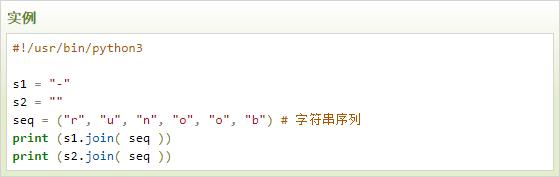
The join() method is called on a separator string and takes an iterable (like a list, tuple, or set) of strings as its argument. It then concatenates all the strings in the iterable, placing the separator string between them.
Syntax:
separator_string.join(iterable_of_strings)
How it works:
Think of it like this: "The separator joins the elements of the iterable together."
Basic Usage: Joining a List of Strings
This is the most common use case. You have a list of words and want to make a sentence.
words = ["Python", "is", "awesome"]
separator = " "
# Use the separator to join the list of words
sentence = separator.join(words)
print(sentence)
Output:
Python is awesomeImportant Note: The elements in the iterable must all be strings. If you have numbers or other data types, you'll get a TypeError.
# This will cause an error
numbers = [1, 2, 3, 4]
# TypeError: sequence item 0: expected str instance, int found
# result = " ".join(numbers)
Solution: Convert the numbers to strings first using a list comprehension or map().
numbers = [1, 2, 3, 4]
# Convert each number to a string before joining
result = " ".join([str(n) for n in numbers])
print(result)
Output:
1 2 3 4Common Separator Examples
The separator can be any string, including an empty string.
a) Joining with a Comma and a Space
This is useful for creating CSV-style strings or lists.
fruits = ["apple", "banana", "cherry"]
result = ", ".join(fruits)
print(result)
Output:
apple, banana, cherryb) Joining with a Newline Character (\n)
Perfect for creating multi-line text from a list of lines.
lines = ["First line", "Second line", "Third line"]
multiline_text = "\n".join(lines)
print(multiline_text)
Output:
First line
Second line
Third line
c) Joining with an Empty String ()
This concatenates all the strings together with nothing in between.
chars = ["H", "e", "l", "l", "o"]
word = "".join(chars)
print(word)
Output:
HelloWhat Happens with an Empty Iterable?
If the iterable you pass to join() is empty, it correctly returns an empty string.
empty_list = []
result = " - ".join(empty_list)
print(f"The result is: '{result}'")
Output:
The result is: ''Joining Other Iterables
join() works with any iterable that yields strings, not just lists.
a) Tuples
tuple_of_words = ("make", "it", "fast")
result = " ".join(tuple_of_words)
print(result)
Output:
make it fastb) Sets
Remember that sets are unordered, so the result might not be in the order you wrote the elements.
set_of_words = {"quick", "brown", "fox"}
result = " ".join(set_of_words)
# Possible output: "fox brown quick" (order is not guaranteed)
print(result)
The Opposite: str.split()
The natural counterpart to join() is split(). While join() combines a list into a string, split() breaks a string into a list.
sentence = "Python is awesome"
words = sentence.split(" ") # Split by a space
print(words)
Output:
['Python', 'is', 'awesome']Common Pitfall: Forgetting the Separator is a Method
A very common mistake for beginners is to try to call join() on the list instead of the separator.
Incorrect Way:
words = ["Hello", "World"]
# This will cause an AttributeError
# words.join(" ")
Correct Way:
The separator () is the object that has the join method.
words = ["Hello", "World"]
result = " ".join(words)
print(result)
Output:
Hello WorldSummary
| Feature | Description | Example |
|---|---|---|
| Method | str.join() |
" ".join(["a", "b"]) |
| Purpose | Combines an iterable of strings into a single string. | To create a sentence from a list of words. |
| Separator | The string on which you call join(). It's placed between the elements of the iterable. |
, , "\n", (empty string). |
| Iterable | A list, tuple, set, or any other sequence of strings. | ["one", "two"], ("a", "b", "c") |
| Key Requirement | All elements in the iterable must be strings. | [str(x) for x in [1, 2, 3]] before joining. |
| Common Error | Calling join() on the list instead of the separator (e.g., my_list.join(" ") instead of " ".join(my_list)). |
Correct: " ".join(my_list) |