Of course! In Java, the add() method is a fundamental operation for the List interface. It's used to insert elements into a list. Let's break it down with clear examples and explanations.
The Basic add(E e) Method
This is the most common way to add an element. It appends the specified element to the end of the list.
Syntax:
boolean add(E e);
Eis the type of elements in the list (e.g.,String,Integer).- It returns
true(the method is specified to always returntrue, but it's good practice to acknowledge the return type). - It throws
NullPointerExceptionif the list does not permit null elements and you try to addnull.
Example:
import java.util.ArrayList;
import java.util.List;
public class ListAddExample {
    public static void main(String[] args) {
        // Create a List of Strings
        List<String> fruits = new ArrayList<>();
        // Add elements to the end of the list
        fruits.add("Apple");
        fruits.add("Banana");
        fruits.add("Cherry");
        // Print the list
        System.out.println("List after adding: " + fruits);
        // Output: List after adding: [Apple, Banana, Cherry]
    }
}
The add(int index, E e) Method
This method allows you to insert an element at a specific position in the list. All existing elements at or after that index are shifted to the right (their indices are increased by one).
Syntax:
void add(int index, E e);
index: The position at which the specified element is to be inserted.e: The element to be inserted.- It throws
IndexOutOfBoundsExceptionif the index is out of range (index < 0 || index > size()). - It throws
NullPointerExceptionif the list does not permit null elements and you try to addnull.
Example:
import java.util.ArrayList;
import java.util.List;
public class ListAddAtIndexExample {
    public static void main(String[] args) {
        List<String> colors = new ArrayList<>();
        colors.add("Red");
        colors.add("Green");
        colors.add("Blue");
        System.out.println("Original list: " + colors);
        // Output: Original list: [Red, Green, Blue]
        // Add "Yellow" at index 1
        colors.add(1, "Yellow");
        System.out.println("List after adding at index 1: " + colors);
        // Output: List after adding at index 1: [Red, Yellow, Green, Blue]
        // Add "Purple" at the end (index 4, which is the current size)
        colors.add(4, "Purple");
        System.out.println("List after adding at the end: " + colors);
        // Output: List after adding at the end: [Red, Yellow, Green, Blue, Purple]
    }
}
Adding All Elements from Another Collection
There are two overloaded addAll() methods that are very useful for combining lists.
a) addAll(Collection<? extends E> c)
Adds all elements from the specified collection to the end of the current list.
Syntax:
boolean addAll(Collection<? extends E> c);
- Returns
trueif the list was changed as a result of the call (i.e., if the collection was not empty).
Example:
import java.util.ArrayList;
import java.util.List;
public class ListAddAllExample {
    public static void main(String[] args) {
        List<String> primaryFruits = new ArrayList<>();
        primaryFruits.add("Apple");
        primaryFruits.add("Banana");
        List<String> secondaryFruits = new ArrayList<>();
        secondaryFruits.add("Cherry");
        secondaryFruits.add("Date");
        System.out.println("Primary fruits: " + primaryFruits);
        // Output: Primary fruits: [Apple, Banana]
        // Add all elements from secondaryFruits to primaryFruits
        primaryFruits.addAll(secondaryFruits);
        System.out.println("Primary fruits after addAll: " + primaryFruits);
        // Output: Primary fruits after addAll: [Apple, Banana, Cherry, Date]
    }
}
b) addAll(int index, Collection<? extends E> c)
Inserts all elements from the specified collection into the list starting at the specified index. The elements are added in the order they are returned by the collection's iterator.
Syntax:
boolean addAll(int index, Collection<? extends E> c);
- Returns
trueif the list was changed as a result of the call.
Example:
import java.util.ArrayList;
import java.util.List;
public class ListAddAllAtIndexExample {
    public static void main(String[] args) {
        List<String> pets = new ArrayList<>();
        pets.add("Dog");
        pets.add("Cat");
        List<String> newPets = new ArrayList<>();
        newPets.add("Rabbit");
        newPets.add("Parrot");
        System.out.println("Original pets: " + pets);
        // Output: Original pets: [Dog, Cat]
        // Add all elements from newPets starting at index 1
        pets.addAll(1, newPets);
        System.out.println("Pets after addAll at index 1: " + pets);
        // Output: Pets after addAll at index 1: [Dog, Rabbit, Parrot, Cat]
    }
}
Key Differences: ArrayList vs. LinkedList
The List interface is implemented by several classes, primarily ArrayList and LinkedList. The performance of the add() method differs between them.
| Feature | ArrayList |
LinkedList |
|---|---|---|
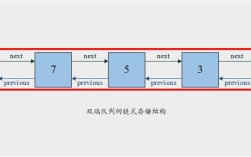
| Internal Structure | A dynamic array. | A doubly-linked list of nodes. |
add(E e) (to end) |
Amortized O(1) - Very fast. Adding to the end is usually just placing the element in the next available slot. If the underlying array is full, it needs to be resized (O(n)), but this is rare. | O(1) - Very fast. It just adds a new node at the tail. |
add(int index, E e) |
O(n) - Slower. It needs to shift all elements from the specified index to the end one position to the right to make space. | O(n) - Can be slow. It needs to traverse the list from the head or tail to find the node at the given index, then link the new node in. |
When to use which?
- Use
ArrayListwhen you primarily need to add/remove elements from the end of the list and access elements by index frequently. It's the most common and generally best-performing choice. - Use
LinkedListwhen you need to frequently add/remove elements from the middle of the list and don't access elements by index often.
Complete, Runnable Example
Here is a single example demonstrating all the methods discussed.
import java.util.ArrayList;
import java.util.Arrays;
import java.util.List;
public class ComprehensiveListAddExample {
    public static void main(String[] args) {
        // 1. Create a new ArrayList
        List<String> technologies = new ArrayList<>();
        System.out.println("Initial list: " + technologies); // Output: Initial list: []
        // 2. Add single elements to the end
        technologies.add("Java");
        technologies.add("Python");
        System.out.println("After adding Java and Python: " + technologies); // Output: [Java, Python]
        // 3. Add an element at a specific index
        technologies.add(1, "JavaScript");
        System.out.println("After adding JavaScript at index 1: " + technologies); // Output: [Java, JavaScript, Python]
        // 4. Add all elements from another Collection to the end
        List<String> moreTech = Arrays.asList("C++", "Go");
        technologies.addAll(moreTech);
        System.out.println("After adding C++ and Go to the end: " + technologies); // Output: [Java, JavaScript, Python, C++, Go]
        // 5. Add all elements from another Collection at a specific index
        List<String> newTech = Arrays.asList("Rust", "Kotlin");
        technologies.addAll(2, newTech);
        System.out.println("After adding Rust and Kotlin at index 2: " + technologies);
        // Output: [Java, JavaScript, Rust, Kotlin, Python, C++, Go]
    }
}