核心概念
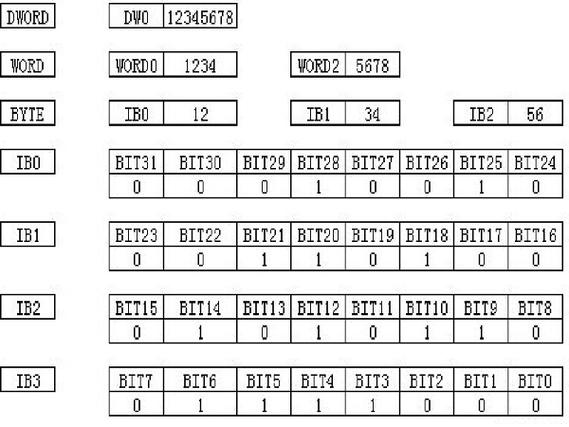
int 在 Java 中是 32 位(4 字节)的,而 byte 是 8 位(1 字节)的,将一个 int 转换为 byte 数组,本质上是将这 32 位数据拆分成 4 个独立的字节,并将它们存入一个长度为 4 的 byte 数组中。
(图片来源网络,侵删)
这里最关键的概念是 字节序,字节序规定了多字节数据在内存或网络上存储的顺序,主要有两种:
-
大端序
- 定义:高位字节存储在低地址,低位字节存储在高地址。
- 例子:
int值0x12345678存储为byte数组[0x12, 0x34, 0x56, 0x78]。 - 应用:网络传输标准(TCP/IP 协议)、Java 虚拟机内部、大多数 Unix 系统都使用大端序,它也被称为“网络字节序”。
-
小端序
- 定义:低位字节存储在低地址,高位字节存储在高地址。
- 例子:
int值0x12345678存储为byte数组[0x78, 0x56, 0x34, 0x12]。 - 应用:大多数现代 x86 架构的个人电脑和 Windows 系统都使用小端序。
在跨平台通信时,必须统一使用大端序(网络字节序)来避免解析错误。
(图片来源网络,侵删)
使用 ByteBuffer (推荐)
这是最现代、最安全、最推荐的方法。java.nio.ByteBuffer 类为此提供了内置的、高效且可读性强的 API。
int 转 byte[]
import java.nio.ByteBuffer;
import java.nio.ByteOrder;
public class IntToByteArray {
    public static void main(String[] args) {
        int intValue = 0x12345678;
        // 1. 创建一个容量为4的ByteBuffer
        ByteBuffer buffer = ByteBuffer.allocate(4);
        // 2. 将int值放入ByteBuffer (默认使用大端序)
        buffer.putInt(intValue);
        // 3. 获取底层的byte数组
        byte[] byteArray = buffer.array();
        System.out.println("Int: " + intValue);
        System.out.println("Byte Array (大端序): " + bytesToHex(byteArray)); // 输出: 12 34 56 78
        // ------------------- 使用小端序 -------------------
        ByteBuffer littleEndianBuffer = ByteBuffer.allocate(4).order(ByteOrder.LITTLE_ENDIAN);
        littleEndianBuffer.putInt(intValue);
        byte[] littleEndianArray = littleEndianBuffer.array();
        System.out.println("Byte Array (小端序): " + bytesToHex(littleEndianArray)); // 输出: 78 56 34 12
    }
    // 一个辅助方法,用于将byte数组打印为十六进制字符串,方便查看
    private static String bytesToHex(byte[] bytes) {
        StringBuilder sb = new StringBuilder();
        for (byte b : bytes) {
            sb.append(String.format("%02X ", b));
        }
        return sb.toString();
    }
}
byte[] 转 int
import java.nio.ByteBuffer;
import java.nio.ByteOrder;
public class ByteArrayToInt {
    public static void main(String[] args) {
        byte[] bigEndianArray = {(byte) 0x12, (byte) 0x34, (byte) 0x56, (byte) 0x78};
        byte[] littleEndianArray = {(byte) 0x78, (byte) 0x56, (byte) 0x34, (byte) 0x12};
        // ------------------- 解析大端序数组 -------------------
        ByteBuffer bigEndianBuffer = ByteBuffer.wrap(bigEndianArray);
        int bigEndianInt = bigEndianBuffer.getInt();
        System.out.println("从大端序数组恢复的Int: " + bigEndianInt); // 输出: 305419896 (即 0x12345678)
        // ------------------- 解析小端序数组 -------------------
        // 必须指定正确的字节序进行解析!
        ByteBuffer littleEndianBuffer = ByteBuffer.wrap(littleEndianArray).order(ByteOrder.LITTLE_ENDIAN);
        int littleEndianInt = littleEndianBuffer.getInt();
        System.out.println("从小端序数组恢复的Int: " + littleEndianInt); // 输出: 305419896 (即 0x12345678)
    }
}
优点:
- 代码简洁:一行代码搞定转换,可读性高。
- 线程安全:
ByteBuffer对象是线程安全的(如果只用于读或只用于写)。 - 高效:由 JVM 内部实现,性能通常优于手动位移。
- 灵活性:可以轻松指定字节序。
手动位移与位运算 (传统方法)
这种方法不依赖任何类,完全使用 Java 的位运算符,有助于理解底层原理,但代码冗长且容易出错。
int 转 byte[]
public class IntToByteArrayManual {
    public static void main(String[] args) {
        int intValue = 0x12345678;
        byte[] byteArray = new byte[4];
        // 使用位运算和强制类型转换
        // >>> 是无符号右移,高位补0
        // >> 是有符号右移,高位补符号位
        // 获取最高8位 (0x12)
        byteArray[0] = (byte) (intValue >>> 24);
        // 获取次高8位 (0x34)
        byteArray[1] = (byte) (intValue >>> 16);
        // 获取次低8位 (0x56)
        byteArray[2] = (byte) (intValue >>> 8);
        // 获取最低8位 (0x78)
        byteArray[3] = (byte) intValue;
        System.out.println("Int: " + intValue);
        System.out.println("Byte Array (大端序): " + bytesToHex(byteArray)); // 输出: 12 34 56 78
        // 小端序
        byteArray[0] = (byte) intValue;
        byteArray[1] = (byte) (intValue >>> 8);
        byteArray[2] = (byte) (intValue >>> 16);
        byteArray[3] = (byte) (intValue >>> 24);
        System.out.println("Byte Array (小端序): " + bytesToHex(byteArray)); // 输出: 78 56 34 12
    }
    private static String bytesToHex(byte[] bytes) {
        StringBuilder sb = new StringBuilder();
        for (byte b : bytes) {
            sb.append(String.format("%02X ", b));
        }
        return sb.toString();
    }
}
byte[] 转 int
public class ByteArrayToIntManual {
    public static void main(String[] args) {
        byte[] bigEndianArray = {(byte) 0x12, (byte) 0x34, (byte) 0x56, (byte) 0x78};
        byte[] littleEndianArray = {(byte) 0x78, (byte) 0x56, (byte) 0x34, (byte) 0x12};
        // ------------------- 解析大端序数组 -------------------
        int bigEndianInt = 0;
        bigEndianInt |= (bigEndianArray[0] & 0xFF) << 24; // & 0xFF 是为了将byte转成无符号的int
        bigEndianInt |= (bigEndianArray[1] & 0xFF) << 16;
        bigEndianInt |= (bigEndianArray[2] & 0xFF) << 8;
        bigEndianInt |= (bigEndianArray[3] & 0xFF);
        System.out.println("从大端序数组恢复的Int: " + bigEndianInt); // 输出: 305419896
        // ------------------- 解析小端序数组 -------------------
        int littleEndianInt = 0;
        littleEndianInt |= (littleEndianArray[0] & 0xFF);
        littleEndianInt |= (littleEndianArray[1] & 0xFF) << 8;
        littleEndianInt |= (littleEndianArray[2] & 0xFF) << 16;
        littleEndianInt |= (littleEndianArray[3] & 0xFF) << 24;
        System.out.println("从小端序数组恢复的Int: " + littleEndianInt); // 输出: 305419896
    }
}
注意:为什么需要 (byte) 0xFF?
因为 Java 的 byte 是有符号类型,范围是 -128 到 127,当 byte 被提升为 int 时,会进行符号扩展。(byte) 0x90 在内存中是 10010000,提升为 int 后会变成 11111111 11111111 11111111 10010000(即 -112),通过 & 0xFF,可以屏蔽掉高 24 位的符号位,只保留低 8 位的原始值。
(图片来源网络,侵删)
优点:
- 不依赖外部库:纯 Java 基础。
- 性能可能略高:对于极端性能优化的场景,手动位移可能比
ByteBuffer的方法调用开销更小。 - 理解原理:能帮助深入理解数据在内存中的表示。
缺点:
- 代码冗长:需要写很多重复的代码。
- 容易出错:位移位数和顺序很容易写反。
- 可读性差:不如
ByteBuffer直观。
总结与最佳实践
| 特性 | ByteBuffer (推荐) |
手动位移 |
|---|---|---|
| 易用性 | ⭐⭐⭐⭐⭐ (非常简单) | ⭐⭐ (复杂) |
| 可读性 | ⭐⭐⭐⭐⭐ (非常清晰) | ⭐⭐ (较差) |
| 健壮性 | ⭐⭐⭐⭐⭐ (不易出错) | ⭐⭐ (容易出错) |
| 性能 | ⭐⭐⭐⭐ (通常很好) | ⭐⭐⭐⭐⭐ (可能最优) |
| 依赖 | java.nio 包 (标准库) |
无 |
在绝大多数情况下,强烈推荐使用 java.nio.ByteBuffer,它为你处理了所有繁琐的细节,代码更健壮、更易于维护,并且性能已经足够好。
只有在以下极端情况下,才考虑使用手动位移:
- 你在编写对性能要求极其苛刻的底层代码,并且经过性能分析确认
ByteBuffer是瓶颈。 - 你在一个受限的 Java 环境中(例如某些嵌入式系统),无法使用
java.nio包。
在涉及网络或文件存储时,始终使用大端序(ByteOrder.BIG_ENDIAN),以确保跨平台兼容性。