Of course! This is a fundamental concept in web development. Let's break down Java Cookies and Sessions, how they work together, and how to use them in Java web applications (specifically with Servlets and JSP, which are the classic technologies).
The Core Problem: HTTP is Stateless
First, remember that the HTTP protocol is stateless. This means that every request from a client to a server is treated as a completely independent, new transaction. The server has no memory of previous requests.
Imagine a shopping cart:
- You request
products.html. The server shows you products. - You click "Add to Cart". This is a new request. The server has no idea who you are or what was in your previous "view products" request.
This is where Cookies and Sessions come in. They are the two primary mechanisms to overcome the statelessness of HTTP and create a stateful user experience.
Cookies
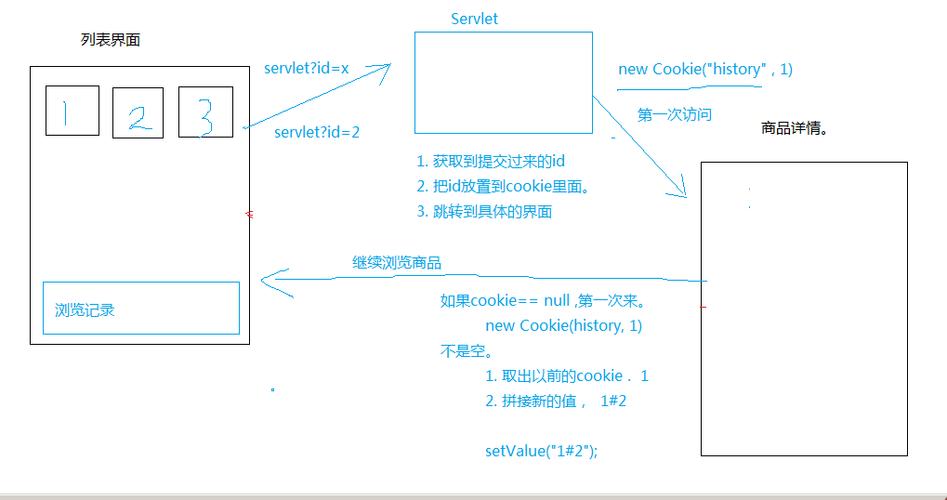
A Cookie is a small piece of data that the server sends to the client's web browser. The browser then stores it and includes it in every subsequent request to the same server.

How Cookies Work (The Flow)
- Server Sends a Cookie: The server generates a cookie (e.g., a unique ID) and includes it in the
Set-Cookieheader of the HTTP response.HTTP/1.1 200 OKContent-Type: text/htmlSet-Cookie: sessionId=12345; Path=/; HttpOnly
- Browser Stores the Cookie: The browser receives this response and stores the cookie. The
Path=/part tells the browser to send this cookie with requests to any page on the website. - Browser Sends the Cookie: On every subsequent request to that server (e.g., when you go to another page or submit a form), the browser automatically attaches the cookie to the
Cookieheader of the HTTP request.GET /cart.html HTTP/1.1Host: www.example.comCookie: sessionId=12345
- Server Reads the Cookie: The server reads the
Cookieheader from the request, identifies the user withsessionId=12345, and can now serve personalized content.
Characteristics of Cookies
- Client-Side Storage: Stored on the user's browser.
- Size Limit: Very small (typically around 4 KB per cookie).
- Number Limit: Limited number of cookies per domain (e.g., ~50).
- Data Persistence: Can be set to expire at a certain time, or be a "session cookie" that is deleted when the browser closes.
- Security Concerns: Data is stored in plain text on the client. It can be modified by the user. Sensitive data (like passwords) should never be stored in a cookie.
Java Servlet Example: Working with Cookies
import javax.servlet.ServletException;
import javax.servlet.annotation.WebServlet;
import javax.servlet.http.*;
import java.io.IOException;
import java.net.URLEncoder;
import java.nio.charset.StandardCharsets;
@WebServlet("/cookieExample")
public class CookieExampleServlet extends HttpServlet {
    @Override
    protected void doGet(HttpServletRequest request, HttpServletResponse response) throws ServletException, IOException {
        // 1. Create a new Cookie
        // It's good practice to URL-encode the value in case it contains special characters
        String cookieValue = URLEncoder.encode("John Doe", StandardCharsets.UTF_8.toString());
        Cookie userCookie = new Cookie("username", cookieValue);
        // 2. Set cookie properties
        userCookie.setMaxAge(60 * 60 * 24); // 1 day in seconds. -1 means it's a session cookie.
        userCookie.setPath("/"); // Available across the entire application
        // 3. Add the cookie to the response
        response.addCookie(userCookie);
        // 4. Send a response to the user
        response.setContentType("text/html");
        response.getWriter().println("<h1>Cookie has been set!</h1>");
        response.getWriter().println("<p>Close and reopen this page to see the cookie in action.</p>");
    }
    @Override
    protected void doPost(HttpServletRequest request, HttpServletResponse response) throws ServletException, IOException {
        // 5. Reading cookies from a request
        Cookie[] cookies = request.getCookies();
        String username = "Guest"; // Default value
        if (cookies != null) {
            for (Cookie cookie : cookies) {
                if ("username".equals(cookie.getName())) {
                    username = URLDecoder.decode(cookie.getValue(), StandardCharsets.UTF_8.toString());
                    break;
                }
            }
        }
        response.setContentType("text/html");
        response.getWriter().println("<h1>Hello, " + username + "!</h1>");
        response.getWriter().println("<p>We recognized you from your cookie.</p>");
    }
}
Sessions
A Session is a mechanism to store data on the server-side for a specific user. The server associates this data with a unique session ID, which is then sent to the client's browser, typically via a Cookie.
How Sessions Work (The Flow)
- Client Requests a Page: The client makes a request to a server for a protected or personalized page (e.g.,
/profile.jsp). The request has no session cookie. - Server Creates a Session: The server sees no session cookie and creates a new
HttpSessionobject. This object lives on the server and can store any Java object (likeString,List,User, etc.). - Server Assigns a Session ID: The server generates a unique ID for this new session (e.g.,
A9F8C3D7E1B2). - Server Sends Session ID to Client: The server sends this session ID back to the client in a cookie named
JSESSIONID.HTTP/1.1 200 OKSet-Cookie: JSESSIONID=A9F8C3D7E1B2; Path=/; HttpOnly
- Client Stores Session ID: The browser stores the
JSESSIONIDcookie. - Client Subsequent Requests: On every future request, the browser sends the
JSESSIONIDcookie back to the server. - Server Finds the Session: The server reads the
JSESSIONIDfrom the cookie, looks up the correspondingHttpSessionobject on the server, and has access to all the data stored for that user.
Characteristics of Sessions
- Server-Side Storage: Data is stored on the server, which is much more secure.
- No Size Limit (Practically): Limited by server memory/disk space.
- Data Persistence: The session lasts as long as the user is active (or until a configured timeout, e.g., 30 minutes of inactivity).
- Security: More secure because sensitive data never leaves the server. The session ID is the only thing sent to the client.
Java Servlet/JSP Example: Working with Sessions
<%@ page import="java.util.ArrayList" %>
<%@ page import="java.util.List" %>
<%@ page contentType="text/html;charset=UTF-8" language="java" %>
<%
    // Get the current session. Creates a new one if it doesn't exist.
    // We use true to create a session if one doesn't exist.
    HttpSession session = request.getSession(true);
    // Get the list of items from the session.
    // We use "cart" as the key for our session attribute.
    List<String> cart = (List<String>) session.getAttribute("cart");
    // If the cart doesn't exist in the session yet, create it.
    if (cart == null) {
        cart = new ArrayList<>();
        session.setAttribute("cart", cart);
    }
    // Get the item from the request parameter
    String item = request.getParameter("item");
    // If an item was added, put it in the cart
    if (item != null && !item.isEmpty()) {
        cart.add(item);
    }
%>
<html>
<head>Shopping Cart (Session Example)</title>
</head>
<body>
    <h1>Your Shopping Cart</h1>
    <p>Items in your cart: ${cart.size()}</p>
    <ul>
        <%
            for (String cartItem : cart) {
                out.println("<li>" + cartItem + "</li>");
            }
        %>
    </ul>
    <h2>Add an Item</h2>
    <form action="cart.jsp" method="post">
        <input type="text" name="item" placeholder="Enter item name">
        <input type="submit" value="Add to Cart">
    </form>
    <p><a href="viewSession.jsp">View Session Details</a></p>
</body>
</html>
viewSession.jsp (to see session details):
<%@ page contentType="text/html;charset=UTF-8" language="java" %>
<%
    HttpSession userSession = request.getSession();
    String sessionId = userSession.getId();
    long creationTime = userSession.getCreationTime();
    long lastAccessedTime = userSession.getLastAccessedTime();
    int maxInactiveInterval = userSession.getMaxInactiveInterval();
%>
<html>
<head>