Of course! Let's dive deep into Java Thread Pools. This is a fundamental concept for writing efficient, scalable, and responsive concurrent applications in Java.
What is a Thread Pool?
A thread pool is a managed collection of worker threads that are created to execute a number of tasks. Instead of creating a new thread for every single task (which is expensive and inefficient), a thread pool reuses existing threads to process multiple tasks.
Think of it like a team of cashiers at a supermarket:
- Creating a new thread per task: Hiring a new, temporary cashier for every single customer. This is slow (hiring takes time), expensive (each cashier needs training and a space), and unscalable (you'd have thousands of cashiers for a busy day).
- Using a thread pool: You have a fixed team of cashiers (the thread pool). Customers (tasks) get in a line (the queue). When a cashier becomes free, they take the next customer from the line. This is efficient, responsive, and easy to manage.
Why Use a Thread Pool? (The Benefits)
- Performance & Resource Management: Creating and destroying a thread is a costly operation involving operating system interaction. Thread pools amortize this cost by reusing threads.
- Improved Response Time: Threads are pre-created and ready to go. When a task arrives, it can be executed almost immediately, without the delay of thread creation.
- Scalability & Contention Control: You can control the maximum number of threads. This prevents your application from creating too many threads, which can exhaust system resources (CPU, memory) and lead to "thrashing" (where the system spends more time context-switching between threads than doing actual work).
- Simplified Management: Managing a large number of threads manually is complex. A thread pool provides a clean, high-level API for submitting and managing tasks.
The Core Components of a Thread Pool
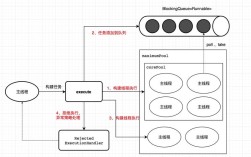
A standard thread pool implementation is based on the Producer-Consumer pattern and has three main parts:
- The Thread Pool (
ExecutorService): This is the main interface that manages the worker threads and the queue. You submit tasks to it. - The Task Queue (
BlockingQueue): This holds the tasks waiting to be executed. It's "blocking," meaning if the queue is full, a producer (the part of your code submitting a task) will block until space becomes available. - The Worker Threads: These are the threads that continuously pull tasks from the queue and execute them. When a thread finishes a task, it goes back to the queue to get the next one.
Java's Thread Pool API: Executor Framework
Java provides a powerful and flexible java.util.concurrent package for managing concurrency. The heart of this framework is the Executor interface.
public interface Executor {
    void execute(Runnable command);
}
The Executor interface decouples task submission from task execution. The most important implementation is ExecutorService, which adds lifecycle management methods.
Key Interfaces and Classes:
Executor: The base interface.ExecutorService: An extension ofExecutorthat adds methods for managing the lifecycle of the executor (e.g.,shutdown(),submit()).ThreadPoolExecutor: The full-featured, flexible implementation ofExecutorService. It allows you to configure all aspects of the thread pool (core size, max size, keep-alive time, queue type, etc.).Executors: A utility class that provides factory methods to create pre-configuredExecutorServiceinstances. This is the easiest way to get started.
How to Use a Thread Pool (Practical Examples)
Method 1: Using the Executors Factory (Recommended for Beginners)
The Executors class provides simple factory methods for common thread pool configurations.
Example 1: Fixed-Size Thread Pool
This is the most common type. It creates a pool with a fixed number of threads that will live for the duration of the application.
import java.util.concurrent.ExecutorService;
import java.util.concurrent.Executors;
import java.util.concurrent.TimeUnit;
public class FixedThreadPoolExample {
    public static void main(String[] args) {
        // Create a thread pool with 2 worker threads
        ExecutorService executor = Executors.newFixedThreadPool(2);
        // Submit 5 tasks to the pool
        for (int i = 1; i <= 5; i++) {
            final int taskId = i;
            executor.execute(() -> {
                System.out.println("Task " + taskId + " is starting on thread " + Thread.currentThread().getName());
                try {
                    // Simulate work
                    Thread.sleep(2000);
                } catch (InterruptedException e) {
                    e.printStackTrace();
                }
                System.out.println("Task " + taskId + " has finished.");
            });
        }
        // Shut down the executor. This is crucial!
        executor.shutdown();
        try {
            // Wait for all tasks to complete before exiting the program
            executor.awaitTermination(1, TimeUnit.MINUTES);
        } catch (InterruptedException e) {
            e.printStackTrace();
        }
        System.out.println("All tasks completed. Executor shut down.");
    }
}
Output:
Task 1 is starting on thread pool-1-thread-1
Task 2 is starting on thread pool-1-thread-2
Task 3 has finished.
Task 1 has finished.
Task 4 is starting on thread pool-1-thread-1
Task 5 is starting on thread pool-1-thread-2
Task 2 has finished.
Task 4 has finished.
Task 5 has finished.
All tasks completed. Executor shut down.
Notice how tasks 1 and 2 start immediately. Tasks 3, 4, and 5 wait in the queue until one of the two threads becomes free.
Example 2: Cached Thread Pool
This pool creates new threads as needed but will reuse previously constructed threads when they are available. It is suitable for applications with many short-lived tasks. Warning: It can grow without bound if you submit tasks faster than they complete.
ExecutorService executor = Executors.newCachedThreadPool();
// ... submit tasks ...
executor.shutdown();
Method 2: Manual Configuration with ThreadPoolExecutor (Advanced)
For fine-grained control, you can instantiate ThreadPoolExecutor directly. This is useful for performance tuning and custom behavior.
The constructor has several key parameters:
public ThreadPoolExecutor(int corePoolSize,
                          int maximumPoolSize,
                          long keepAliveTime,
                          TimeUnit unit,
                          BlockingQueue<Runnable> workQueue,
                          ThreadFactory threadFactory,
                          RejectedExecutionHandler handler)
corePoolSize: The number of threads to keep in the pool, even if they are idle.maximumPoolSize: The maximum number of threads to allow in the pool.keepAliveTime&unit: When the number of threads is greater thancorePoolSize, this is the time excess threads will wait for a new task before being terminated.workQueue: The queue to use for holding tasks before they are executed. Common types:LinkedBlockingQueue: An unbounded queue (can grow very large).ArrayBlockingQueue: A bounded queue (good for preventing resource exhaustion).SynchronousQueue: A queue that hands off tasks directly to threads, without queuing them. RequiresmaximumPoolSizeto be large.
- **`threadFactory``: A factory for creating new threads. You can use this to customize thread names, priorities, etc.
handler: The policy to use when a task cannot be executed because the thread pool is shut down or saturated.
Example: Custom ThreadPoolExecutor
import java.util.concurrent.*;
import java.util.concurrent.atomic.AtomicInteger;
public class CustomThreadPoolExample {
    public static void main(String[] args) {
        // A custom thread factory to name threads
        ThreadFactory threadFactory = r -> {
            Thread t = new Thread(r);
            t.setName("MyCustomWorker-" + new AtomicInteger().getAndIncrement());
            return t;
        };
        // Create a ThreadPoolExecutor with custom settings
        ThreadPoolExecutor executor = new ThreadPoolExecutor(
                2, // corePoolSize
                5, // maximumPoolSize
                60, // keepAliveTime
                TimeUnit.SECONDS,
                new LinkedBlockingQueue<>(10), // workQueue with capacity of 10
                threadFactory
        );
        // Submit 20 tasks to the pool
        for (int i = 1; i <= 20; i++) {
            final int taskId = i;
            executor.execute(() -> {
                System.out.println("Executing Task " + taskId + " on thread " + Thread.currentThread().getName());
                try {
                    Thread.sleep(1000);
                } catch (InterruptedException e) {
                    Thread.currentThread().interrupt();
                }
            });
        }
        // Shutdown gracefully
        executor.shutdown();
    }
}
Handling Task Submission: execute() vs. submit()
-
void execute(Runnable command): Submits aRunnabletask for execution. It returns nothing. If the task cannot be accepted (e.g., pool is full and queue is full), it throws aRejectedExecutionException. -
Future<T> submit(Callable<T> task): Submits aCallabletask for execution and returns aFutureobject. TheFuturerepresents the pending result of the computation. You can use it to:- Check if the task is complete (
isDone()). - Wait for the task to complete (
get()). - Cancel the task (
cancel()).
- Check if the task is complete (
A Callable is like a Runnable, but it can return a value and throw a checked exception.
ExecutorService executor = Executors.newFixedThreadPool(2);
// Using submit() with a Callable
Future<String> future = executor.submit(() -> {
    Thread.sleep(1000);
    return "Task Result";
});
// Do other work...
try {
    // The get() method blocks until the result is available
    String result = future.get();
    System.out.println("Received result: " + result);
} catch (InterruptedException | ExecutionException e) {
    e.printStackTrace();
}
Graceful Shutdown
It's critical to shut down your ExecutorService to release resources and allow your application to exit cleanly.
shutdown(): Initiates an orderly shutdown. It doesn't accept new tasks, but it will complete all previously submitted tasks. It does not force the termination of running tasks.shutdownNow(): Attempts to stop all actively executing tasks, halts the processing of waiting tasks, and returns a list of the tasks that were awaiting execution. This is a more abrupt shutdown.
Best Practice: Use shutdown() and then awaitTermination().
executor.shutdown(); // Disable new tasks from being submitted
try {
    // Wait a while for existing tasks to terminate
    if (!executor.awaitTermination(60, TimeUnit.SECONDS)) {
        // That timed out, so cancel currently executing tasks
        executor.shutdownNow();
        // Wait a while for tasks to respond to being cancelled
        if (!executor.awaitTermination(60, TimeUnit.SECONDS))
            System.err.println("Pool did not terminate");
    }
} catch (InterruptedException ie) {
    // (Re-)Cancel if current thread also interrupted
    executor.shutdownNow();
    // Preserve interrupt status
    Thread.currentThread().interrupt();
}
Common Pitfalls
- Not Shutting Down the Pool: This leads to resource leaks and prevents your application from exiting.
- Queue Overflow: Using an unbounded queue (
LinkedBlockingQueue) can cause your application to run out of memory if tasks are submitted much faster than they are processed. - Deadlocks: Be careful when tasks submitted to the pool need to wait for other tasks submitted to the same pool to complete. This can cause a deadlock.
- Ignoring Exceptions: Exceptions thrown by a
Runnabletask are caught and handled by the thread pool, but they don't propagate to your main thread. Usesubmit()and check theFuture.get()to handle exceptions from tasks.