Of course! Here’s a comprehensive guide on how to perform RSA signature verification in Python, covering the standard library, the popular cryptography library, and a complete example.
What is RSA Signature Verification?
RSA signature verification is the process of checking if a digital signature was created by the private key corresponding to a specific public key. It's used to ensure:
- Authenticity: The message came from the claimed sender.
- Integrity: The message was not altered in transit.
The process involves:
- The sender's public key.
- The original message.
- The signature that was created by the sender.
The algorithm uses these three inputs to perform a mathematical check. If the check passes, the signature is valid.
Method 1: Using the Standard Library (hashlib and rsa)
This approach is great for understanding the fundamentals but is generally not recommended for new projects because the rsa module is basic and lacks features like key loading from standard formats (PEM, DER).
Step-by-Step Example
Let's break it down into three parts: Key Generation (for the sender), Signature Creation (by the sender), and Verification (by the receiver).
Key Generation (Sender's Side)
First, the sender needs to generate an RSA key pair.
import rsa
# Generate a public/private key pair (1024-bit key for this example)
# In a real application, use a much larger key (e.g., 2048 or 4096 bits)
public_key, private_key = rsa.newkeys(1024)
print("Sender's Public Key (PEM format):")
print(public_key.save_pkcs1().decode('utf-8'))
print("\nSender's Private Key (PEM format):")
print(private_key.save_pkcs1().decode('utf-8'))
Signature Creation (Sender's Side)
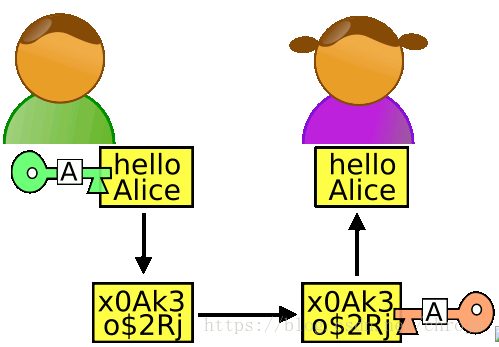
The sender signs the message with their private key.
# The message the sender wants to sign
message = b"Hello, this is a secret message."
# Create the signature using the sender's private key
# The 'hash' algorithm must be specified. SHA256 is a common and secure choice.
signature = rsa.sign(message, private_key, 'SHA-256')
print(f"\nOriginal Message: {message.decode('utf-8')}")
print(f"Signature (hex): {signature.hex()}")
# In a real scenario, the sender would now send the message and the signature
# to the receiver. The sender would keep the private key secret.
Signature Verification (Receiver's Side)
The receiver receives the message, the signature, and the sender's public key. They then perform the verification.
# --- RECEIVER'S SIDE ---
# The receiver gets these three items:
# 1. The original message
# 2. The signature from the sender
# 3. The sender's public key
received_message = b"Hello, this is a secret message."
received_signature = signature  # The signature from above
sender_public_key = public_key   # The public key from above
try:
    # Verify the signature
    # This will raise an exception if the verification fails
    rsa.verify(received_message, received_signature, sender_public_key)
    print("\nSignature is VALID!")
except rsa.VerificationError:
    print("\nSignature is INVALID!")
except Exception as e:
    print(f"\nAn error occurred: {e}")
# --- Example of an INVALID signature ---
print("\n--- Testing with a TAMPERED message ---")
tampered_message = b"Hello, this is a TAMPERED message."
try:
    rsa.verify(tampered_message, received_signature, sender_public_key)
    print("Signature is VALID!")
except rsa.VerificationError:
    print("Signature is INVALID (as expected for a tampered message).")
Method 2: Using the cryptography Library (Recommended)
The cryptography library is the modern standard for cryptographic operations in Python. It's more robust, secure, and easier to use with standard key formats.
First, install it:
pip install cryptography
Step-by-Step Example
The process is similar, but the API is more aligned with industry standards.
Key Generation and Saving (Sender's Side)
We'll generate keys and save them to files in the standard PEM format. This is how keys are typically stored and exchanged.
from cryptography.hazmat.primitives.asymmetric import rsa
from cryptography.hazmat.primitives import serialization
from cryptography.hazmat.primitives import hashes
from cryptography.hazmat.primitives.asymmetric import padding
from cryptography.exceptions import InvalidSignature
# --- SENDER'S SIDE ---
# 1. Generate a private key
private_key = rsa.generate_private_key(
    public_exponent=65537,
    key_size=2048,
)
# 2. Get the public key
public_key = private_key.public_key()
# 3. Save the private key to a file
with open("private_key.pem", "wb") as f:
    f.write(private_key.private_bytes(
        encoding=serialization.Encoding.PEM,
        format=serialization.PrivateFormat.PKCS8,
        encryption_algorithm=serialization.NoEncryption() # Use BestAvailableEncryption in production
    ))
# 4. Save the public key to a file
with open("public_key.pem", "wb") as f:
    f.write(public_key.public_bytes(
        encoding=serialization.Encoding.PEM,
        format=serialization.PublicFormat.SubjectPublicKeyInfo
    ))
print("Sender's keys have been generated and saved.")
Signature Creation (Sender's Side)
The sender loads their private key and signs the message.
# The message to be signed
message = b"Hello, this is a secret message."
# Load the private key from the file
with open("private_key.pem", "rb") as key_file:
    private_key = serialization.load_pem_private_key(
        key_file.read(),
        password=None, # Set to password if you encrypted the key
    )
# Create the signature
# PSS (Probabilistic Signature Scheme) is a more secure padding scheme than PKCS#1 v1.5
signature = private_key.sign(
    message,
    padding.PSS(
        mgf=padding.MGF1(hashes.SHA256()),
        salt_length=padding.PSS.MAX_LENGTH
    ),
    hashes.SHA256()
)
print(f"\nOriginal Message: {message.decode('utf-8')}")
print(f"Signature (hex): {signature.hex()}")
# Sender sends 'message' and 'signature' to the receiver.
Signature Verification (Receiver's Side)
The receiver loads the sender's public key and verifies the signature.
# --- RECEIVER'S SIDE ---
# The receiver gets these items:
# 1. The original message
# 2. The signature from the sender
# 3. The sender's public key file
received_message = b"Hello, this is a secret message."
received_signature = signature # The signature from above
# Load the sender's public key from the file
with open("public_key.pem", "rb") as key_file:
    sender_public_key = serialization.load_pem_public_key(
        key_file.read(),
    )
try:
    # Verify the signature
    sender_public_key.verify(
        received_signature,
        received_message,
        padding.PSS(
            mgf=padding.MGF1(hashes.SHA256()),
            salt_length=padding.PSS.MAX_LENGTH
        ),
        hashes.SHA256()
    )
    print("\nSignature is VALID!")
except InvalidSignature:
    print("\nSignature is INVALID!")
except Exception as e:
    print(f"\nAn error occurred: {e}")
# --- Example of an INVALID signature ---
print("\n--- Testing with a TAMPERED message ---")
tampered_message = b"Hello, this is a TAMPERED message."
try:
    sender_public_key.verify(
        received_signature,
        tampered_message,
        padding.PSS(
            mgf=padding.MGF1(hashes.SHA256()),
            salt_length=padding.PSS.MAX_LENGTH
        ),
        hashes.SHA256()
    )
    print("Signature is VALID!")
except InvalidSignature:
    print("Signature is INVALID (as expected for a tampered message).")
Summary: Which one to use?
| Feature | rsa (Standard Library) |
cryptography (Recommended) |
|---|---|---|
| Ease of Use | Simple for basic cases. | More complex API, but more powerful. |
| Key Formats | Manual conversion needed. | Excellent support for PEM, DER, etc. |
| Padding | Basic support (PKCS#1 v1.5). | Supports modern, secure padding (PSS). |
| Security | Good, but less actively maintained. | Actively maintained by security experts. |
| Recommendation | Good for learning, simple scripts. | Recommended for all new projects. |
For any serious application, use the cryptography library. It provides better security features and follows modern cryptographic best practices.