Of course! Let's dive deep into Java 8's collect() method, which is a cornerstone of the Stream API for transforming streams into collections or other data structures.
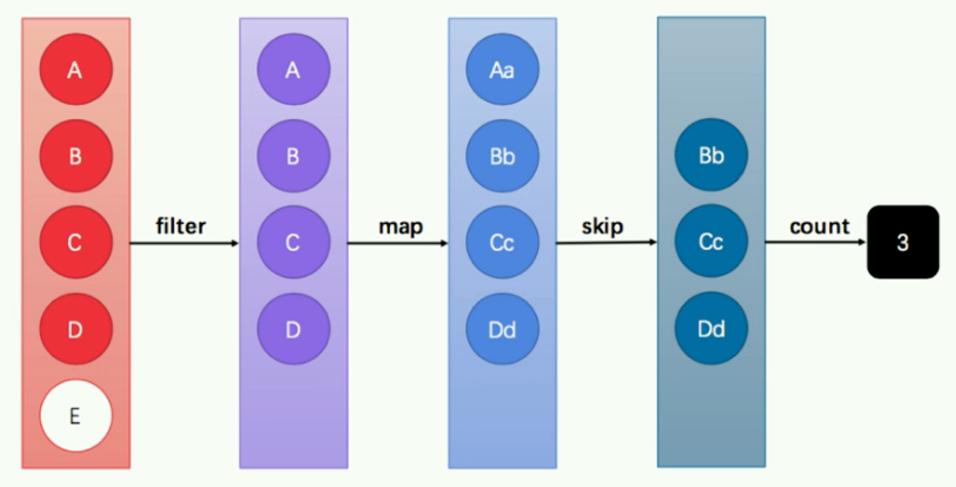
What is collect()?
In simple terms, collect() is a terminal operation that transforms the elements of a stream into a different result, such as a List, Set, Map, or even a custom object.
It works by taking a collector as an argument. A collector is an object that tells collect() how to accumulate the stream elements.
The Two Main Ways to Use collect()
There are two primary ways to use collect():
- Using Built-in Collectors (The Easy Way): The
Collectorsutility class provides a rich set of predefined static methods for common collection tasks. This is what you'll use 95% of the time. - Using a Custom Collector (The Advanced Way): You can implement the
Collector<T, A, R>interface to define your own accumulation logic. This is powerful but more complex.
Method Signatures
The collect() method has a few overloads, but the most common and flexible one is:

<R, A> R collect(Collector<? super T, A, R> collector)
T: The type of elements in the stream.A: The type of the accumulator or mutable result container (e.g.,ArrayList,StringBuilder).R: The type of the final result (e.g.,List,String).
Using Built-in Collectors (Collectors)
The java.util.stream.Collectors class is your best friend. Let's explore its most useful methods.
A. Collecting into a Collection
These are the most straightforward collectors.
toList(): Collects elements into a newList.toSet(): Collects elements into a newSet, automatically removing duplicates.toCollection(Supplier<C> collectionFactory): Collects into a specific collection type, like aLinkedListor aTreeSet.
Example:
import java.util.*;
import java.util.stream.*;
public class CollectExamples {
    public static void main(String[] args) {
        List<String> names = Arrays.asList("Alice", "Bob", "Charlie", "Alice", "David");
        // 1. Collect to a List (default, usually ArrayList)
        List<String> nameList = names.stream()
                                     .collect(Collectors.toList());
        System.out.println("List: " + nameList); // [Alice, Bob, Charlie, Alice, David]
        // 2. Collect to a Set (removes duplicates)
        Set<String> nameSet = names.stream()
                                    .collect(Collectors.toSet());
        System.out.println("Set: " + nameSet); // [Alice, Bob, Charlie, David]
        // 3. Collect to a specific collection type (e.g., LinkedList)
        LinkedList<String> nameLinkedList = names.stream()
                                                .collect(Collectors.toCollection(LinkedList::new));
        System.out.println("LinkedList: " + nameLinkedList); // [Alice, Bob, Charlie, Alice, David]
    }
}
B. Collecting into a Map
This is extremely useful for transforming stream elements into key-value pairs.
toMap(Function<T, K> keyMapper, Function<T, U> valueMapper): Creates aMapwhere the key and value are derived from the stream element.toMap(Function<T, K> keyMapper, Function<T, U> valueMapper, BinaryOperator<U> mergeFunction): Handles duplicate keys by specifying a merge function (e.g., keep the old value, keep the new value, or sum them).toMap(Function<T, K> keyMapper, Function<T, U> valueMapper, BinaryOperator<U> mergeFunction, Supplier<Map<K, U>> mapSupplier): Full control, specifying the map type (e.g.,HashMap,TreeMap).
Example:
import java.util.*;
import java.util.stream.*;
import java.util.function.*;
class Person {
    String name;
    int age;
    Person(String name, int age) {
        this.name = name;
        this.age = age;
    }
    public String getName() { return name; }
    public int getAge() { return age; }
    @Override
    public String toString() {
        return name + " (" + age + ")";
    }
}
public class MapCollectExamples {
    public static void main(String[] args) {
        List<Person> people = Arrays.asList(
            new Person("Alice", 30),
            new Person("Bob", 25),
            new Person("Charlie", 35),
            new Person("David", 25) // Same age as Bob
        );
        // 1. Create a Map: Name -> Age
        Map<String, Integer> nameToAge = people.stream()
            .collect(Collectors.toMap(
                Person::getName,  // Key mapper: person's name
                Person::getAge     // Value mapper: person's age
            ));
        System.out.println("Name -> Age: " + nameToAge);
        // {Alice=30, Bob=25, Charlie=35, David=25}
        // 2. Create a Map: Age -> Person (handle duplicate ages)
        // We need a merge function to decide what to do if two people have the same age.
        // Here, we keep the first one we encounter.
        Map<Integer, Person> ageToPersonFirst = people.stream()
            .collect(Collectors.toMap(
                Person::getAge,
                Function.identity(), // Value mapper: the person object itself
                (existing, replacement) -> existing // Merge function: keep existing
            ));
        System.out.println("Age -> Person (keep first): " + ageToPersonFirst);
        // {30=Alice (30), 25=Bob (25), 35=Charlie (35)}
        // 3. Create a Map: Age -> List of People
        Map<Integer, List<Person>> ageToPeopleList = people.stream()
            .collect(Collectors.groupingBy(Person::getAge));
        System.out.println("Age -> List of People: " + ageToPeopleList);
        // {30=[Alice (30)], 25=[Bob (25), David (25)], 35=[Charlie (35)]}
    }
}
C. Grouping, Partitioning, and Reducing
-
groupingBy(): The most powerful collector for maps. It groups elements by a classifier function.groupingBy(Function<T, K> classifier)groupingBy(Function<T, K> classifier, Collector downstream)(e.g., group by age, then count people in each group)groupingBy(Function<T, K> classifier, Supplier<Map<K, D>> mapFactory, Collector downstream)
-
partitioningBy(): A special case ofgroupingBythat splits a stream into two groups based on aPredicate. It always returns aMap<Boolean, List<T>>.partitioningBy(Predicate<T> predicate)partitioningBy(Predicate<T> predicate, Collector downstream)
-
joining(): Primarily forStream<Character>orStream<String>. It concatenates elements into a single string.joining(): Simple concatenation.joining(CharSequence delimiter): With a delimiter.joining(CharSequence delimiter, CharSequence prefix, CharSequence suffix): With delimiter, prefix, and suffix.
Example:
import java.util.*;
import java.util.stream.*;
public class AdvancedCollectExamples {
    public static void main(String[] args) {
        List<String> words = Arrays.asList("apple", "banana", "cherry", "date", "fig", "grape");
        // 1. Grouping by length of the word
        Map<Integer, List<String>> wordsByLength = words.stream()
            .collect(Collectors.groupingBy(String::length));
        System.out.println("Group by length: " + wordsByLength);
        // {5=[apple, date], 6=[banana, cherry, grape], 3=[fig]}
        // 2. Grouping by first character and collecting to a Set (to remove duplicates)
        Map<Character, Set<String>> wordsByFirstChar = words.stream()
            .collect(Collectors.groupingBy(s -> s.charAt(0), Collectors.toSet()));
        System.out.println("Group by first char (Set): " + wordsByFirstChar);
        // {a=[apple], b=[banana], c=[cherry], d=[date], f=[fig], g=[grape]}
        // 3. Partitioning into words with more than 4 letters and others
        Map<Boolean, List<String>> partitioned = words.stream()
            .collect(Collectors.partitioningBy(s -> s.length() > 4));
        System.out.println("Partition by length > 4: " + partitioned);
        // {false=[fig], true=[apple, banana, cherry, date, grape]}
        // 4. Joining strings
        String joined = words.stream()
            .collect(Collectors.joining(", ", "Fruits: [", "]"));
        System.out.println("Joined string: " + joined);
        // Fruits: [apple, banana, cherry, date, fig, grape]
    }
}
How Collectors Work: The "3 Operations" Model
Each collector (from Collectors) is built around three core functions that define the accumulation process:
- Supplier
() -> A: A function that creates a new, empty result container (accumulator). FortoList(), this would be() -> new ArrayList<>(). - Accumulator
(A, T) -> A: A function that takes an accumulator and a stream element, and merges the element into the accumulator. FortoList(), this is(list, item) -> { list.add(item); return list; }. - Combiner
(A, A) -> A: A function used to combine two partial results when the stream is processed in parallel. FortoList(), this is(list1, list2) -> { list1.addAll(list2); return list1; }.
The collect() operation does the following:
- Creates a new accumulator using the supplier.
- For each element in the stream, it calls the accumulator to add the element to the accumulator.
- If the stream is parallel, it may create multiple accumulators and then use the combiner to merge them at the end.
Creating a Custom Collector
This is an advanced topic, but it's good to know it's possible. You would implement the Collector<T, A, R> interface, which has five methods:
supplier(): Returns the supplier.accumulator(): Returns the accumulator.combiner(): Returns the combiner.finisher(): A function to convert the final accumulator into the result type (e.g.,StringBuilder->String). Often an identity function.characteristics(): Returns a set of characteristics likeCONCURRENT,UNORDERED, orIDENTITY_FINISH.
Example: A custom collector to find the longest string.
import java.util.*;
import java.util.stream.*;
import java.util.function.*;
public class CustomCollectorExample {
    public static void main(String[] args) {
        List<String> words = Arrays.asList("giraffe", "ant", "monkey", "elephant");
        // Using a custom collector to find the longest string
        Optional<String> longestWord = words.stream()
            .collect(
                () -> new ArrayList<String>(1), // Supplier: create a list with capacity 1
                (list, word) -> {              // Accumulator
                    if (list.isEmpty() || word.length() > list.get(0).length()) {
                        list.clear();
                        list.add(word);
                    }
                },
                (list1, list2) -> {            // Combiner
                    if (list2.get(0).length() > list1.get(0).length()) {
                        list1.clear();
                        list1.addAll(list2);
                    }
                }
            ).stream().findFirst(); // The result is a List with one element
        longestWord.ifPresent(s -> System.out.println("Longest word: " + s)); // Longest word: elephant
    }
}
While this works, for this specific task, Collectors.reducing() is a much cleaner built-in solution.
collect() vs. reduce()
This is a common point of confusion.
| Feature | collect() |
reduce() |
|---|---|---|
| Purpose | Transform a stream into a collection (List, Set, Map). |
Reduce a stream to a single value (a sum, a product, a custom object). |
| Mutability | Designed for mutable accumulation. It's efficient and thread-safe for parallel streams. | Designed for immutable reduction. While you can use mutable objects, it's not its primary purpose and can be less efficient in parallel. |
| Type | Result type can be different from the stream element type. | Result type is usually the same as the stream element type. |
| Usage | collect(Collectors.toList()) |
reduce(0, (a, b) -> a + b) |
Think of it this way:
- Use
collect()when you are building something new from the stream (like a list, a map, or a string). - Use
reduce()when you are calculating a single summary value from the stream (like a sum, max, min, or a combined object).
Summary
The collect() method is an incredibly versatile and powerful tool in Java 8. By mastering the Collectors utility class, you can write concise, readable, and efficient code for almost any data aggregation or transformation task. It's one of the features that truly makes functional-style programming in Java both elegant and practical.