Of course! Here is a comprehensive guide to Python list items, covering everything from basic creation to advanced operations.
What is a Python List?
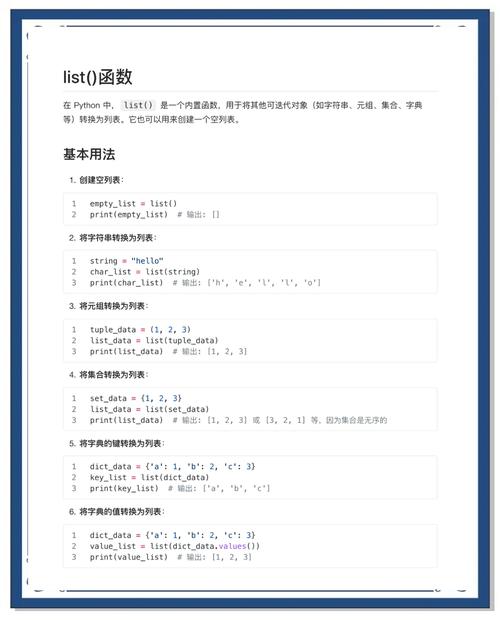
A list is one of Python's most fundamental and versatile data structures. It's an ordered, mutable (changeable) collection of items. Think of it as a dynamic array or a shopping list where you can add, remove, or change items.
Key Characteristics:
- Ordered: The items have a defined order, and that order will not change unless you modify the list.
- Mutable: You can change, add, or remove items after the list has been created.
- Allows Duplicates: Lists can contain items with the same value.
- Heterogeneous: A single list can contain items of different data types (e.g., integers, strings, booleans, even other lists).
Creating a List
You create a list by placing comma-separated items inside square brackets [].
# A list of integers
numbers = [1, 2, 3, 4, 5]
# A list of strings
fruits = ["apple", "banana", "cherry"]
# A list with mixed data types
mixed_list = [10, "hello", True, 3.14]
# An empty list
empty_list = []
# You can also use the list() constructor
another_empty_list = list()
Accessing List Items (Indexing)
You access items in a list by using their index, which is their position in the list. Indexing starts at 0.
Positive Indexing (from the start)
| Index | 0 | 1 | 2 | 3 |
|---|---|---|---|---|
| Value | "apple" | "banana" | "cherry" | "date" |
fruits = ["apple", "banana", "cherry", "date"]
print(fruits[0])  # Output: apple
print(fruits[2])  # Output: cherry
Negative Indexing (from the end)
Negative indexing allows you to count backward from the end of the list. -1 is the last item, -2 is the second-to-last, and so on.
| Index | -4 | -3 | -2 | -1 |
|---|---|---|---|---|
| Value | "apple" | "banana" | "cherry" | "date" |
fruits = ["apple", "banana", "cherry", "date"]
print(fruits[-1])  # Output: date
print(fruits[-3])  # Output: banana
Slicing (Getting a Sub-list)
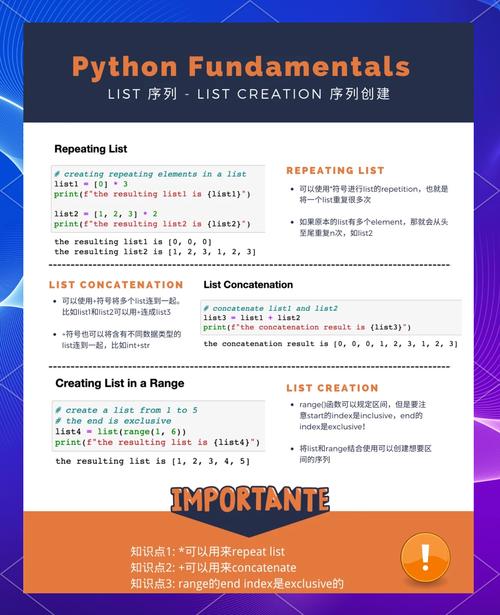
You can get a portion of a list using slicing. The syntax is list[start:stop:step].
start: The index to start at (inclusive).stop: The index to stop at (exclusive).step: The size of the jump between items (optional, defaults to 1).
fruits = ["apple", "banana", "cherry", "date", "elderberry"]
# Get items from index 1 up to (but not including) index 3
print(fruits[1:3])  # Output: ['banana', 'cherry']
# Get the first three items
print(fruits[:3])   # Output: ['apple', 'banana', 'cherry']
# Get from the third item to the end
print(fruits[2:])   # Output: ['cherry', 'date', 'elderberry']
# Get every second item
print(fruits[::2])  # Output: ['apple', 'cherry', 'elderberry']
# Reverse the list
print(fruits[::-1]) # Output: ['elderberry', 'date', 'cherry', 'banana', 'apple']
Modifying List Items
Since lists are mutable, you can change items directly by accessing them via their index.
fruits = ["apple", "banana", "cherry"]
# Change the item at index 1
fruits[1] = "blueberry"
print(fruits)  # Output: ['apple', 'blueberry', 'cherry']
# Change a slice of the list
fruits[1:3] = ["blackberry", "raspberry"]
print(fruits)  # Output: ['apple', 'blackberry', 'raspberry']
Adding Items to a List
There are several ways to add items to a list.
append()
Adds a single item to the end of the list.
fruits = ["apple", "banana"]
fruits.append("cherry")
print(fruits)  # Output: ['apple', 'banana', 'cherry']
insert()
Adds an item at a specific position.
fruits = ["apple", "banana"]
fruits.insert(1, "blueberry")  # Insert "blueberry" at index 1
print(fruits)  # Output: ['apple', 'blueberry', 'banana']
extend()
Adds all items from another iterable (like another list) to the end of the list.
fruits = ["apple", "banana"]
more_fruits = ["cherry", "date"]
fruits.extend(more_fruits)
print(fruits)  # Output: ['apple', 'banana', 'cherry', 'date']
Note: fruits += more_fruits does the same thing.
Removing Items from a List
remove()
Removes the first occurrence of a specified value. Raises a ValueError if the item is not found.
fruits = ["apple", "banana", "cherry", "banana"]
fruits.remove("banana")
print(fruits)  # Output: ['apple', 'cherry', 'banana']
pop()
Removes the item at a specified index. If no index is given, it removes and returns the last item. It raises an IndexError if the list is empty or the index is out of range.
fruits = ["apple", "banana", "cherry"]
# Remove the last item
last_fruit = fruits.pop()
print(f"Removed:", last_fruit)  # Output: Removed: cherry
print(fruits)                  # Output: ['apple', 'banana']
# Remove the item at index 0
first_fruit = fruits.pop(0)
print("Removed:", first_fruit) # Output: Removed: apple
print(fruits)                  # Output: ['banana']
del statement
Deletes an item at a specific index or a slice. It doesn't return the item; it just deletes it.
fruits = ["apple", "banana", "cherry", "date"]
# Delete the item at index 2
del fruits[2]
print(fruits)  # Output: ['apple', 'banana', 'date']
# Delete a slice
del fruits[0:2]
print(fruits)  # Output: ['date']
clear()
Removes all items from the list, leaving it empty.
fruits = ["apple", "banana", "cherry"]
fruits.clear()
print(fruits)  # Output: []
Common List Methods and Operations
| Method/Operation | Description | Example |
|---|---|---|
len(list) |
Returns the number of items in the list. | len(fruits) -> 3 |
list.count(item) |
Returns the number of times an item appears in the list. | fruits.count("apple") -> 1 |
list.sort() |
Sorts the list in ascending order (in-place). | numbers.sort() |
list.reverse() |
Reverses the order of the items (in-place). | fruits.reverse() |
list.copy() |
Returns a shallow copy of the list. | new_fruits = fruits.copy() |
# Example of sorting and reversing
numbers = [4, 2, 9, 1, 5]
numbers.sort()
print(numbers)  # Output: [1, 2, 4, 5, 9]
numbers.reverse()
print(numbers)  # Output: [9, 5, 4, 2, 1]
# Example of counting
fruits = ["apple", "banana", "apple", "cherry"]
print(fruits.count("apple")) # Output: 2
Checking for an Item
Use the in keyword to check if an item exists in a list. This returns a boolean (True or False).
fruits = ["apple", "banana", "cherry"]
print("banana" in fruits)  # Output: True
print("grape" in fruits)   # Output: False
Looping Through a List
You can iterate over the items in a list using a for loop.
fruits = ["apple", "banana", "cherry"]
# Loop through the items
for fruit in fruits:
    print(fruit)
# Output:
# apple
# banana
# cherry
# Loop through the indices and items
for index, fruit in enumerate(fruits):
    print(f"Index {index}: {fruit}")
# Output:
# Index 0: apple
# Index 1: banana
# Index 2: cherry
Nested Lists
Lists can contain other lists as items. This is how you can create multi-dimensional structures like matrices.
# A 3x3 matrix
matrix = [
    [1, 2, 3],
    [4, 5, 6],
    [7, 8, 9]
]
# Accessing an item in a nested list
# First row, second column
print(matrix[0][1])  # Output: 2
# Looping through a nested list
for row in matrix:
    for item in row:
        print(item, end=" ")
# Output: 1 2 3 4 5 6 7 8 9