Java Base64 二进制处理指南
在Java中处理Base64编码的二进制数据非常常见,以下是详细的处理方法:
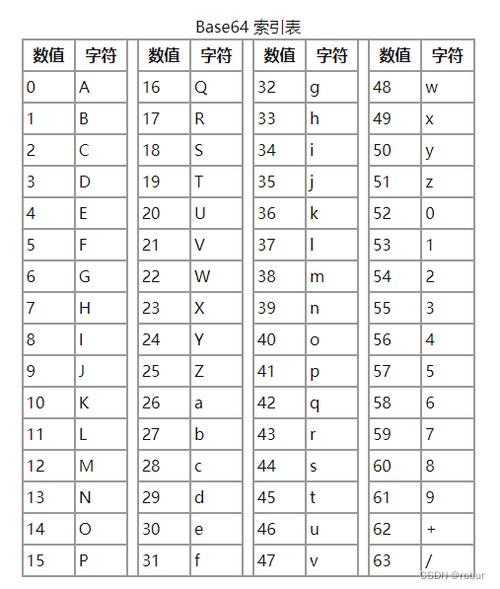
(图片来源网络,侵删)
Java 8+ 内置Base64 API
Java 8及以上版本提供了内置的java.util.Base64类,推荐使用。
编码二进制数据为Base64字符串
import java.util.Base64;
public class Base64Example {
    public static void main(String[] args) {
        // 原始二进制数据
        byte[] binaryData = "Hello, World!".getBytes();
        // 编码为Base64
        String base64Encoded = Base64.getEncoder().encodeToString(binaryData);
        System.out.println("Base64编码: " + base64Encoded);
        // 或者直接使用静态方法
        String base64Static = Base64.getEncoder().encodeToString(binaryData);
        System.out.println("静态方法编码: " + base64Static);
    }
}
解码Base64字符串为二进制数据
import java.util.Base64;
public class Base64Example {
    public static void main(String[] args) {
        // Base64字符串
        String base64String = "SGVsbG8sIFdvcmxkIQ==";
        // 解码为二进制数据
        byte[] decodedBytes = Base64.getDecoder().decode(base64String);
        System.out.println("解码后的字符串: " + new String(decodedBytes));
    }
}
处理大型二进制数据
对于大型文件或二进制数据,可以使用流式处理:
import java.io.*;
import java.util.Base64;
public class Base64StreamExample {
    public static void main(String[] args) throws IOException {
        // 编码文件
        try (InputStream in = new FileInputStream("input.bin");
             OutputStream out = new FileOutputStream("output.b64")) {
            Base64.Encoder encoder = Base64.getEncoder();
            encoder.wrap(out); // 包装输出流
            byte[] buffer = new byte[1024];
            int bytesRead;
            while ((bytesRead = in.read(buffer)) != -1) {
                out.write(buffer, 0, bytesRead);
            }
        }
        // 解码文件
        try (InputStream in = new FileInputStream("output.b64");
             OutputStream out = new FileOutputStream("decoded.bin")) {
            Base64.Decoder decoder = Base64.getDecoder();
            decoder.wrap(in); // 包装输入流
            byte[] buffer = new byte[1024];
            int bytesRead;
            while ((bytesRead = in.read(buffer)) != -1) {
                out.write(buffer, 0, bytesRead);
            }
        }
    }
}
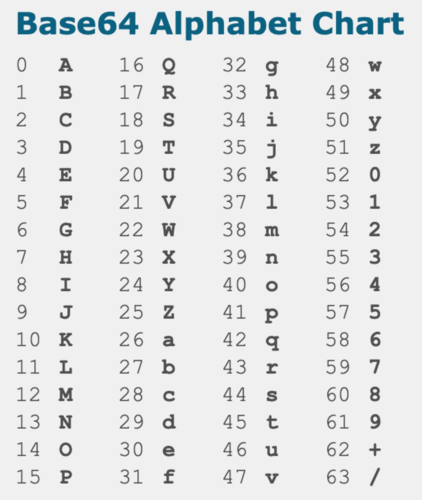
URL安全的Base64编码
URL安全的Base64编码使用和_替代和:
import java.util.Base64;
public class Base64UrlExample {
    public static void main(String[] args) {
        byte[] data = "Hello, World!".getBytes();
        // URL安全的Base64编码
        String urlSafeEncoded = Base64.getUrlEncoder().encodeToString(data);
        System.out.println("URL安全编码: " + urlSafeEncoded);
        // 解码
        byte[] decoded = Base64.getUrlDecoder().decode(urlSafeEncoded);
        System.out.println("解码后: " + new String(decoded));
    }
}
处理MIME类型的Base64
MIME类型的Base64编码每76个字符插入换行符:
(图片来源网络,侵删)
import java.util.Base64;
public class Base64MimeExample {
    public static void main(String[] args) {
        byte[] data = "This is a longer string that will be encoded with MIME line breaks".getBytes();
        // MIME类型的Base64编码
        String mimeEncoded = Base64.getMimeEncoder().encodeToString(data);
        System.out.println("MIME编码:\n" + mimeEncoded);
        // 解码
        byte[] decoded = Base64.getMimeDecoder().decode(mimeEncoded);
        System.out.println("解码后: " + new String(decoded));
    }
}
Java 7及更早版本的处理
对于Java 7及更早版本,可以使用第三方库如Apache Commons Codec:
import org.apache.commons.codec.binary.Base64;
public class Base64LegacyExample {
    public static void main(String[] args) {
        byte[] data = "Hello, World!".getBytes();
        // 编码
        byte[] encodedBytes = Base64.encodeBase64(data);
        String encodedString = new String(encodedBytes);
        System.out.println("Base64编码: " + encodedString);
        // 解码
        byte[] decodedBytes = Base64.decodeBase64(encodedString);
        System.out.println("解码后: " + new String(decodedBytes));
    }
}
注意事项
- Base64编码会增加数据大小(大约增加33%)
- 处理大型文件时使用流式处理避免内存问题
- 根据使用场景选择适当的Base64变体(标准、URL安全或MIME)
- 解码时确保输入是有效的Base64字符串,否则会抛出
IllegalArgumentException
方法涵盖了Java中处理Base64二进制数据的主要场景。
(图片来源网络,侵删)