Of course! Here is a comprehensive guide to using Akka Actors in Java, covering the core concepts, a practical example, and best practices.
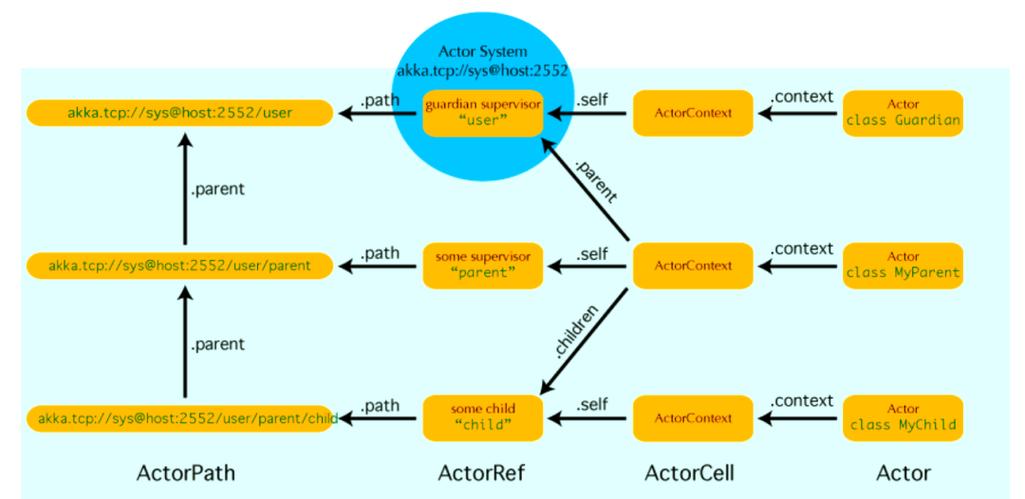
What is Akka?
Akka is a toolkit and runtime for building concurrent, distributed, and resilient message-driven applications on the JVM. At its heart, the Actor Model provides a powerful way to manage concurrency.
Why the Actor Model?
Traditional concurrency in Java (using synchronized, volatile, java.util.concurrent locks) can be complex and error-prone, leading to issues like deadlocks and race conditions.
The Actor Model solves this by enforcing a different approach:
- Actors are the Units of Computation: Everything is an actor.
- Communication via Asynchronous Messages: Actors communicate by sending messages to each other's "mailbox." They never share mutable state.
- No Shared State: An actor processes one message at a time, so its internal state is never accessed by more than one thread simultaneously. This eliminates the need for locks.
- Location Transparency: You can treat an actor that's on the same JVM as one that's on a remote machine the same way. This makes building distributed systems much easier.
Core Concepts in Akka (Java)
Let's break down the essential building blocks.
The Actor System
The ActorSystem is the heart of any Akka application. It's a factory for actors, a lifecycle manager, and a configuration container. You typically create one ActorSystem per application.
// Create an ActorSystem
ActorSystem system = ActorSystem.create("MyActorSystem");
The Actor Trait (Interface in Java)
In Java, an actor is a class that extends the abstract AbstractActor class. You must implement the createReceive() method, which defines how the actor handles different types of messages.
import akka.actor.AbstractActor;
import akka.actor.Props;
public class MyActor extends AbstractActor {
    // This is the "behavior" of the actor
    @Override
    public Receive createReceive() {
        // Match on the type of message
        return receiveBuilder()
                .match(String.class, this::onStringMessage)
                .match(Integer.class, this::onIntegerMessage)
                .matchAny(o -> { // Handles messages we don't understand
                    unhandled(o);
                })
                .build();
    }
    private void onStringMessage(String message) {
        System.out.println("Received String: " + message);
    }
    private void onIntegerMessage(Integer number) {
        System.out.println("Received Number: " + number);
    }
}
Props
Props is a configuration object that is used to create and configure an actor. It specifies the actor class and any constructor arguments.
// Create Props for our MyActor
Props props = Props.create(MyActor.class);
Creating an Actor
You don't use the new keyword to create actors. You use the actorOf() method on the ActorSystem or another actor.

// Create an actor using the ActorSystem
ActorRef myActor = system.actorOf(props, "myActor-1");
props: The configuration for the actor."myActor-1": The unique name for the actor within its parent context.
The Actor Reference (ActorRef)
You never get a direct reference to an actor instance. You only get an ActorRef, which is a handle to the actor. This is crucial for location transparency. The ActorRef can point to an actor in the same JVM or on a remote server.
Sending Messages
You send messages to an ActorRef using the tell() method (or its alias ). This is an asynchronous, fire-and-forget operation.
// Send a String message to the actor
myActor.tell("Hello, Actor!", ActorRef.noSender());
// Send an Integer message
myActor.tell(42, ActorRef.noSender());
- The first argument is the message.
- The second is the "sender." If you don't care about a reply, use
ActorRef.noSender().
Handling Replies
Actors can reply to messages by sending a new message back to the original sender. The sender is available as getSender() inside the onMessage handler.
Let's modify MyActor to send a reply:
// In MyActor.java
@Override
public Receive createReceive() {
    return receiveBuilder()
            .match(String.class, message -> {
                System.out.println("Received String: " + message);
                // Get the sender and send a reply
                getSender().tell("Thanks for the message!", getSelf());
            })
            .matchAny(o -> unhandled(o))
            .build();
}
Now, when the sender sends a message, it can expect a reply. We'll see how to handle this next.
A Complete, Runnable Example
This example demonstrates a parent/actor hierarchy, message passing, and replies.
Project Setup (Maven)
You need the Akka Actor dependency in your pom.xml.
<dependencies>
    <dependency>
        <groupId>com.typesafe.akka</groupId>
        <artifactId>akka-actor_2.13</artifactId> <!-- or _2.12 for Scala 2.12 -->
        <version>2.8.5</version> <!-- Check for the latest version -->
    </dependency>
</dependencies>
The Code
GreeterActor.java - An actor that greets people and replies.
import akka.actor.AbstractActor;
import akka.actor.Props;
public class GreeterActor extends AbstractActor {
    // Define the messages it can receive
    public static class Greet {
        public final String whom;
        public Greet(String whom) {
            this.whom = whom;
        }
    }
    public static class WhoToGreet {
        public final String whom;
        public WhoToGreet(String whom) {
            this.whom = whom;
        }
    }
    // The greeting message, which is a reply
    public static class Greeting {
        public final String message;
        public Greeting(String message) {
            this.message = message;
        }
    }
    private String greeting = "Hello";
    @Override
    public Receive createReceive() {
        return receiveBuilder()
                // When a WhoToGreet message is received, update the greeting
                .match(WhoToGreet.class, wtg -> {
                    this.greeting = "Hello, " + wtg.whom;
                })
                // When a Greet message is received, reply with a Greeting
                .match(Greet.class, g -> {
                    // Get the original sender and send them back a message
                    getSender().tell(new Greeting(greeting), getSelf());
                })
                .build();
    }
}
Main.java - The entry point that creates and uses the actors.
import akka.actor.ActorRef;
import akka.actor.ActorSystem;
import akka.actor.Props;
public class Main {
    public static void main(String[] args) {
        // 1. Create the ActorSystem
        final ActorSystem system = ActorSystem.create("HelloAkka");
        try {
            // 2. Create the "greeter" actor
            final ActorRef greeter = system.actorOf(Props.create(GreeterActor.class), "greeter");
            // 3. Tell the greeter to change its greeting message
            greeter.tell(new GreeterActor.WhoToGreet("Akka"), ActorRef.noSender());
            // 4. Ask the greeter for a greeting (which is a message sent to the greeter)
            greeter.tell(new GreeterActor.Greet(), ActorRef.noSender());
            // IMPORTANT: The 'tell' is asynchronous. The main thread will continue
            // immediately. We need a way to wait for the reply or see the output.
            // For this simple example, we'll just sleep. In a real app, you'd use
            // Futures or Akka's Ask pattern.
            Thread.sleep(1000);
            System.out.println(">>> Press ENTER to exit <<<");
            System.in.read();
        } catch (Exception e) {
            System.err.println("ERROR: " + e.getMessage());
        } finally {
            // 5. Shut down the ActorSystem
            system.terminate();
        }
    }
}
How to Run and Understand the Output
- Run the
Mainclass. - The
ActorSystemis created. - A
GreeterActoris created and named "greeter". - We send a
WhoToGreet("Akka")message. The actor's internal state (greeting) changes to "Hello, Akka". - We send a
Greet()message. The actor receives it, sees that the sender isActorRef.noSender(), and sends aGreeting("Hello, Akka")message back to... no one. - The program sleeps for a second and then terminates.
To see the reply in action, modify Main.java to use the Ask Pattern, which is a more robust way to handle replies.
Using the Ask Pattern (with Future)
The ask pattern wraps the asynchronous tell in a Future, allowing you to work with the result later.
First, add the Akka Streams dependency for the ask pattern (it's part of the same akka-stream artifact):
<dependency>
    <groupId>com.typesafe.akka</groupId>
    <artifactId>akka-stream_2.13</artifactId>
    <version>2.8.5</version>
</dependency>
Now, update Main.java:
import akka.actor.ActorRef;
import akka.actor.ActorSystem;
import akka.pattern.Patterns;
import akka.util.Timeout;
import scala.concurrent.Await;
import scala.concurrent.Future;
import scala.concurrent.duration.Duration;
import java.util.concurrent.TimeUnit;
public class Main {
    public static void main(String[] args) throws Exception {
        final ActorSystem system = ActorSystem.create("HelloAkka");
        try {
            final ActorRef greeter = system.actorOf(Props.create(GreeterActor.class), "greeter");
            // Tell the greeter who to greet
            greeter.tell(new GreeterActor.WhoToGreet("Charlie"), ActorRef.noSender());
            // Ask the greeter for a greeting
            // This returns a Future
            Timeout timeout = Timeout.create(Duration.create(5, TimeUnit.SECONDS));
            Future<Object> future = Patterns.ask(greeter, new GreeterActor.Greet(), timeout);
            // Block and wait for the result (NOT recommended for production, but fine for examples)
            String result = (String) Await.result(future, timeout.duration());
            System.out.println("Got result: " + result);
        } finally {
            system.terminate();
        }
    }
}
Now, when you run this, the output will be:
Got result: Hello, CharlieAdvanced Topics & Best Practices
- Actor Hierarchy: Actors can create other actors. This forms a hierarchy, which is useful for organizing work and for supervision.
- Supervision: Parent actors are supervisors of their children. If a child actor crashes (throws an exception), the parent can decide on a strategy:
Resume: Restart the child, but keep its internal state.Restart: Restart the child, clearing its internal state.Stop: Stop the child actor permanently.Escalate: Pass the failure up to its own parent. This is the foundation of building resilient, self-healing systems.
- Configuration (
application.conf): Akka behavior is heavily configured through HOCON (Human-Optimized Config Object Notation) files. You can configure thread pools, dispatcher strategies, and timeouts here. - Immutable Messages: All messages passed between actors should be immutable. This is a critical best practice to prevent subtle bugs. Use
finalfields and no setters. - Don't Block in Actors: An actor processes one message at a time. If you perform a long-running blocking operation (like a database call or HTTP request) inside an actor's message handler, it will stall the entire actor, preventing it from processing other messages. For this, use Akka's Streams or Typed Actors.