Of course! This is a very common requirement in Java. Here’s a comprehensive guide covering everything you need to know about Base64 in Java, including the built-in library, popular third-party JARs, and practical examples.
The Modern Java 8+ Way (No External JAR Needed)
Since Java 8, the java.util.Base64 class has been part of the standard Java Development Kit (JDK). This is the recommended and most common approach for modern Java projects. You do not need to add any external JAR file.
This class provides three types of Base64 encoders/decoders:
- Basic: Uses the standard Base64 alphabet. It does not add any line separators and does not ignore characters not in the alphabet. This is the most common type.
- URL and Filename Safe: Uses an alphabet that is safe for URLs and filenames. It replaces with and with
_. - MIME: Uses the Basic alphabet but adds line breaks (
\n) every 76 characters. This is useful for encoding email bodies or other text-based formats.
How to Use java.util.Base64
Here are code examples for the most common use cases.
A. Basic Encoding and Decoding (Strings)
import java.util.Base64;
import java.nio.charset.StandardCharsets;
public class Base64Example {
    public static void main(String[] args) {
        String originalString = "Hello, World! This is a test.";
        // 1. Encode the String
        Base64.Encoder encoder = Base64.getEncoder();
        String encodedString = encoder.encodeToString(originalString.getBytes(StandardCharsets.UTF_8));
        System.out.println("Encoded String: " + encodedString);
        // Output: SGVsbG8sIFdvcmxkISBUaGlzIGlzIGEgdGVzdC4=
        // 2. Decode the String
        Base64.Decoder decoder = Base64.getDecoder();
        byte[] decodedBytes = decoder.decode(encodedString);
        String decodedString = new String(decodedBytes, StandardCharsets.UTF_8);
        System.out.println("Decoded String: " + decodedString);
        // Output: Hello, World! This is a test.
    }
}
B. URL-Safe Encoding and Decoding
This is crucial for when you need to include Base64 data in a URL or a filename.
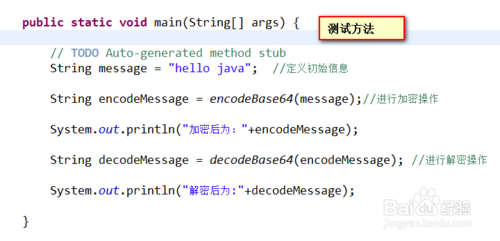
import java.util.Base64;
import java.nio.charset.StandardCharsets;
public class Base64UrlExample {
    public static void main(String[] args) {
        String originalString = "https://example.com/path?param=value";
        // Use the URL-safe encoder
        Base64.Encoder urlEncoder = Base64.getUrlEncoder();
        String encodedString = urlEncoder.encodeToString(originalString.getBytes(StandardCharsets.UTF_8));
        System.out.println("URL Encoded String: " + encodedString);
        // Output: aHR0cHM6Ly9leGFtcGxlLmNvbS9wYXRoP3BhcmFtP3ZhbHVl
        // Use the URL-safe decoder
        Base64.Decoder urlDecoder = Base64.getUrlDecoder();
        byte[] decodedBytes = urlDecoder.decode(encodedString);
        String decodedString = new String(decodedBytes, StandardCharsets.UTF_8);
        System.out.println("URL Decoded String: " + decodedString);
        // Output: https://example.com/path?param=value
    }
}
C. Encoding and Decoding Binary Data (like an Image)
import java.io.IOException;
import java.nio.file.Files;
import java.nio.file.Paths;
import java.util.Base64;
public class Base64BinaryExample {
    public static void main(String[] args) throws IOException {
        // 1. Read a binary file (e.g., an image)
        byte[] imageBytes = Files.readAllBytes(Paths.get("path/to/your/image.png"));
        // 2. Encode the binary data
        Base64.Encoder encoder = Base64.getEncoder();
        String encodedImage = encoder.encodeToString(imageBytes);
        System.out.println("Image Encoded Length: " + encodedImage.length());
        // 3. Decode the Base64 string back to binary data
        Base64.Decoder decoder = Base64.getDecoder();
        byte[] decodedImageBytes = decoder.decode(encodedImage);
        // 4. (Optional) Write the decoded bytes back to a file to verify
        Files.write(Paths.get("path/to/your/decoded_image.png"), decodedImageBytes);
        System.out.println("Image decoded and saved successfully.");
    }
}
Legacy Java 7 and Older (Using an External JAR)
If you are working on a legacy project using Java 7 or earlier, you will need to use an external library. The most popular and standard one is the Apache Commons Codec.
A. The Apache Commons Codec JAR
This is the de-facto standard for encoding/decoding in older Java versions.
-
Download the JAR:
- You can download it directly from the Apache Commons Codec website.
- The file is typically named
commons-codec-VERSION.jar.
-
Add the JAR to Your Project:
 (图片来源网络,侵删)
-
Maven (
pom.xml): This is the recommended way for modern projects. You add the dependency, and Maven will automatically download the JAR for you.<dependency> <groupId>commons-codec</groupId> <artifactId>commons-codec</artifactId> <version>1.17.1</version> <!-- Use the latest version --> </dependency> -
Gradle (
build.gradle):implementation 'commons-codec:commons-codec:1.17.1' // Use the latest version
-
Manually (IDE like IntelliJ/Eclipse):
- Download the
commons-codec-VERSION.jarfile. - In your IDE, right-click your project -> Project Structure / Build Path.
- Go to the "Libraries" or "Dependencies" section.
- Click "Add External JARs" and select the downloaded file.
- Download the
-
B. How to Use Apache Commons Codec
The main class is org.apache.commons.codec.binary.Base64. It's very similar to the Java 8 version.
import org.apache.commons.codec.binary.Base64;
import org.apache.commons.codec.binary.StringUtils;
public class ApacheBase64Example {
    public static void main(String[] args) {
        String originalString = "Hello, legacy Java world!";
        // 1. Encode the String
        // Base64.encodeBase64String returns a String
        byte[] encodedBytes = Base64.encodeBase64(originalString.getBytes());
        String encodedString = StringUtils.newStringUtf8(encodedBytes);
        System.out.println("Encoded String: " + encodedString);
        // Output: SGVsbG8sIGxlY2FnaW4gSmF2YSB3b3JsZCE=
        // 2. Decode the String
        // Base64.decodeBase64 works on a String directly
        byte[] decodedBytes = Base64.decodeBase64(encodedString);
        String decodedString = StringUtils.newStringUtf8(decodedBytes);
        System.out.println("Decoded String: " + decodedString);
        // Output: Hello, legacy Java world!
    }
}
Summary and Recommendation
| Feature | Java 8+ (java.util.Base64) |
Java 7 & Older (Apache Commons Codec) |
|---|---|---|
| Dependency | None. Built into the JDK. | Required. You must add the commons-codec.jar file. |
| Usage | Standard library, no extra setup. | Add JAR to project classpath. |
| API | Base64.getEncoder(), Base64.getDecoder() |
Base64.encodeBase64(), Base64.decodeBase64() |
| Recommendation | Use this for all new projects. It's the standard, modern, and dependency-free way. | Use this only for maintaining legacy codebases on Java 7 or older. |
Final Advice:
- For any new Java project, use the
java.util.Base64class from the standard library. - Only use an external JAR like Apache Commons Codec if you are forced to work with Java 7 or older. If you start a new project today, there is no reason not to use Java 8 or later.