Of course! Mapping a Java object to a JSON string is a very common task in Java, especially for web applications and APIs. The most popular and robust way to do this is by using a dedicated JSON processing library.
Here’s a comprehensive guide covering the most popular libraries, with code examples and explanations.
The Short Answer: The Best Way
For most modern Java projects, the best choice is Jackson. It's fast, feature-rich, and the de-facto standard in the Java ecosystem.
Add the Jackson Dependency (Maven)
If you're using Maven, add this to your pom.xml:
<dependency>
    <groupId>com.fasterxml.jackson.core</groupId>
    <artifactId>jackson-databind</artifactId>
    <version>2.15.2</version> <!-- Use the latest version -->
</dependency>
Create Your Java Object (POJO)
Your Java class needs getters and setters for Jackson to work its magic. It's also good practice to have a no-arg constructor.
// User.java
public class User {
    private String name;
    private int age;
    private String[] roles;
    private boolean isActive;
    // No-arg constructor (required by Jackson)
    public User() {
    }
    // All-args constructor (good practice)
    public User(String name, int age, String[] roles, boolean isActive) {
        this.name = name;
        this.age = age;
        this.roles = roles;
        this.isActive = isActive;
    }
    // Getters and Setters (required by Jackson)
    public String getName() { return name; }
    public void setName(String name) { this.name = name; }
    public int getAge() { return age; }
    public void setAge(int age) { this.age = age; }
    public String[] getRoles() { return roles; }
    public void setRoles(String[] roles) { this.roles = roles; }
    public boolean getIsActive() { return isActive; }
    public void setActive(boolean active) { isActive = active; }
    // Optional: toString() for easy printing
    @Override
    public String toString() {
        return "User{" +
                "name='" + name + '\'' +
                ", age=" + age +
                ", roles=" + Arrays.toString(roles) +
                ", isActive=" + isActive +
                '}';
    }
}
Convert the Object to JSON
Here is the core Java code to perform the mapping.
import com.fasterxml.jackson.core.JsonProcessingException;
import com.fasterxml.jackson.databind.ObjectMapper;
import java.util.Arrays;
public class Main {
    public static void main(String[] args) {
        // 1. Create an instance of your object
        User user = new User("John Doe", 30, new String[]{"admin", "user"}, true);
        // 2. Create an instance of ObjectMapper
        ObjectMapper objectMapper = new ObjectMapper();
        try {
            // 3. Use the writeValueAsString() method to convert the object to a JSON string
            String jsonString = objectMapper.writeValueAsString(user);
            // 4. Print the JSON string
            System.out.println(jsonString);
        } catch (JsonProcessingException e) {
            e.printStackTrace();
        }
    }
}
Output:
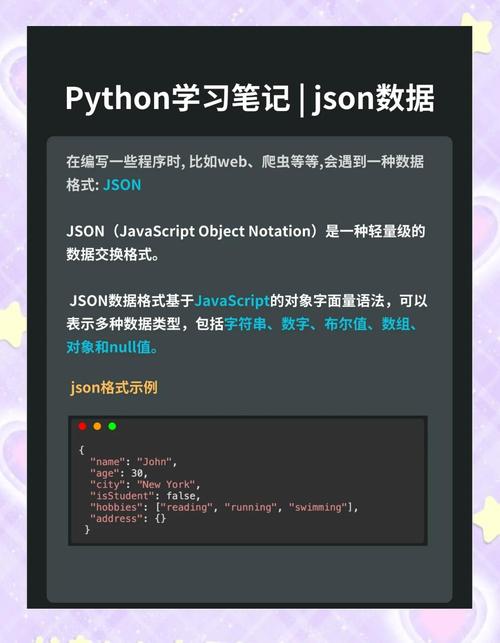
{"name":"John Doe","age":30,"roles":["admin","user"],"isActive":true}
Detailed Breakdown and Advanced Topics
Let's dive deeper into what's happening and how to customize the output.
The Key Player: ObjectMapper
The ObjectMapper is the main class in Jackson that handles reading and writing JSON. It's best practice to create a single, shared instance of it in your application, as it is thread-safe and expensive to create.
Customizing the JSON Output
Jackson provides annotations to control how your Java object is serialized to JSON.
Common Annotations:
@JsonProperty: Changes the name of the property in the JSON output.@JsonIgnore: Excludes a property from the JSON output entirely.@JsonIgnoreProperties: Used at the class level to ignore unknown properties in the input JSON (useful for deserialization).@JsonFormat: Controls the format of date/time fields.
Example with Annotations:
import com.fasterxml.jackson.annotation.*;
public class User {
    @JsonProperty("full_name") // Maps Java field 'name' to JSON property 'full_name'
    private String name;
    private int age;
    @JsonIgnore // This field will NOT appear in the JSON output
    private String internalId;
    @JsonProperty("is_active") // Maps Java getter 'isActive' to JSON property 'is_active'
    public boolean getIsActive() {
        return isActive;
    }
    public void setActive(boolean active) {
        isActive = active;
    }
    // ... other fields and methods
}
Output with Annotations:
{"full_name":"John Doe","age":30,"is_active":true}
Pretty-Printing the JSON
The default output is a compact string. For debugging or APIs where readability is important, you can "pretty-print" it.
// Create an ObjectMapper with pretty-printing enabled
ObjectMapper objectMapper = new ObjectMapper();
objectMapper.enable(SerializationFeature.INDENT_OUTPUT);
String prettyJsonString = objectMapper.writeValueAsString(user);
System.out.println(prettyJsonString);
Pretty-Printed Output:
{
  "name" : "John Doe",
  "age" : 30,
  "roles" : [ "admin", "user" ],
  "isActive" : true
}
Alternative Libraries
While Jackson is the king, there are other excellent options.
Gson (by Google)
Gson is another very popular library, known for its simplicity.
Add Dependency (Maven)
<dependency>
    <groupId>com.google.code.gson</groupId>
    <artifactId>gson</artifactId>
    <version>2.10.1</version> <!-- Use the latest version -->
</dependency>
Code Example
The API is slightly different but just as easy.
import com.google.gson.Gson;
public class Main {
    public static void main(String[] args) {
        User user = new User("Jane Doe", 28, new String[]{"editor"}, false);
        // Create a Gson instance
        Gson gson = new Gson();
        // Convert to JSON
        String jsonString = gson.toJson(user);
        System.out.println(jsonString);
    }
}
Output:
{"name":"Jane Doe","age":28,"roles":["editor"],"isActive":false}
org.json (Simple Library)
This is a very lightweight, no-dependency library (the JAR file is small). It's great for simple tasks but less feature-rich than Jackson or Gson.
Add Dependency (Maven)
<dependency>
    <groupId>org.json</groupId>
    <artifactId>json</artifactId>
    <version>20251013</version> <!-- Use the latest version -->
</dependency>
Code Example
The API is more manual. You build the JSON object yourself.
import org.json.JSONObject;
public class Main {
    public static void main(String[] args) {
        User user = new User("Peter Jones", 45, new String[]{"manager"}, true);
        // Manually create a JSONObject from the POJO
        JSONObject jsonObject = new JSONObject();
        jsonObject.put("name", user.getName());
        jsonObject.put("age", user.getAge());
        jsonObject.put("roles", user.getRoles());
        jsonObject.put("isActive", user.getIsActive());
        // Convert to JSON string
        String jsonString = jsonObject.toString();
        System.out.println(jsonString);
    }
}
Output:
{"name":"Peter Jones","age":45,"roles":["manager"],"isActive":true}
Summary and Comparison
| Feature | Jackson | Gson | org.json |
|---|---|---|---|
| Ease of Use | Very Easy (POJO mapping) | Very Easy (POJO mapping) | Manual (build JSONObject) |
| Performance | Excellent (Fastest) | Good | Good |
| Features | Most Comprehensive (Annotations, Streaming, Modules) | Good (Annotations) | Basic |
| Flexibility | High (Configurable ObjectMapper) |
High | Low |
| Ecosystem | Industry Standard, deeply integrated with Spring, JAX-RS, etc. | Widely used, from Google | Good for simple, no-frills needs |
| Dependencies | Requires jackson-databind |
Requires gson |
Requires json (small JAR) |
Recommendation:
- For any serious project, especially web applications or microservices: Use Jackson. It's the most powerful, performant, and widely supported library.
- For a simple script or a project where you prefer a simpler API: Use Gson. It's a fantastic and reliable alternative.
- For a minimal environment where you want to avoid large dependencies: Use org.json. Be prepared for more manual coding.