Of course. An OutOfMemoryError in Java is a critical and common runtime error that every Java developer encounters. Here’s a comprehensive guide covering what it is, why it happens, how to diagnose it, and how to fix it.
What is an OutOfMemoryError?
Contrary to what its name suggests, an OutOfMemoryError is not an Exception but an Error. This is a crucial distinction.
Exception: Represents conditions that an application might want to catch and recover from (e.g.,FileNotFoundException,SQLException).Error: Represents serious, typically unrecoverable problems that an application should not try to catch. They indicate that something has gone so wrong at a very low level that the JVM itself is in an unstable state.
The OutOfMemoryError is thrown by the Java Virtual Machine (JVM) when it attempts to allocate memory but cannot find enough space to do so, and the garbage collector (GC) cannot free up any more memory.
The Main Cause: The Heap
The vast majority of OutOfMemoryError cases are related to the Java Heap.
- What is the Heap? The heap is the runtime data area from which memory for all class instances and arrays is allocated.
- How it works: When you create an object with
new MyObject(), memory is allocated on the heap. - How it's cleaned up: The Garbage Collector (GC) automatically reclaims memory from objects that are no longer being used (i.e., there are no more references to them).
An OutOfMemoryError on the heap occurs when:
- The application is creating too many objects.
- These objects are not being garbage collected because they are still referenced.
- The heap fills up completely, and a new allocation request cannot be fulfilled.
Common Types of OutOfMemoryError and Their Causes
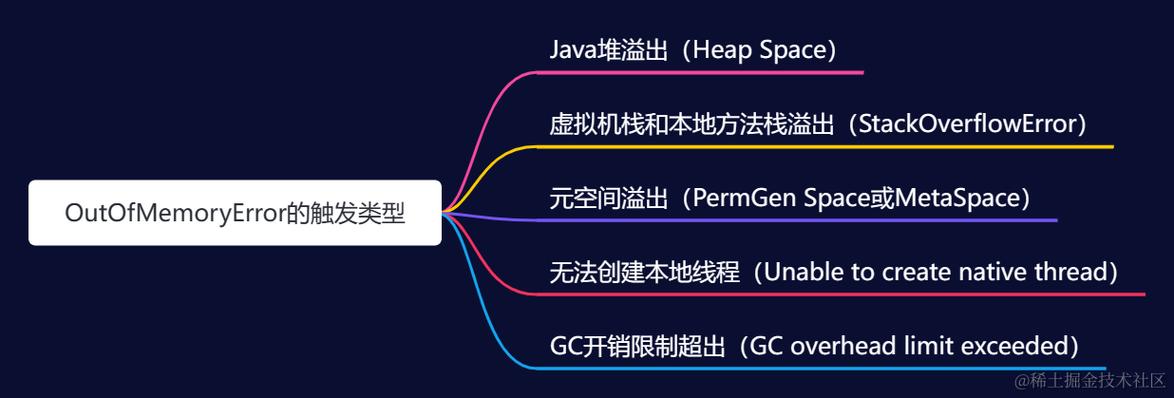
While the root cause is often "the heap is full," the specific error message can give you a huge clue about what's happening. Here are the most common types:
a) java.lang.OutOfMemoryError: Java heap space
This is the most common type. It means the application has exhausted the space available in the Java heap.
Causes:
- Memory Leak: The application is holding onto references to objects that are no longer needed, preventing the GC from reclaiming their memory. Over time, these leaked objects fill up the heap.
- Inadequate Heap Size: The application legitimately needs more memory than the
-Xmx(maximum heap size) setting allows. This is common for applications with large datasets (e.g., loading a huge file into memory). - Inefficient Data Structures: Using an inefficient algorithm or data structure that can cause excessive object creation.
b) java.lang.OutOfMemoryError: GC overhead limit exceeded
This is a more subtle error introduced in Java 6. The JVM has a heuristic that if it spends more than 98% of its time in the GC and recovers less than 2% of the heap, it concludes that something is seriously wrong and will not make progress.
Causes:
- Severe Memory Leak: The heap is almost completely full, and the GC is working furiously but can't free up enough space to be effective.
- Inadequate Heap Size: The heap is too small for the working set of your application, causing it to constantly thrash between full and near-full states.
c) java.lang.OutOfMemoryError: Metaspace
(Note: In Java 8 and earlier, this was java.lang.OutOfMemoryError: PermGen space. The concept is the same, but the implementation changed.)
The Metaspace (or PermGen) is a separate area of memory that stores class metadata, such as class names, field information, method information, and bytecodes.
Causes:
- Loading Too Many Classes: This is common in applications that use reflection heavily, generate a lot of classes at runtime (e.g., via bytecode manipulation libraries like CGLIB or Hibernate), or use web containers that redeploy applications frequently without properly unloading old classes.
- Inadequate Metaspace Size: The default Metaspace size might be too small for your application's needs.
d) java.lang.OutOfMemoryError: Unable to create new native thread
This error occurs when the JVM cannot create a new operating system thread.
Causes:
- Too Many Threads: Your application is trying to create more threads than the OS or the JVM allows.
- Per-Thread Memory Consumption: Each thread requires memory for its stack (defined by
-Xss). If the heap is already using most of the available virtual memory, there isn't enough left for the OS to create new thread stacks.- Example Calculation: If your
-Xmxis 1.5 GB and you have 1.5 GB of physical RAM, the OS has almost no virtual memory left. If each thread needs a 1 MB stack (-Xss1m), you can only create a handful of new threads before failing.
- Example Calculation: If your
How to Diagnose an OutOfMemoryError
Diagnosis is a systematic process. Don't just increase the heap size blindly; find the root cause.
Step 1: Get a Heap Dump
A heap dump is a snapshot of the memory at a specific moment. It's the single most important piece of evidence.
- How to trigger one automatically:
- Add this JVM argument:
-XX:+HeapDumpOnOutOfMemoryError - Optionally, specify the location:
-XX:HeapDumpPath=/path/to/dumps/
- Add this JVM argument:
- How to trigger one manually:
- Use tools like VisualVM (bundled with the JDK) or JConsole to connect to the running JVM and trigger a heap dump.
- What it looks like: A file named
java_pid<pid>.hprof.
Step 2: Analyze the Heap Dump
Use a specialized tool to inspect the .hprof file. The best free tool is Eclipse MAT (Memory Analyzer Tool).
- What to look for in MAT:
- Leak Suspects Report: MAT automatically analyzes the dump and gives you a "suspects" report, which is a great starting point.
- Dominator Tree: This is the most powerful view. It shows you which objects are "holding" the most memory. An object "dominates" another if every path from the root of the heap to the second object must go through the first. This helps you find the root cause of a memory leak.
- Histogram: Shows you a count of all objects by class. You can sort this by "retained heap" to see which object types are consuming the most memory.
Step 3: Analyze the GC Log
GC logs tell you the story of the memory usage over time.
-
How to enable it:
-Xlog:gc*:file=/path/to/gc.log:time,uptime,level,tags
(For older Java versions:
-Xloggc:/path/to/gc.log -XX:+PrintGCDetails -XX:+PrintGCTimeStamps) -
What to look for:
- Frequent GC Pauses: If you see many "Full GC" events happening in quick succession, it's a sign of trouble.
- GC Not Freeing Memory: After a "Full GC," the "Old Gen" (tenured generation) space is not decreasing significantly, which is a strong indicator of a memory leak.
Step 4: Use Profiling Tools
Tools like VisualVM, YourKit, or JProfiler can be attached to a running application to monitor memory usage, track object allocation, and find leaks without needing to crash the application first.
How to Fix and Prevent OutOfMemoryError
a) For Java heap space
- Fix the Leak: Use the heap dump analysis to find the object(s) retaining the most memory and trace back in your code to find why they aren't being garbage collected. This is the best long-term solution.
- Increase Heap Size: As a temporary fix or for a legitimate memory need, increase the maximum heap size.
-Xmx2g// Sets maximum heap size to 2 gigabytes
- Optimize Code: Review your code for inefficient loops, large data structures holding unnecessary data, or opportunities to use more memory-efficient algorithms.
b) For GC overhead limit exceeded
- The fixes are the same as for
Java heap space: fix the leak or increase the heap size. This error is a symptom of a more severe underlying problem.
c) For Metaspace
- Increase Metaspace Size:
-XX:MaxMetaspaceSize=256m// Sets the maximum metaspace size to 256 MB
- Fix the Class Loading Issue: If you're using reflection or libraries that generate classes, see if you can configure them to be less aggressive. For web applications, ensure proper application undeployment to allow old classes to be garbage collected.
d) For Unable to create new native thread
- Reduce Thread Count: Refactor your application to use a thread pool with a controlled number of threads (
java.util.concurrent.ExecutorService). This is the best practice. - Increase Per-Thread Stack Size (if needed): If you have very deep recursion, you might need a larger stack.
-Xss2m// Sets thread stack size to 2 megabytes
- Increase Overall Memory: Add more RAM to the machine so the OS can allocate memory for thread stacks.
Summary: A Practical Workflow
- Reproduce: If possible, reproduce the error in a development or staging environment.
- Enable Diagnostics: Run the application with
-XX:+HeapDumpOnOutOfMemoryErrorand GC logging enabled. - Let it Crash: Let the application run until it throws the
OutOfMemoryError. This will generate the.hproffile. - Analyze: Open the
.hproffile in Eclipse MAT. Run the "Leak Suspects" report and explore the Dominator Tree. - Identify the Cause: Find the root object that is holding onto the memory. Trace it back to your code.
- Fix: Refactor the code to fix the memory leak or adjust the JVM memory settings as a temporary measure.
- Test: Verify your fix in a staging environment that closely mirrors production before deploying.