Of course! This is a fundamental concept in modern Spring development. Let's break down the relationship between a main method and the Spring framework.
The Core Idea: From Manual Setup to Automated Magic
In a plain Java application, the main method is the entry point. You manually create objects and wire them together.
// Plain Java
public class MyApplication {
    public static void main(String[] args) {
        UserService userService = new UserServiceImpl(); // Manual creation
        ReportGenerator reportGenerator = new ReportGenerator(); // Manual creation
        reportGenerator.setUserService(userService); // Manual wiring
        reportGenerator.generateMonthlyReport(); // Run the application
    }
}
This becomes tedious and error-prone as the application grows. Spring's primary job is to automate this process.
Instead of you creating and wiring objects, you tell Spring what you need, and Spring (its "Container" or "Context") creates, configures, and wires them all together for you. The main method's only job in a Spring application is to start the Spring container.
The Two Main Ways to Use a main Method with Spring
There are two primary approaches, depending on the type of application you're building.
The Modern Way: Spring Boot (Recommended for most new projects)
Spring Boot makes creating stand-alone, production-grade Spring applications incredibly easy. It uses "convention over configuration" and an embedded server (like Tomcat) so you don't need to deploy a WAR file.
Here is the canonical "Hello World" Spring Boot application. Notice how simple the main method is.
File: src/main/java/com/example/demo/DemoApplication.java
package com.example.demo;
import org.springframework.boot.SpringApplication;
import org.springframework.boot.autoconfigure.SpringBootApplication;
import org.springframework.web.bind.annotation.GetMapping;
import org.springframework.web.bind.annotation.RestController;
// 1. This annotation marks this class as the Spring Boot Application entry point.
//    It enables auto-configuration and component scanning.
@SpringBootApplication
public class DemoApplication {
    // 2. This is the main method. Its only job is to run the Spring Boot application.
    public static void main(String[] args) {
        // SpringApplication.run() does all the heavy lifting:
        // - Starts the Spring Framework (the "Context").
        // - Performs "auto-configuration" (e.g., sees you have a web dependency and starts a web server).
        // - Performs "component scanning" (finds @RestController, @Service, etc. and creates beans).
        SpringApplication.run(DemoApplication.class, args);
    }
}
// 3. A simple web controller to prove it's working.
@RestController
class HelloWorldController {
    @GetMapping("/")
    public String sayHello() {
        return "Hello, Spring Boot!";
    }
}
Key Points for Spring Boot:
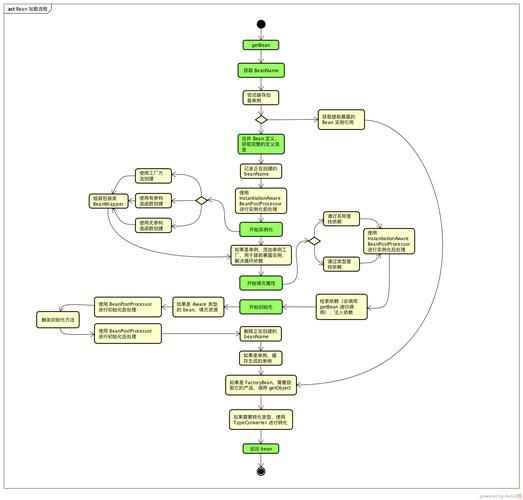
@SpringBootApplication: This is a "meta-annotation" that combines three important annotations:@SpringBootConfiguration: Marks the class as a configuration source.@EnableAutoConfiguration: Tells Spring Boot to start adding beans to the application context based on the classpath (e.g., ifspring-boot-starter-webis on the classpath, it configures a web server).@ComponentScan: Tells Spring to look for other components (like@Service,@Repository,@Controller) in thecom.example.demopackage and its sub-packages.
SpringApplication.run(): This static method is the magic. It bootstraps the entire application. It starts the Spring container, which then reads your configuration, finds all your components, and wires them together.
The Classic Way: Spring Framework (with XML or JavaConfig)
This is the traditional approach before Spring Boot. It's more verbose but gives you more explicit control. You typically don't use this for new projects unless you're working on a legacy system or have very specific deployment requirements.
Here, you explicitly create a ClassPathXmlApplicationContext or AnnotationConfigApplicationContext to load your configuration.
Example with Java Configuration (Recommended over XML for this style)
Step 1: Create a Configuration Class
This class uses Spring annotations to define the beans instead of XML.
File: AppConfig.java
import org.springframework.context.annotation.Bean;
import org.springframework.context.annotation.Configuration;
// This class is our Spring configuration.
@Configuration
public class AppConfig {
    // This method defines a bean named "userService".
    // Spring will call this method to get an instance of UserService.
    @Bean
    public UserService userService() {
        return new UserServiceImpl();
    }
    // This method defines another bean.
    @Bean
    public ReportGenerator reportGenerator() {
        ReportGenerator generator = new ReportGenerator();
        // Spring can automatically inject dependencies if they are also beans!
        // (This is called "autowiring by type")
        generator.setUserService(userService());
        return generator;
    }
}
Step 2: Create a Plain Java Class with a main Method
This class is the entry point. Its job is to create the Spring container and then use it to get the beans you need.
File: MainApplication.java
import org.springframework.context.annotation.AnnotationConfigApplicationContext;
public class MainApplication {
    public static void main(String[] args) {
        // 1. Create the Spring container.
        // We tell it to use our AppConfig class for configuration.
        AnnotationConfigApplicationContext context = new AnnotationConfigApplicationContext(AppConfig.class);
        // 2. Retrieve the beans we need from the Spring container.
        // We are no longer 'new'ing up objects ourselves.
        ReportGenerator reportGenerator = context.getBean(ReportGenerator.class);
        UserService userService = context.getBean(UserService.class);
        // 3. Use the beans.
        System.out.println("Report Generator's user service: " + reportGenerator.getUserService());
        System.out.println("User Service from context: " + userService);
        reportGenerator.generateMonthlyReport();
        // 4. Close the context to release resources.
        context.close();
    }
}
Key Points for Classic Spring Framework:
@Configuration: Marks a class as a source of bean definitions.@Bean: On a method, it indicates that the method returns a bean to be managed by the Spring container.AnnotationConfigApplicationContext: This is the interface that represents the Spring container. We create it by pointing it to our configuration class (AppConfig.class).context.getBean(): This is how you retrieve a fully configured object from the Spring container.
Summary: Spring Boot vs. Classic Spring
| Feature | Spring Boot | Classic Spring Framework |
|---|---|---|
| Goal | "Convention over Configuration" to get you running fast. | "Explicit Configuration" for full control. |
main Method |
Very simple. Just calls SpringApplication.run(). |
Manually creates an ApplicationContext. |
| Dependencies | Uses "Starters" (e.g., spring-boot-starter-web) that bundle all necessary libraries. |
You must manually add each dependency (e.g., spring-web, spring-jdbc). |
| Server | Embedded server (Tomcat, Jetty) by default. No need to deploy to an external server. | Requires an external server (like Tomcat) to be configured and deployed. |
| Configuration | Mostly auto-detected via @SpringBootApplication. Can be overridden with properties files (application.properties) or Java config. |
Requires explicit XML files or Java @Configuration classes. |
| Use Case | The default choice for almost all new applications (web services, microservices, APIs). | Legacy applications, or when you need to avoid auto-configuration. |
Conclusion:
For any new project, you should use Spring Boot. Its main method is clean, simple, and powerful, hiding all the complexity of starting up the Spring framework. Understanding the classic Spring approach is valuable for working with older codebases, but Spring Boot is the present and future of the Spring ecosystem.