核心概念
-
Session (会话):
 (图片来源网络,侵删)
- 当用户第一次访问网站时,服务器会为该用户创建一个独一无二的 Session 对象。
- 服务器会给这个 Session 对象一个唯一的 ID,称为
Session ID。 - 服务器将
Session ID通过 Cookie 发送给浏览器,并保存起来。 - 在后续的每一次请求中,浏览器都会自动携带这个 Cookie(包含
Session ID),服务器通过Session ID就能找到对应的 Session 对象,从而知道是哪个用户在访问。 - Session 的生命周期:从用户访问开始,到用户关闭浏览器或 Session 超时(30 分钟)为止,在这期间,同一个用户的多次请求共享同一个 Session 对象。
-
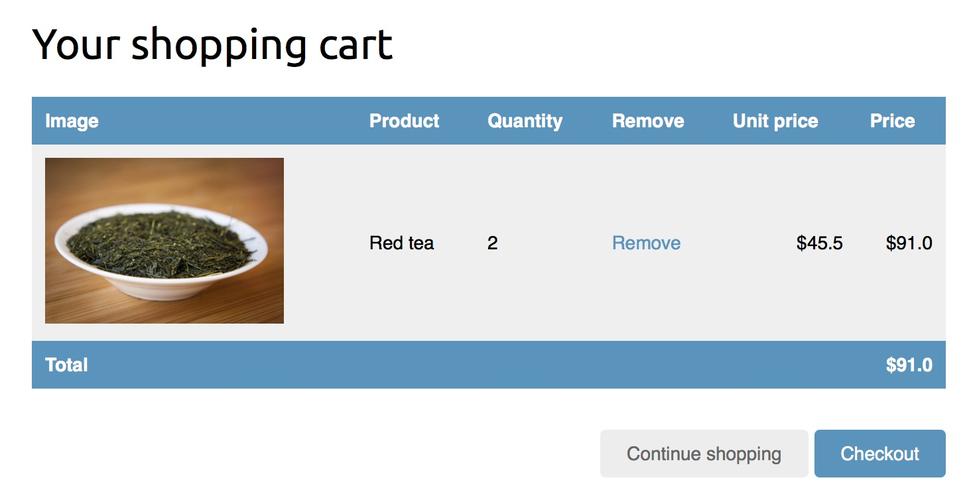
购物车:
- 购物车是一个临时的数据容器,用于存储用户在本次会话中想要购买的商品。
- 每个用户的购物车应该是独立的,用户 A 的购物车里不能有用户 B 的商品。
- 这与 Session 的特性完美契合:每个用户一个 Session,我们可以将每个用户的购物车数据存储在其对应的 Session 对象中。
实现步骤
我们将使用最基础的 Servlet + JSP 技术来实现,这样逻辑最清晰,如果你使用的是 Spring Boot 等框架,核心思想是相通的,只是 API 和配置方式不同。
第 1 步:准备项目环境
- 创建一个 Dynamic Web Project (动态 Web 项目)。
- 准备一个商品列表页面
products.jsp,用于展示所有商品。 - 准备一个购物车页面
cart.jsp,用于展示购物车中的商品。 - 准备一个
Product类,用于封装商品信息。
第 2 步:创建 Product 类
这是一个简单的 Java Bean,用来表示一个商品。
// Product.java
package com.example.model;
public class Product {
    private int id;
    private String name;
    private double price;
    public Product(int id, String name, double price) {
        this.id = id;
        this.name = name;
        this.price = price;
    }
    // Getters and Setters
    public int getId() { return id; }
    public String getName() { return name; }
    public double getPrice() { return price; }
}
第 3 步:创建商品列表页面 products.jsp
这个页面展示所有商品,每个商品旁边都有一个“加入购物车”的链接。
(图片来源网络,侵删)
<%@ page contentType="text/html;charset=UTF-8" language="java" %>
<%@ page import="java.util.List, com.example.model.Product" %>
<html>
<head>商品列表</title>
</head>
<body>
    <h1>欢迎光临我们的商店</h1>
    <table border="1">
        <tr>
            <th>商品ID</th>
            <th>商品名称</th>
            <th>商品价格</th>
            <th>操作</th>
        </tr>
        <%-- 模拟从数据库获取商品列表 --%>
        <%
            List<Product> products = List.of(
                new Product(1, "苹果手机", 6999.0),
                new Product(2, "华为笔记本", 8999.0),
                new Product(3, "小米耳机", 299.0)
            );
            request.setAttribute("productList", products);
        %>
        <c:forEach items="${productList}" var="product">
            <tr>
                <td>${product.id}</td>
                <td>${product.name}</td>
                <td>¥${product.price}</td>
                <td>
                    <%-- 点击链接,将商品ID提交给AddToCartServlet --%>
                    <a href="add-to-cart?id=${product.id}">加入购物车</a>
                </td>
            </tr>
        </c:forEach>
    </table>
    <br/>
    <a href="cart.jsp">查看我的购物车</a>
</body>
</html>
第 4 步:创建处理“加入购物车”逻辑的 Servlet (AddToCartServlet)
这是核心部分,Servlet 从请求中获取商品 ID,然后找到对应的商品,最后将其添加到 Session 中。
// AddToCartServlet.java
package com.example.servlet;
import com.example.model.Product;
import javax.servlet.ServletException;
import javax.servlet.annotation.WebServlet;
import javax.servlet.http.HttpServlet;
import javax.servlet.http.HttpServletRequest;
import javax.servlet.http.HttpServletResponse;
import javax.servlet.http.HttpSession;
import java.io.IOException;
import java.util.ArrayList;
import java.util.List;
@WebServlet("/add-to-cart")
public class AddToCartServlet extends HttpServlet {
    @Override
    protected void doGet(HttpServletRequest request, HttpServletResponse response) throws ServletException, IOException {
        // 1. 从请求参数中获取商品ID
        String productIdStr = request.getParameter("id");
        if (productIdStr == null || productIdStr.isEmpty()) {
            response.sendRedirect("products.jsp");
            return;
        }
        int productId = Integer.parseInt(productIdStr);
        // 2. 从Session中获取购物车列表
        // getAttribute返回的是Object,需要强制转换
        // 如果是第一次获取,Session中可能没有购物车,所以需要处理null的情况
        HttpSession session = request.getSession();
        List<Product> cart = (List<Product>) session.getAttribute("cart");
        if (cart == null) {
            // 如果购物车为空,说明是第一次添加,创建一个新的ArrayList
            cart = new ArrayList<>();
            session.setAttribute("cart", cart);
        }
        // 3. 根据ID查找商品 (实际项目中应该从数据库查询)
        Product productToAdd = findProductById(productId);
        if (productToAdd != null) {
            // 4. 将商品添加到购物车列表
            cart.add(productToAdd);
        }
        // 5. 重定向到购物车页面,避免刷新页面重复提交
        response.sendRedirect("cart.jsp");
    }
    // 模拟根据ID查找商品的方法
    private Product findProductById(int id) {
        List<Product> allProducts = List.of(
            new Product(1, "苹果手机", 6999.0),
            new Product(2, "华为笔记本", 8999.0),
            new Product(3, "小米耳机", 299.0)
        );
        for (Product p : allProducts) {
            if (p.getId() == id) {
                return p;
            }
        }
        return null;
    }
}
第 5 步:创建购物车页面 cart.jsp
这个页面从 Session 中获取购物车列表并展示。
<%@ page contentType="text/html;charset=UTF-8" language="java" %>
<%@ page import="java.util.List, com.example.model.Product" %>
<html>
<head>我的购物车</title>
</head>
<body>
    <h1>我的购物车</h1>
    <%
        // 从Session中获取购物车
        List<Product> cart = (List<Product>) session.getAttribute("cart");
    %>
    <c:choose>
        <c:when test="${empty cart}">
            <p>您的购物车是空的,快去<a href="products.jsp">添加商品</a>吧!</p>
        </c:when>
        <c:otherwise>
            <table border="1">
                <tr>
                    <th>商品名称</th>
                    <th>商品价格</th>
                </tr>
                <c:forEach items="${cart}" var="item">
                    <tr>
                        <td>${item.name}</td>
                        <td>¥${item.price}</td>
                    </tr>
                </c:forEach>
            </table>
            <p>购物车中共有 ${cart.size()} 件商品。</p>
        </c:otherwise>
    </c:choose>
    <br/>
    <a href="products.jsp">继续购物</a>
</body>
</html>
代码分析与注意事项
-
HttpSession session = request.getSession();- 这是获取 Session 的关键方法,如果当前请求没有关联的 Session,它会自动创建一个新的 Session。
-
List<Product> cart = (List<Product>) session.getAttribute("cart");- 我们使用
session.setAttribute("cart", cartList)将购物车存入 Session 时,用的是String类型的键("cart")和Object类型的值。 - 取出时,
getAttribute总是返回Object类型,所以必须强制转换回我们原来的类型(List<Product>)。
- 我们使用
-
处理
null购物车- 用户第一次访问时,Session 中肯定没有
"cart"这个属性。getAttribute会返回null。 - 如果不检查
if (cart == null),直接调用cart.add(...)就会抛出NullPointerException。 - 我们必须先判断购物车是否存在,如果不存在,就创建一个新的
ArrayList并存入 Session。
- 用户第一次访问时,Session 中肯定没有
-
重定向 vs 转发
- 在
AddToCartServlet中,我们使用response.sendRedirect("cart.jsp")进行重定向。 - 为什么用重定向?
- 避免重复提交:如果用户刷新
cart.jsp页面,浏览器会重新发送请求,因为是重定向,所以是 GET 请求,不会再次执行AddToCartServlet的逻辑,也就不会重复添加商品。 - 如果使用
request.getRequestDispatcher("cart.jsp").forward(request, response)(转发),刷新页面会再次触发AddToCartServlet,导致商品被重复添加。
- 避免重复提交:如果用户刷新
- 重定向的缺点:URL 会变成
cart.jsp,而不是add-to-cart,对于用户来说,URL 没有准确反映他们刚刚执行的操作。
- 在
更健壮的实现:使用 Map 购物车
上面的实现有一个小问题:如果用户多次点击“加入购物车”,同一个商品会被添加多次,虽然这符合某些购物车的逻辑,但更常见的做法是统计数量。
我们可以修改购物车的数据结构,从 List<Product> 改为 Map<Integer, Product>,key 是商品ID,value 是商品对象,这样我们可以轻松地判断商品是否已存在。
修改 AddToCartServlet
@WebServlet("/add-to-cart")
public class AddToCartServlet extends HttpServlet {
    @Override
    protected void doGet(HttpServletRequest request, HttpServletResponse response) throws ServletException, IOException {
        String productIdStr = request.getParameter("id");
        if (productIdStr == null || productIdStr.isEmpty()) {
            response.sendRedirect("products.jsp");
            return;
        }
        int productId = Integer.parseInt(productIdStr);
        HttpSession session = request.getSession();
        // 购物车的数据结构从 List 改为 Map
        Map<Integer, Product> cart = (Map<Integer, Product>) session.getAttribute("cart");
        if (cart == null) {
            cart = new HashMap<>();
            session.setAttribute("cart", cart);
        }
        Product productToAdd = findProductById(productId);
        if (productToAdd != null) {
            // 如果商品已在购物车中,更新数量(这里简化了,直接覆盖,实际应该有数量属性)
            // cart.put(productId, productToAdd);
            // 或者更简单的,直接覆盖,因为对象没变
            cart.putIfAbsent(productId, productToAdd); // 如果key不存在才put
        }
        response.sendRedirect("cart.jsp");
    }
    // ... findProductById 方法不变 ...
}
修改 cart.jsp (展示方式类似)
<c:forEach items="${cart}" var="item">
    <tr>
        <td>${item.value.name}</td>  <!-- Map的value是Product对象 -->
        <td>¥${item.value.price}</td>
    </tr>
</c:forEach>
| 特性 | 描述 |
|---|---|
| 数据存储 | 将 List 或 Map 购物车对象存入 HttpSession。 |
| 数据隔离 | 每个用户有自己的 Session,因此购物车天然隔离,互不影响。 |
| 生命周期 | 购物车随 Session 的创建而创建,随 Session 的销毁(如浏览器关闭、超时)而销毁。这是 Session 购物车最大的优点,也是最大的缺点。 |
| 优点 | 实现简单,无需数据库交互,性能高。 |
| 缺点 | 数据不持久化,如果服务器重启,Session 数据会全部丢失,用户的购物车就空了,不适用于需要长期保存购物车或用户未登录也能购物的场景。 |
进阶方案:如果需要解决数据不持久化的问题,可以将购物车数据存入数据库,并与用户账户关联,当用户登录时,将数据库中的购物车数据加载到 Session;用户退出登录或 Session 过期时,再将 Session 中的购物车数据存回数据库。