Of course! Here is a comprehensive guide to setting up and using Apache Thrift on Ubuntu with Python.
This guide is broken down into several parts:
- What is Thrift? (A quick overview)
- Installation: Installing the Thrift compiler and Python library.
- A Complete "Hello, World!" Example: The best way to learn.
- A More Realistic Example: A multi-service setup with a shared data type.
- Running the Server and Client: How to execute your code.
- Best Practices & Next Steps.
What is Apache Thrift?
Apache Thrift is a binary serialization protocol and Remote Procedure Call (RPC) framework. It allows you to define data types and service interfaces in a single language-neutral .thrift file. From this single definition, Thrift's compiler can generate code in multiple programming languages (Python, Java, C++, Go, Ruby, etc.).
This enables you to build clients and servers that communicate seamlessly, even if they are written in different languages.
Key Concepts:
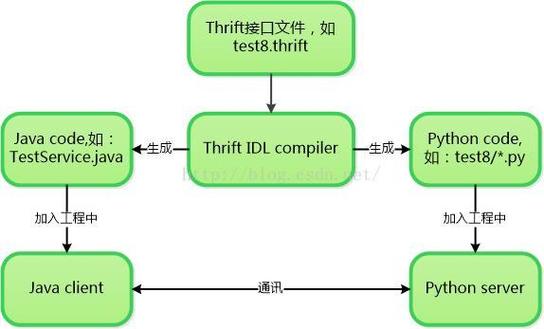
.thriftfile: The source file where you define your data structures (like classes) and services (like APIs).- Thrift Compiler: A tool that reads your
.thriftfile and generates the necessary boilerplate code for your chosen languages. - Generated Code: The Python classes that represent your data types and the base classes for your server and client.
- Protocol: The serialization format for data. Common ones are
binary,compact, andjson.binaryis the most efficient. - Transport: The mechanism for reading and writing data. Common ones are
socket,file, andhttp.
Installation
We need to install two things:
- The Thrift Compiler (to generate the code).
- The Python Thrift Library (to run the generated code).
Step 1: Install the Thrift Compiler
It's highly recommended to install the compiler using your system's package manager or by building it from source for the latest version.
Method A: Using APT (Easiest, but may be an older version)
sudo apt update
sudo apt install thrift-compiler
Check the version:
thrift --version
# Expected output: The Apache Thrift Compiler (version 0.16.0, built ...)
Method B: Building from Source (Recommended for the latest features)
If the version from apt is too old, you can build it from the official source.
-
Install build dependencies:
sudo apt install build-essential autoconf automake libtool bison flex
-
Clone the Thrift repository:
git clone https://github.com/apache/thrift.git
cd thrift
-
Configure and build:
./bootstrap.sh
./configure --without-java --without-cpp --without-go --without-erlang --without-php --without-perl --without-php --without-ruby --without-haskell --without-nodejs --without-lua --without-swift
make
sudo make install
Note: We disable the building of language bindings you don't need to speed up the compile time. You can remove
--without-<language>for any language you actually want. -
Verify the installation:
thrift --version
Step 2: Install the Python Library
The easiest way to install the Python runtime library is using pip.
# It's best practice to use a virtual environment
python3 -m venv thrift_env
source thrift_env/bin/activate
# Install the thrift library
pip install thrift
A Complete "Hello, World!" Example
Let's create a simple service that takes a name and returns a greeting.
Step 1: Create the .thrift file
Create a file named hello.thrift:
// hello.thrift
namespace py hello_service  // This will create a Python module named 'hello_service'
// Define a simple service
service HelloService {
    string sayHello(1: string name),
}
Explanation:
namespace py hello_service: Tells the Thrift compiler to place the generated Python code into a Python package namedhello_service.service HelloService: Defines a service namedHelloService.string sayHello(1: string name): Defines a methodsayHellothat takes one argument of typestring(namedname) and returns astring. The1:is a unique field ID, which is important for binary protocols.
Step 2: Generate the Python Code
Now, use the Thrift compiler to create the Python files from your .thrift definition.
thrift --gen py hello.thrift
This will create a new directory called gen-py. Inside, you'll find the generated code:
gen-py/
└── hello_service/
    ├── HelloService.py
    ├── HelloService-remote
    ├── __init__.py
    ├── constants.py
└── ttypes.pyttypes.py: Contains the data type definitions (empty in this case).HelloService.py: Contains the client and server base classes you'll use to build your application.
Step 3: Write the Python Server
Create a file named server.py in the same directory as hello.thrift:
# server.py
import sys
import time
from thrift import Thrift
from thrift.transport import TSocket, TTransport
from thrift.server import TServer
from gen_py.hello_service import HelloService
# Import the generated service implementation class
# We will create this class next
from hello_service import HelloServiceHandler
class HelloServiceHandler:
    """
    Implements the HelloService interface.
    """
    def sayHello(self, name):
        print(f"[Server] Received request for sayHello with name: {name}")
        return f"Hello, {name}!"
def main():
    # Create a server socket
    processor = HelloService.Processor(HelloServiceHandler())
    transport = TSocket.TServerSocket(port=9090)
    tfactory = TTransport.TBufferedTransportFactory()
    pfactory = TBinaryProtocol.TBinaryProtocolFactory()
    # Create a server
    server = TServer.TSimpleServer(processor, transport, tfactory, pfactory)
    print("Starting the Python server...")
    print("The server is listening on port 9090...")
    server.serve()
if __name__ == '__main__':
    main()
Step 4: Write the Python Client
Create a file named client.py:
# client.py
from thrift import Thrift
from thrift.transport import TSocket, TTransport
from thrift.protocol import TBinaryProtocol
# Import the generated client
from gen_py.hello_service import HelloService
def main():
    # Make socket
    transport = TSocket.TSocket('localhost', 9090)
    # Buffering is critical. Raw sockets are very slow
    transport = TTransport.TBufferedTransport(transport)
    # Wrap in a protocol
    protocol = TBinaryProtocol.TBinaryProtocol(transport)
    # Create a client to use the protocol encoder
    client = HelloService.Client(protocol)
    # Connect!
    transport.open()
    # Use the client
    print("[Client] Calling sayHello...")
    result = client.sayHello("Thift User")
    print(f"[Client] Result: '{result}'")
    # Close!
    transport.close()
if __name__ == '__main__':
    main()
A More Realistic Example (Multi-file, Shared Data)
Let's define a shared data type User and use it in a service.
Step 1: Update the .thrift file
Modify hello.thrift:
// hello.thrift
namespace py hello_service
// Define a shared data structure
struct User {
    1: string username,
    2: i32 age,
    3: string email,
}
// Define a service that uses the User struct
service UserService {
    string getGreeting(1: User user),
    void logUserAction(1: User user, 2: string action),
}
Step 2: Regenerate the Code
thrift --gen py hello.thrift
Now, gen-py/hello_service/ttypes.py will contain the Python User class definition.
Step 3: Write the Server
Create user_server.py:
# user_server.py
import sys
from thrift import Thrift
from thrift.transport import TSocket, TTransport
from thrift.server import TServer
from gen_py.hello_service import UserService, User
class UserServiceHandler:
    """
    Implements the UserService interface.
    """
    def getGreeting(self, user):
        print(f"[Server] Received getGreeting for user: {user.username}")
        return f"Hi, {user.username}! You are {user.age} years old."
def logUserAction(self, user, action):