Of course! Let's break down Java threads, focusing on the Runnable interface, which is a fundamental and highly recommended approach.
We'll cover:
- What is a Thread? (The Big Picture)
- The
RunnableInterface (The "What to Do") - How to Use
Runnable(Two Ways) Runnablevs.ThreadClass (A Crucial Comparison)- Practical Example & Best Practices
- Lifecycle of a Thread
What is a Thread? (The Big Picture)
Think of your Java program as a single sequence of instructions running from top to bottom. This is called the main thread.
A thread is the smallest unit of a process. It's a lightweight subprocess, a separate line of execution. By creating multiple threads, your program can perform multiple tasks (or parts of a task) concurrently.
Analogy: Imagine a chef (the main thread) in a kitchen.
- Single-threaded: The chef chops vegetables, then puts them on the stove, then washes the dishes. They do everything one after the other.
- Multi-threaded: The chef hires two assistants. Assistant A chops vegetables while Assistant B washes dishes. The chef (main thread) can now oversee both tasks happening at the same time. Each assistant is a thread.
The Runnable Interface (The "What to Do")
To make a task run in a separate thread, you need to tell Java what that task is. The Runnable interface is the contract for a task. It's a functional interface, meaning it has only one abstract method.
@FunctionalInterface
public interface Runnable {
    public abstract void run();
}
Your job is to create a class that implements Runnable and provide the code for the run() method. This run() method contains the sequence of instructions you want to execute in the new thread.
How to Use Runnable (Two Ways)
There are two primary ways to use Runnable.
Method 1: Implementing the Runnable Interface (The Classic Way)
This is the traditional object-oriented approach.
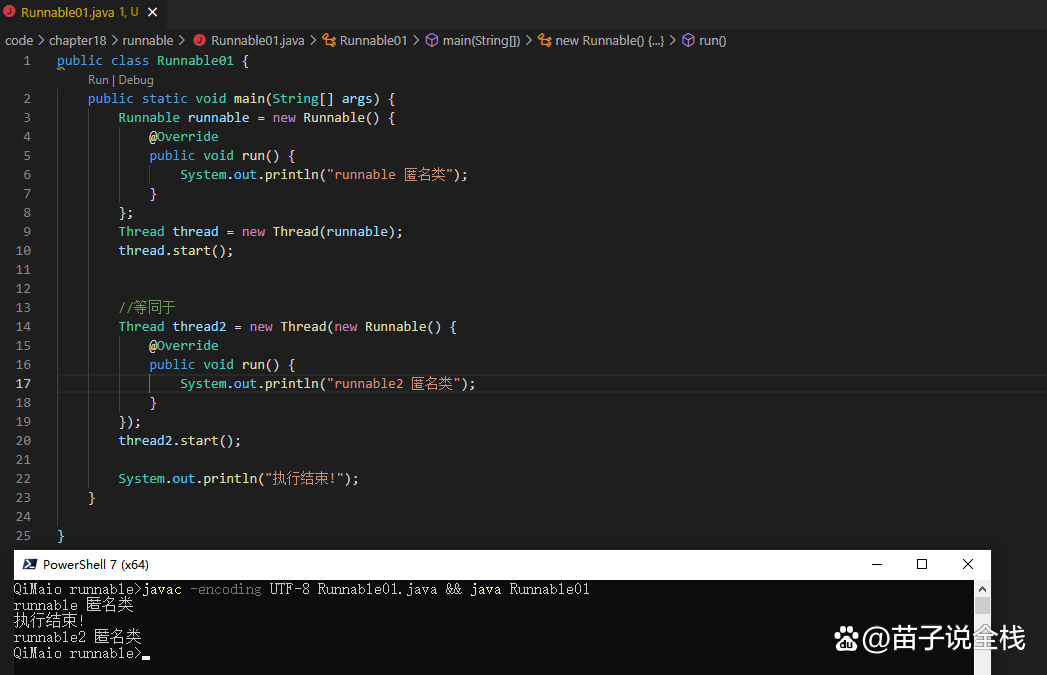
Step 1: Create a task class that implements Runnable.
class MyTask implements Runnable {
    @Override
    public void run() {
        // Code inside this method will run in a separate thread.
        // It's good practice to handle potential exceptions.
        try {
            for (int i = 1; i <= 5; i++) {
                System.out.println("Running " + Thread.currentThread().getName() + " count: " + i);
                // Simulate some work
                Thread.sleep(500);
            }
        } catch (InterruptedException e) {
            System.out.println(Thread.currentThread().getName() + " was interrupted.");
        }
    }
}
Step 2: Create a Thread object, passing your Runnable task to its constructor.
The Thread class is the "engine" that will execute your Runnable task.
MyTask myTask = new MyTask();
Thread workerThread = new Thread(myTask); // Pass the task to the engine
Step 3: Start the thread.
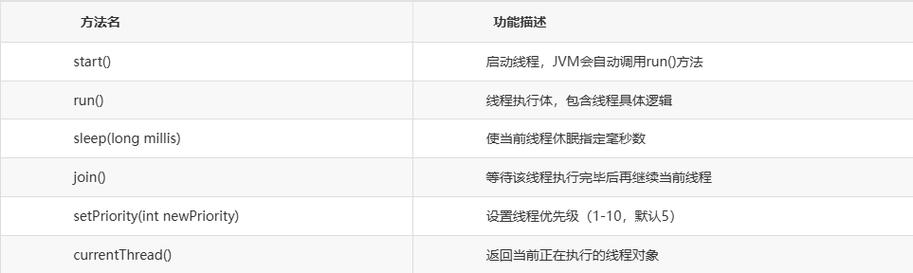
This is the most important step. Calling thread.start() tells the Java Virtual Machine (JVM) to create a new thread and execute the run() method of your Runnable task in that new thread.
Never call thread.run() directly! That would just execute the code in the current thread, defeating the purpose.
workerThread.start(); // This creates a new thread and calls myTask.run()
Method 2: Using a Lambda Expression (The Modern Way)
Since Java 8, Runnable is a functional interface, so you can use a lambda expression for a much more concise and readable syntax. This is the preferred method for simple tasks.
You skip creating a separate class entirely.
public class LambdaRunnableExample {
    public static void main(String[] args) {
        // Create a Thread with a Runnable task defined by a lambda
        Thread thread = new Thread(() -> {
            try {
                for (int i = 1; i <= 5; i++) {
                    System.out.println("Running " + Thread.currentThread().getName() + " count: " + i);
                    Thread.sleep(500);
                }
            } catch (InterruptedException e) {
                System.out.println(Thread.currentThread().getName() + " was interrupted.");
            }
        });
        thread.start(); // Start the new thread
        System.out.println("Main thread continues its work...");
    }
}
Runnable vs. Thread Class (A Crucial Comparison)
This is a very common point of confusion for beginners.
| Feature | implements Runnable |
extends Thread |
|---|---|---|
| Basis | You are defining a task. | You are creating a thread. |
| Inheritance | Does not prevent you from extending another class. | You cannot extend any other class because Java only supports single inheritance. |
| Composition | Follows the Composition over Inheritance principle, which is more flexible and robust. | Tightly couples your task to the Thread class. |
| Multiple Threads | Easy to run the same task with multiple threads. Just pass the same Runnable instance to different Thread objects. |
You would need to create multiple instances of your custom Thread class, which is less efficient. |
| Recommendation | Highly Recommended. It's more flexible, follows better design principles, and is the standard practice. | Not Recommended. It's rigid and less flexible. |
Example of running the same task with multiple threads:
class PrintTask implements Runnable {
    @Override
    public void run() {
        System.out.println("Executing task in " + Thread.currentThread().getName());
    }
}
public class MultipleThreadsOneTask {
    public static void main(String[] args) {
        PrintTask task = new PrintTask(); // Create ONE task
        // Create TWO different threads to run the SAME task
        Thread thread1 = new Thread(task, "Worker-1");
        Thread thread2 = new Thread(task, "Worker-2");
        thread1.start();
        thread2.start();
    }
}
// Output will be something like:
// Executing task in Worker-1
// Executing task in Worker-2
Practical Example & Best Practices
Here is a complete, runnable example that demonstrates the key concepts.
// Task class that implements Runnable
class Task implements Runnable {
    private final String taskName;
    public Task(String name) {
        this.taskName = name;
    }
    @Override
    public void run() {
        try {
            for (int i = 1; i <= 5; i++) {
                System.out.println(taskName + " is running... Count: " + i);
                // Pause the thread for 1 second (1000 milliseconds)
                Thread.sleep(1000);
            }
            System.out.println(taskName + " has finished.");
        } catch (InterruptedException e) {
            System.out.println(taskName + " was interrupted.");
            // Restore the interrupted status
            Thread.currentThread().interrupt();
        }
    }
}
public class ThreadExample {
    public static void main(String[] args) {
        System.out.println("Main thread has started.");
        // Create two tasks
        Task task1 = new Task("Task-A");
        Task task2 = new Task("Task-B");
        // Create two threads, each assigned a task
        Thread thread1 = new Thread(task1);
        Thread thread2 = new Thread(task2);
        // Give the threads names for easier identification
        thread1.setName("Alpha-Thread");
        thread2.setName("Beta-Thread");
        // Start both threads. They will run concurrently.
        thread1.start();
        thread2.start();
        // The main thread continues its own execution
        System.out.println("Main thread is waiting for the other threads to finish...");
        // Optional: Wait for the threads to complete before the main thread exits
        try {
            thread1.join(); // Main thread waits for thread1 to die
            thread2.join(); // Main thread waits for thread2 to die
        } catch (InterruptedException e) {
            e.printStackTrace();
        }
        System.out.println("Main thread has finished.");
    }
}
Output (will vary in order due to concurrency):
Main thread has started.
Main thread is waiting for the other threads to finish...
Task-A is running... Count: 1
Task-B is running... Count: 1
Task-A is running... Count: 2
Task-B is running... Count: 2
Task-A has finished.
Task-B is running... Count: 3
Task-B is running... Count: 4
Task-B is running... Count: 5
Task-B has finished.
Main thread has finished.
Lifecycle of a Thread
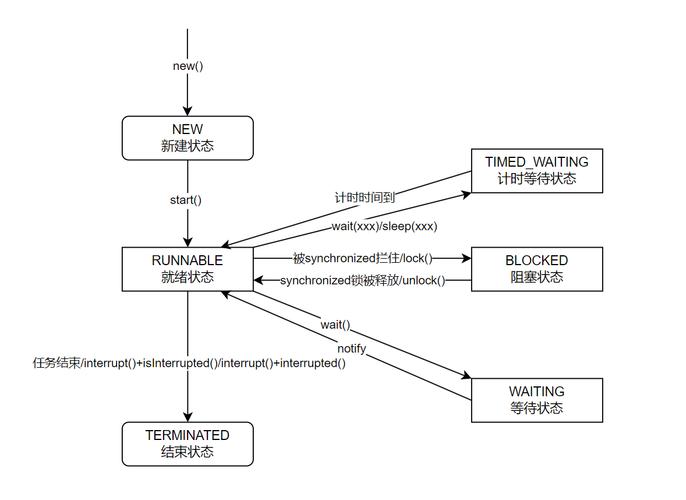
A thread goes through several states during its lifetime. Understanding this is key to debugging multi-threaded applications.
- New: The thread has been created but not yet started (
new Thread(...)).