方法概览
| 方法 | 优点 | 缺点 | 适用场景 |
|---|---|---|---|
JDK 自带的 javax.xml.ws |
无需额外依赖,简单直接 | 仅支持 SOAP 1.1/1.2,功能有限,对复杂类型支持较差 | 快速调用简单的、基于 SOAP 的 WebService,或学习原理。 |
| Apache CXF | 功能强大,灵活,支持 SOAP 1.1/1.2,易于集成到 Spring | 需要引入外部依赖,配置稍复杂 | 生产环境首选,功能全面的 WebService 客户端和服务端框架。 |
| Spring Boot + WebService Template | 与 Spring 生态无缝集成,配置简单,代码优雅 | 需要 Spring Boot 环境 | 已经在使用 Spring/Spring Boot 的项目中,非常推荐。 |
| 动态调用 (不生成客户端) | 无需生成客户端代码,灵活性高 | 代码可读性差,调试困难,容易出错 | 调用多个不同 WSDL 但结构相似的 WebService,或 WSDL 地址不固定时。 |
准备工作:获取 WebService 的信息
在编写代码之前,你需要从提供方获取以下关键信息,通常这些信息可以在 WSDL (Web Services Description Language) 文件中找到:
- WSDL 地址:服务的描述文件,包含了服务的所有信息(端口、方法、参数、返回值类型等)。
- 目标命名空间 (Target Namespace):一个唯一的 URI,用于标识这个服务。
- 服务端点地址:实际调用服务的 URL。
- 服务名:WSDL 中
<service>标签的name属性。 - 端口名:WSDL 中
<port>标签的name属性。 - 操作名:你想要调用的方法名。
示例 WSDL 信息 (我们将在示例中使用):
- WSDL 地址:
http://ws.webxml.com.cn/WebServices/MobileCodeWS.asmx?wsdl - 目标命名空间:
http://WebXml.com.cn/ - 服务名:
MobileCodeWS - 端口名:
MobileCodeWSSoap - 操作名:
getMobileCodeInfo - 方法签名:
getMobileCodeInfo(String mobileCode, String userID)
使用 JDK 自带的 javax.xml.ws (JAX-WS)
这是最基础的方法,不需要引入任何第三方库,JDK 内置了 wsimport 工具来根据 WSDL 生成客户端代码。
步骤 1: 生成客户端代码
打开你的命令行工具,执行以下命令:
# -keep: 生成源代码
# -d: 指定编译后的 .class 文件存放目录
# -p: 指定生成的包名
wsimport -keep -d . -p com.example.webservice.client http://ws.webxml.com.cn/WebServices/MobileCodeWS.asmx?wsdl
执行后,会在你指定的目录下生成一堆 .java 和 .class 文件。

步骤 2: 编写调用代码
import com.example.webservice.client.MobileCodeWS;
import com.example.webservice.client.MobileCodeWSLocator;
import com.example.webservice.client.MobileCodeWSSoap;
public class JdkWebserviceClient {
    public static void main(String[] args) {
        try {
            // 1. 创建服务实例 (通过 Locator)
            MobileCodeWS service = new MobileCodeWSLocator();
            // 2. 获取 Port (服务端点接口)
            MobileCodeWSSoap port = service.getMobileCodeWSSoap();
            // 3. 直接调用方法
            String result = port.getMobileCodeInfo("13800138000", "");
            // 4. 处理结果
            System.out.println("调用结果: " + result);
        } catch (Exception e) {
            e.printStackTrace();
        }
    }
}
优点:非常简单,适合快速验证。
缺点:wsimport 过程略显繁琐,且对复杂 XML 结构(如 List、自定义对象)的支持不够友好。
使用 Apache CXF (推荐)
CXF 是一个功能强大的开源框架,是目前生产环境中使用最广泛的方案之一,它支持从 WSDL 自动生成客户端,也支持手动创建客户端。
步骤 1: 添加 Maven 依赖
在 pom.xml 中添加 CXF 的依赖:
<dependencies>
    <!-- CXF 核心依赖 -->
    <dependency>
        <groupId>org.apache.cxf</groupId>
        <artifactId>cxf-rt-frontend-jaxws</artifactId>
        <version>3.4.5</version> <!-- 使用最新稳定版本 -->
    </dependency>
    <dependency>
        <groupId>org.apache.cxf</groupId>
        <artifactId>cxf-rt-transports-http</artifactId>
        <version>3.4.5</version>
    </dependency>
    <!-- 如果需要日志来查看请求/响应,可以添加 slf4j 和 logback -->
    <dependency>
        <groupId>org.slf4j</groupId>
        <artifactId>slf4j-api</artifactId>
        <version>1.7.36</version>
    </dependency>
    <dependency>
        <groupId>ch.qos.logback</groupId>
        <artifactId>logback-classic</artifactId>
        <version>1.2.11</version>
    </dependency>
</dependencies>
步骤 2: 使用 CXF 自动生成客户端 (推荐)
CXF 提供了 cxf-codegen-plugin Maven 插件,可以在编译时自动生成客户端代码,比手动执行 wsimport 更方便。
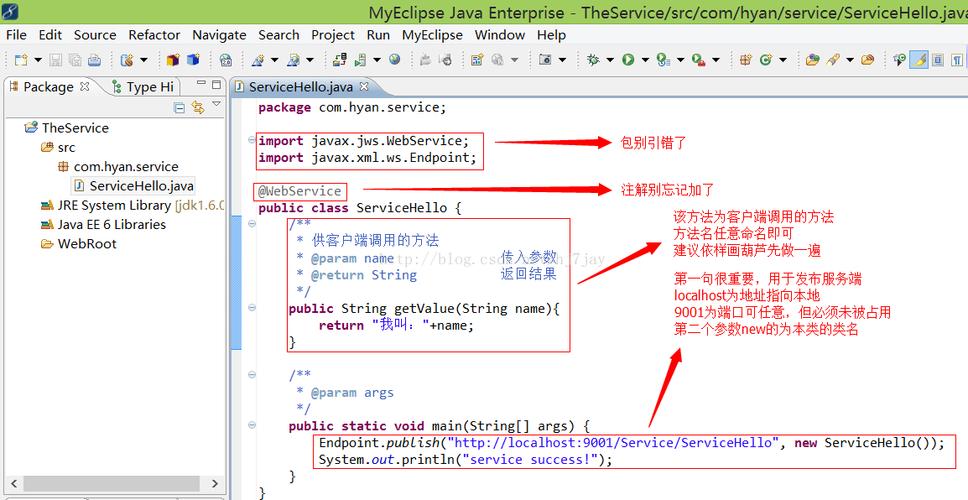
在 pom.xml 的 <build> 标签内添加:
<build>
    <plugins>
        <plugin>
            <groupId>org.apache.cxf</groupId>
            <artifactId>cxf-codegen-plugin</artifactId>
            <version>3.4.5</version>
            <executions>
                <execution>
                    <id>generate-sources</id>
                    <phase>generate-sources</phase>
                    <configuration>
                        <sourceRoot>${project.build.directory}/generated-sources/cxf</sourceRoot>
                        <wsdlOptions>
                            <wsdlOption>
                                <wsdl>http://ws.webxml.com.cn/WebServices/MobileCodeWS.asmx?wsdl</wsdl>
                            </wsdlOption>
                        </wsdlOptions>
                    </configuration>
                    <goals>
                        <goal>wsdltojava</goal>
                    </goals>
                </execution>
            </executions>
        </plugin>
    </plugins>
</build>
然后执行 mvn clean compile,CXF 会自动生成代码到 target/generated-sources/cxf 目录。
步骤 3: 编写调用代码
生成的代码与 JDK 方式类似,但 CXF 的客户端创建方式略有不同。
import com.example.webservice.client.MobileCodeWS;
import com.example.webservice.client.MobileCodeWSImplService;
import com.example.webservice.client.MobileCodeWSSoap;
public class CxfWebserviceClient {
    public static void main(String[] args) {
        try {
            // 1. 创建服务实现类实例
            MobileCodeWSImplService service = new MobileCodeWSImplService();
            // 2. 获取 Port (CXF 推荐使用这种方式)
            MobileCodeWSSoap port = service.getMobileCodeWSSoap12(); // 注意:这里是 getMobileCodeWSSoap12
            // 3. 调用方法
            String result = port.getMobileCodeInfo("13800138000", "");
            // 4. 处理结果
            System.out.println("调用结果: " + result);
        } catch (Exception e) {
            e.printStackTrace();
        }
    }
}
优点:功能强大,支持多种协议和传输方式,社区活跃,是事实上的标准。 缺点:需要引入额外的依赖。
使用 Spring Boot + WebServiceTemplate
如果你的项目已经是 Spring Boot 应用,那么使用 WebServiceTemplate 是最优雅的方式。
步骤 1: 添加 Maven 依赖
除了 Spring Boot 的 web 依赖,你还需要 spring-ws-core。
<dependencies>
    <!-- Spring Boot Web Starter -->
    <dependency>
        <groupId>org.springframework.boot</groupId>
        <artifactId>spring-boot-starter-web</artifactId>
    </dependency>
    <!-- Spring Web Services -->
    <dependency>
        <groupId>org.springframework.boot</groupId>
        <artifactId>spring-boot-starter-web-services</artifactId>
    </dependency>
</dependencies>
步骤 2: 配置 WebServiceTemplate
在 Spring Boot 的主配置类或一个专门的 @Configuration 类中配置 WebServiceTemplate。
import org.springframework.context.annotation.Bean;
import org.springframework.context.annotation.Configuration;
import org.springframework.oxm.jaxb.Jaxb2Marshaller;
import org.springframework.ws.client.core.WebServiceTemplate;
@Configuration
public class WebserviceConfig {
    @Bean
    public Jaxb2Marshaller marshaller() {
        Jaxb2Marshaller marshaller = new Jaxb2Marshaller();
        // 设置要生成的包名,这个包名必须与 WSDL 生成的客户端代码的包名一致
        marshaller.setPackagesToScan("com.example.webservice.client");
        return marshaller;
    }
    @Bean
    public WebServiceTemplate webServiceTemplate(Jaxb2Marshaller marshaller) {
        WebServiceTemplate webServiceTemplate = new WebServiceTemplate();
        webServiceTemplate.setMarshaller(marshaller);
        webServiceTemplate.setUnmarshaller(marshaller);
        // 设置默认的 URI,即 WebService 的地址
        webServiceTemplate.setDefaultUri("http://ws.webxml.com.cn/WebServices/MobileCodeWS.asmx");
        return webServiceTemplate;
    }
}
步骤 3: 创建 Service 并调用
import com.example.webservice.client.GetMobileCodeInfo;
import com.example.webservice.client.GetMobileCodeInfoResponse;
import org.springframework.ws.client.core.WebServiceTemplate;
import org.springframework.ws.soap.client.core.SoapActionCallback;
import javax.xml.bind.JAXBElement;
public class MobileCodeService {
    private final WebServiceTemplate webServiceTemplate;
    public MobileCodeService(WebServiceTemplate webServiceTemplate) {
        this.webServiceTemplate = webServiceTemplate;
    }
    public String getMobileInfo(String mobileCode) {
        // 1. 创建请求对象 (需要是 WSDL 生成的类型)
        GetMobileCodeInfo request = new GetMobileCodeInfo();
        request.setMobileCode(mobileCode);
        request.setUserID("");
        // 2. 定义 SOAP Action (非常重要,通常在 WSDL 的 <binding> 中定义)
        String soapActionUri = "http://WebXml.com.cn/getMobileCodeInfo";
        // 3. 发送请求并获取响应
        JAXBElement<GetMobileCodeInfoResponse> response = (JAXBElement<GetMobileCodeInfoResponse>) webServiceTemplate
                .marshalSendAndReceive(request, new SoapActionCallback(soapActionUri));
        // 4. 从响应对象中提取结果
        return response.getValue().getGetMobileCodeInfoResult();
    }
}
步骤 4: 创建 Controller 进行测试
import org.springframework.beans.factory.annotation.Autowired;
import org.springframework.web.bind.annotation.GetMapping;
import org.springframework.web.bind.annotation.PathVariable;
import org.springframework.web.bind.annotation.RequestMapping;
import org.springframework.web.bind.annotation.RestController;
@RestController
@RequestMapping("/api/mobile")
public class MobileCodeController {
    @Autowired
    private MobileCodeService mobileCodeService;
    @GetMapping("/{code}")
    public String getMobileCodeInfo(@PathVariable String code) {
        return mobileCodeService.getMobileInfo(code);
    }
}
启动 Spring Boot 应用,访问 http://localhost:8080/api/mobile/13800138000 即可看到结果。
优点:与 Spring 生态完美集成,代码结构清晰,易于管理。 缺点:必须基于 Spring/Spring Boot 框架。
动态调用 (不生成客户端)
当你不想或不能生成客户端代码时,可以使用这种方式,它通过直接构造 SOAP 请求 XML 来调用服务。
步骤 1: 添加依赖 (可以使用 CXF 或 JDK 自带的)
<!-- 使用 CXF -->
<dependency>
    <groupId>org.apache.cxf</groupId>
    <artifactId>cxf-rt-frontend-jaxws</artifactId>
    <version>3.4.5</version>
</dependency>
<dependency>
    <groupId>org.apache.cxf</groupId>
    <artifactId>cxf-rt-transports-http</artifactId>
    <version>3.4.5</version>
</dependency>
步骤 2: 编写调用代码
import org.apache.cxf.endpoint.Client;
import org.apache.cxf.frontend.ClientProxy;
import org.apache.cxf.jaxws.JaxWsProxyFactoryClient;
import org.apache.cxf.transport.http.HTTPConduit;
import org.apache.cxf.transports.http.configuration.HTTPClientPolicy;
public class DynamicWebserviceClient {
    public static void main(String[] args) {
        // 1. 创建工厂
        JaxWsProxyFactoryClient factory = new JaxWsProxyFactoryClient();
        // 2. 设置服务地址
        factory.setAddress("http://ws.webxml.com.cn/WebServices/MobileCodeWS.asmx");
        // 3. 设置服务接口 (需要你手动创建一个与 WSDL 中 PortType 对应的 Java 接口)
        // 这是一个关键步骤,你需要根据 WSDL 手动定义这个接口。
        // interface MobileCodeWSSoap {
        //     String getMobileCodeInfo(String mobileCode, String userID);
        // }
        factory.setServiceClass(MobileCodeWSSoap.class); // 假设你已手动创建此接口
        // 4. 创建客户端代理
        MobileCodeWSSoap soap = (MobileCodeWSSoap) factory.create();
        // 5. (可选) 设置超时等连接属性
        Client client = ClientProxy.getClient(soap);
        HTTPConduit conduit = (HTTPConduit) client.getConduit();
        HTTPClientPolicy httpClientPolicy = new HTTPClientPolicy();
        httpClientPolicy.setConnectionTimeout(10000); // 连接超时 10 秒
        httpClientPolicy.setReceiveTimeout(20000);   // 接收超时 20 秒
        conduit.setClient(httpClientPolicy);
        // 6. 调用方法
        String result = soap.getMobileCodeInfo("13800138000", "");
        // 7. 处理结果
        System.out.println("动态调用结果: " + result);
    }
}
优点:最大的灵活性,无需生成任何代码。 缺点:
- 必须手动创建服务接口,这本身就相当于“部分”生成了代码。
- 无法在编译时检查错误,如果方法名或参数写错,只有在运行时才会报错。
- 调试困难,需要查看原始 XML。
总结与建议
| 场景 | 推荐方法 |
|---|---|
| 新手学习 / 快速验证 / 简单调用 | JDK javax.xml.ws |
| 全新 Java 项目 / 生产环境 | Apache CXF |
| 已在使用 Spring Boot 的项目 | Spring Boot + WebServiceTemplate |
| 需要调用多个不同 WSDL 服务 / WSDL 地址不固定 | 动态调用 |
对于绝大多数现代 Java 项目,Apache CXF 是最稳妥、功能最全面的选择,如果你的项目已经是 Spring 生态的一部分,Spring Boot + WebServiceTemplate 会让你感觉非常舒适和自然。