Of course! Here is a comprehensive guide to using Redis with a Java client, covering the most popular libraries, setup, and code examples.
Choosing a Java Client
There are several excellent Redis clients for Java. The two most popular and recommended ones are Lettuce and Jedis.
| Feature | Lettuce | Jedis |
|---|---|---|
| Async/Sync | Netty-based, fully non-blocking and supports both synchronous and asynchronous (reactive) programming out of the box. | Traditionally synchronous, with an async API added later. The underlying connections are often blocking. |
| Thread Safety | Connection is thread-safe. You can share a single RedisClient instance across your application. |
Connection is NOT thread-safe. You must use a connection pool (e.g., JedisPool) to manage connections safely in a multi-threaded environment. |
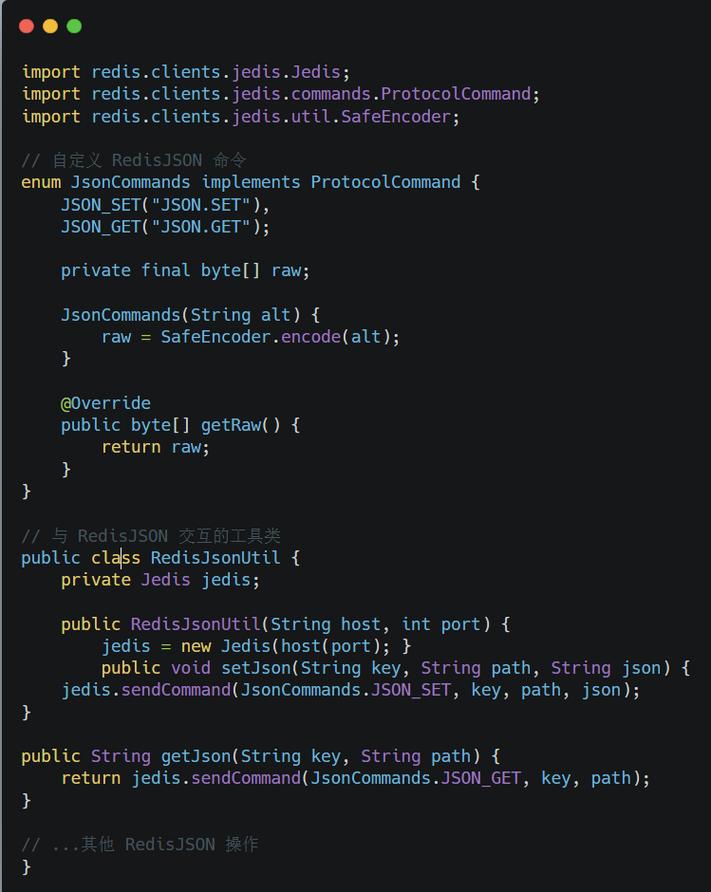
| Modern Features | Excellent support for Redis modules (RedSearch, RedisJSON, RedisTimeSeries) and advanced features like pipelining and transactions. | Solid and mature, but generally considered less modern than Lettuce in terms of its async/reactive capabilities. |
| Recommendation | Recommended for new projects. It's the modern default for Spring Boot 2.x and newer versions. | Still a great, battle-tested choice, especially if you're on an older stack or prefer a simpler, more traditional approach. |
Setup and Dependencies
You'll need to add the dependency for your chosen client to your project (e.g., a pom.xml for Maven or build.gradle for Gradle).
Using Maven
For Lettuce (Recommended):
<dependency>
    <groupId>io.lettuce</groupId>
    <artifactId>lettuce-core</artifactId>
    <version>6.3.2.RELEASE</version> <!-- Use the latest version -->
</dependency>
For Jedis:
<dependency>
    <groupId>redis.clients</groupId>
    <artifactId>jedis</artifactId>
    <version>5.1.0</version> <!-- Use the latest version -->
</dependency>
Basic Operations with Lettuce
Lettuce is a great choice to start with. Let's walk through a simple, synchronous example.
Step 1: Create a RedisClient and Connect
import io.lettuce.core.RedisClient;
import io.lettuce.core.api.StatefulRedisConnection;
import io.lettuce.core.api.sync.RedisCommands;
public class LettuceExample {
    public static void main(String[] args) {
        // 1. Create a client that connects to Redis
        // By default, it connects to redis://localhost:6379
        RedisClient redisClient = RedisClient.create("redis://localhost");
        // 2. Open a connection. This is thread-safe.
        // The 'use' block ensures the connection is closed automatically.
        try (StatefulRedisConnection<String, String> connection = redisClient.connect()) {
            // 3. Create a sync interface for commands
            RedisCommands<String, String> syncCommands = connection.sync();
            System.out.println("Connected to Redis successfully!");
            // --- Basic Operations ---
            // SET a key-value pair
            syncCommands.set("user:1001:name", "Alice");
            System.out.println("SET user:1001:name to Alice");
            // GET the value
            String name = syncCommands.get("user:1001:name");
            System.out.println("GET user:1001:name: " + name);
            // SET another key with an expiration (TTL of 10 seconds)
            syncCommands.setex("temp:session:abc123", 10, "user_session_data");
            System.out.println("SET temp:session:abc123 with TTL of 10 seconds");
            // INCR a counter
            syncCommands.incr("page:views:home");
            syncCommands.incr("page:views:home");
            Long views = syncCommands.get("page:views:home");
            System.out.println("Page views for home: " + views);
            // HSET (Hash)
            syncCommands.hset("user:1001", "email", "alice@example.com");
            syncCommands.hset("user:1001", "age", "30");
            String email = syncCommands.hget("user:1001", "email");
            System.out.println("User email: " + email);
            // LPUSH (List)
            syncCommands.lpush("notifications", "Welcome!", "Your order has shipped.");
            Long listLength = syncCommands.llen("notifications");
            System.out.println("Notifications list length: " + listLength);
            // SADD (Set)
            syncCommands.sadd("tags:java", "programming", "backend", "jvm");
            Long setSize = syncCommands.scard("tags:java");
            System.out.println("Tags set size: " + setSize);
        } finally {
            // 4. Close the client
            redisClient.shutdown();
        }
    }
}
Basic Operations with Jedis
Jedis is straightforward but requires a connection pool for production use.
Step 1: Create a JedisPool
You should always use a JedisPool to manage connections. Creating a new connection for every operation is very inefficient.
import redis.clients.jedis.Jedis;
import redis.clients.jedis.JedisPool;
import redis.clients.jedis.JedisPoolConfig;
public class JedisExample {
    public static void main(String[] args) {
        // 1. Configure the connection pool
        JedisPoolConfig poolConfig = new JedisPoolConfig();
        poolConfig.setMaxTotal(128); // Max total connections
        poolConfig.setMaxIdle(20);   // Max idle connections
        // 2. Create a connection pool
        // By default, it connects to localhost:6379
        try (JedisPool jedisPool = new JedisPool(poolConfig, "localhost", 6379)) {
            // 3. Get a connection from the pool
            // The 'try-with-resources' block ensures the connection is returned to the pool
            try (Jedis jedis = jedisPool.getResource()) {
                System.out.println("Connected to Redis successfully!");
                // --- Basic Operations ---
                // SET a key-value pair
                jedis.set("user:1002:name", "Bob");
                System.out.println("SET user:1002:name to Bob");
                // GET the value
                String name = jedis.get("user:1002:name");
                System.out.println("GET user:1002:name: " + name);
                // INCR a counter
                jedis.incr("page:views:about");
                Long views = jedis.get("page:views:about");
                System.out.println("Page views for about: " + views);
                // HSET (Hash)
                jedis.hset("user:1002", "email", "bob@example.com");
                jedis.hset("user:1002", "city", "New York");
                String email = jedis.hget("user:1002", "email");
                System.out.println("User email: " + email);
            } // jedis.close() returns the connection to the pool
        } // jedisPool.close() closes all connections in the pool
    }
}
Advanced Features (with Lettuce)
Lettuce shines when you need more advanced patterns.
Pipelining
Pipelining sends multiple commands to the server without waiting for a response for each one, then reads all the responses at once. This significantly reduces network latency.
// Inside the try-with-resources block for the connection...
RedisCommands<String, String> syncCommands = connection.sync();
// Start a pipeline
RedisCommandQueue<String, String> queue = syncCommands.multi(); // multi() starts a pipeline
// Queue up commands
queue.get("key1");
queue.set("key2", "value2");
queue.incr("counter");
// Execute the pipeline and get all results
List<Object> results = queue.exec(); // exec() sends the commands and gets responses
System.out.println("Pipeline results: " + results);
// results will contain: [value_of_key1, OK, new_counter_value]
Transactions
Transactions ensure that a block of commands is executed atomically. All commands in a transaction are queued and executed sequentially, and no other client can run a command in between.
// Inside the try-with-resources block for the connection...
RedisCommands<String, String> syncCommands = connection.sync();
// Start a transaction
Transaction tx = syncCommands.multi();
try {
    // Queue commands within the transaction
    tx.set("transaction_key", "value1");
    tx.incr("transaction_counter");
    // Execute the transaction
    tx.exec(); // This will commit all commands
    System.out.println("Transaction committed successfully.");
} catch (Exception e) {
    // If any command fails, the entire transaction is rolled back
    tx.discard();
    System.err.println("Transaction failed and was rolled back: " + e.getMessage());
}
Spring Boot with Redis (The Easy Way)
If you're using the Spring Framework, integrating Redis is incredibly easy. Spring Boot provides auto-configuration for both Lettuce and Jedis.
Step 1: Add the Spring Data Redis Starter
<dependency>
    <groupId>org.springframework.boot</groupId>
    <artifactId>spring-boot-starter-data-redis</artifactId>
</dependency>
This dependency automatically chooses Lettuce as the default client.
Step 2: Configure application.properties
# Redis server connection
spring.redis.host=localhost
spring.redis.port=6379
# Optional: Use a password if your Redis server is protected
# spring.redis.password=yourpassword
# Optional: Use a connection pool
spring.redis.lettuce.pool.max-active=8
spring.redis.lettuce.pool.max-idle=8
spring.redis.lettuce.pool.min-idle=0
spring.redis.lettuce.pool.max-wait=-1ms
Step 3: Use @Autowired with RedisTemplate
RedisTemplate is a high-level abstraction provided by Spring that handles serialization and connection management for you. It's the recommended way to interact with Redis in a Spring application.
import org.springframework.beans.factory.annotation.Autowired;
import org.springframework.data.redis.core.RedisTemplate;
import org.springframework.stereotype.Service;
@Service
public class UserService {
    // Spring Boot automatically configures and injects a RedisTemplate
    // by default, it uses String serialization for both key and value
    @Autowired
    private RedisTemplate<String, String> redisTemplate;
    public void saveUser(String userId, String userName) {
        // The key is "user::1001", the value is "Alice"
        redisTemplate.opsForValue().set("user::" + userId, userName);
    }
    public String getUser(String userId) {
        return redisTemplate.opsForValue().get("user::" + userId);
    }
}
Spring Boot also makes it easy to work with complex objects by configuring a different serializer on the RedisTemplate.