Of course! Let's break down the topic of "Flash Java Socket" communication. This was a very common and powerful technique for creating rich, real-time applications (like multiplayer games or chat clients) in the late 2000s and early 2010s.
Here’s a comprehensive guide covering the concepts, how it worked, code examples, and its modern relevance.
The Big Picture: Why Flash and Java?
First, let's understand the roles of each technology in this partnership.
-
Adobe Flash (Client-Side):
- Strength: Ran in the web browser and was the undisputed king of rich media at the time. It had a powerful, vector-based graphics engine (for games and animations) and, most importantly for this topic, a robust
Socketclass. - The
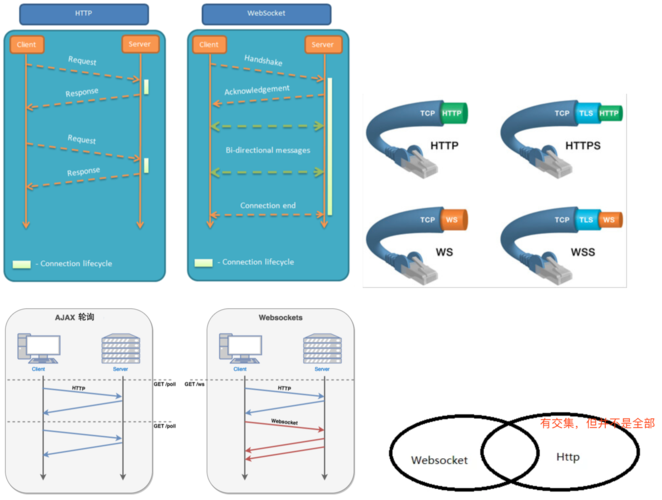
SocketClass: This allowed a Flash movie (a.swffile) to establish a persistent, low-latency, two-way TCP connection to a server. This was a game-changer because standard web communication (HTTP/HTTPS) is stateless and request-response based. A socket connection is like an open phone line, allowing the server to "push" data to the client at any time, which is essential for real-time applications.
- Strength: Ran in the web browser and was the undisputed king of rich media at the time. It had a powerful, vector-based graphics engine (for games and animations) and, most importantly for this topic, a robust
-
Java (Server-Side):
 (图片来源网络,侵删)
- Strength: Java was (and still is) a premier choice for building robust, scalable, multi-threaded server applications. Its core networking libraries are excellent.
- The Key Classes: Java's
java.net.ServerSocketandjava.net.Socketclasses are the perfect counterparts to Flash'sSocketclass. A JavaServerSocketlistens for incoming connections, and when a client (like a Flash movie) connects, it gets aSocketobject to communicate with that specific client.
The Synergy: You combine Flash's client-side socket power with Java's server-side socket power to create a real-time, interactive experience that runs entirely within a web browser.
How It Worked: The Communication Flow
The process follows a standard client-server socket model.
- Connection: The Flash application, when loaded, uses its
Socketclass to connect to a specific IP address and port where your Java server is listening. - Acceptance: The Java server, running a
ServerSocket, detects the incoming connection and "accepts" it, creating a newSocketthread dedicated to handling that one Flash client. - Two-Way Communication:
- Flash to Java: The Flash app can send data (e.g., user input, game commands) over the socket using
socket.writeBytes()orsocket.writeObject(). - Java to Flash: The Java server can push data (e.g., new game state, chat messages) back to the Flash app using the
OutputStreamfrom the client'sSocketobject.
- Flash to Java: The Flash app can send data (e.g., user input, game commands) over the socket using
- Protocol: A critical part of this is defining a protocol. Since you're just sending raw bytes, both the client and server must agree on a format for the messages. A simple protocol could be:
- The first 4 bytes represent an integer indicating the length of the message.
- The following bytes are the actual message content (e.g., JSON, plain text, or custom binary data).
Code Examples
Here is a simple "Echo Server" example. The client sends a message, and the server sends it right back.
A. Java Server-Side Code (SocketServer.java)
This server listens on port 12345. When a client connects, it reads a message and prints it, then sends the same message back.

import java.io.*;
import java.net.*;
public class SocketServer {
    public static void main(String[] args) throws IOException {
        int port = 12345;
        // Use try-with-resources to automatically close the server socket
        try (ServerSocket serverSocket = new ServerSocket(port)) {
            System.out.println("Server is listening on port " + port);
            while (true) {
                // Accept a client connection. This is a blocking call.
                try (Socket clientSocket = serverSocket.accept();
                     // Get input stream from the client
                     BufferedReader in = new BufferedReader(new InputStreamReader(clientSocket.getInputStream()));
                     // Get output stream to the client
                     PrintWriter out = new PrintWriter(clientSocket.getOutputStream(), true)) {
                    System.out.println("Client connected: " + clientSocket.getInetAddress());
                    // Read data from the client
                    String inputLine;
                    // The readLine() method is also blocking. It waits until a full line is received.
                    // Note: Flash's socket doesn't send newlines by default, so this might need adjustment.
                    // A better approach is to read a fixed number of bytes.
                    // For simplicity, we'll assume the client sends a line.
                    if ((inputLine = in.readLine()) != null) {
                        System.out.println("Received from client: " + inputLine);
                        // Send the same message back to the client
                        out.println(inputLine);
                        System.out.println("Sent back to client: " + inputLine);
                    }
                } catch (IOException e) {
                    System.out.println("Exception in client handler: " + e.getMessage());
                }
            }
        }
    }
}
B. Flash Client-Side Code (ActionScript 3.0)
You would place this code on the first frame of your Flash .fla file.
import flash.events.*;
import flash.net.Socket;
import flash.utils.ByteArray;
// Create a new Socket object
var socket:Socket = new Socket();
// Define event listeners
socket.addEventListener(Event.CONNECT, connectHandler);
socket.addEventListener(Event.CLOSE, closeHandler);
socket.addEventListener(IOErrorEvent.IO_ERROR, ioErrorHandler);
socket.addEventListener(SecurityErrorEvent.SECURITY_ERROR, securityErrorHandler);
socket.addEventListener(ProgressEvent.SOCKET_DATA, dataHandler);
// Connect to the Java server (running on the same machine for this example)
// IMPORTANT: For Flash to connect to a socket, the server must have a
// cross-domain policy file at /crossdomain.xml on the root of the domain.
// Example crossdomain.xml:
// <?xml version="1.0"?>
// <cross-domain-policy>
//   <site-control permitted-cross-domain-policies="all"/>
//   <allow-access-from domain="*" to-ports="12345" />
// </cross-domain-policy>
socket.connect("127.0.0.1", 12345);
function connectHandler(e:Event):void {
    trace("Connected to server!");
    // Let's send a message
    var message:String = "Hello from Flash!";
    // The Java server's readLine() expects a newline character.
    socket.writeUTFBytes(message + "\n");
    socket.flush(); // Send the data immediately
    trace("Sent: " + message);
}
function dataHandler(e:ProgressEvent):void {
    trace("Socket data received.");
    // The server's response is expected to be a line of text.
    var response:String = socket.readUTFBytes(socket.bytesAvailable);
    trace("Received from server: " + response);
}
function closeHandler(e:Event):void {
    trace("Connection closed.");
}
function ioErrorHandler(e:IOErrorEvent):void {
    trace("IO Error: " + e.text);
}
function securityErrorHandler(e:SecurityErrorEvent):void {
    trace("Security Error: " + e.text);
    // This is a VERY common error. It means the server's crossdomain.xml
    // file is missing, incorrect, or not accessible.
}
The Critical Security Policy File (crossdomain.xml)
This is the most common point of failure and confusion for beginners.
- What it is: A simple XML file that tells a Flash player which external servers it's allowed to communicate with via sockets.
- Why it's needed: The Flash Player Security Sandbox is very strict. By default, a Flash movie can only make socket connections back to the exact same domain it was loaded from. If your
SocketServer.javais running onmyserver.combut your Flash movie is loaded fromwww.myserver.com, the connection will be blocked. - Where it goes: The file must be named
crossdomain.xmland placed in the web root of the server where your Java socket server is running. If your Java app is behind a web server (like Apache or Nginx), that's where it goes. If your Java app is a raw socket server, you often have to serve this file yourself on port 843 (the policy port) or make your main server handle the request for/crossdomain.xml.
Example crossdomain.xml:
<?xml version="1.0"?>
<!DOCTYPE cross-domain-policy SYSTEM "http://www.adobe.com/xml/dtds/cross-domain-policy.dtd">
<cross-domain-policy>
    <!-- Allow any subdomain of myserver.com to connect -->
    <allow-access-from domain="*.myserver.com" to-ports="12345" />
    <!-- Or, for development, allow access from anywhere (not recommended for production) -->
    <!-- <allow-access-from domain="*" to-ports="12345" /> -->
</cross-domain-policy>
The Modern Era: Why This Isn't Used Anymore
While powerful in its time, this combination has been almost entirely replaced by modern web technologies.
-
The Death of Flash:
- Performance Issues: Flash was notoriously CPU-intensive and prone to crashes and security vulnerabilities.
- Lack of Mobile Support: Apple famously refused to support Flash on iOS, which was a massive blow to its ubiquity.
- HTML5 Rise: The advent of HTML5 introduced
<canvas>for graphics and, most importantly, WebSockets.
-
The Rise of WebSockets:
- Native Browser Support: WebSockets are a built-in part of all modern web browsers (Chrome, Firefox, Safari, Edge). No plugins required.
- Simplicity: The JavaScript API is much simpler than ActionScript 3's socket handling.
- Standardization: It's a W3C and IETF standard, ensuring wide compatibility and future-proofing.
-
The Modern Equivalent:
- Client: A web page using JavaScript's
WebSocketAPI. - Server: A Java server using a library like Jetty, Netty, or Spring WebSocket. These libraries handle the complexities of the WebSocket protocol (handshake, framing, etc.) much more easily than raw Java Sockets.
- Client: A web page using JavaScript's
Summary: Flash vs. Modern WebSockets
| Feature | Flash Socket (AS3) + Java Socket | Modern WebSockets (JS + Java) |
|---|---|---|
| Client Tech | Adobe Flash Player (Plugin Required) | Modern Web Browser (Native) |
| Client Code | ActionScript 3.0 | JavaScript |
| Server Tech | Raw java.net.Socket (complex) |
Libraries like Jetty, Netty, Tyrus (simpler) |
| Protocol | Custom binary/text protocol | Standardized WebSocket Protocol (RFC 6455) |
| Security | Relies on crossdomain.xml |
Uses browser-origin security + wss:// (secure) |
| Ubiquity | Declining (plugin issues) | Universal (built into all modern browsers) |
| Use Case | Legacy applications, games from the 2000s | All modern real-time web apps (chat, games, dashboards) |
Conclusion
The "Flash Java Socket" was a pioneering approach for real-time web interactivity. It demonstrated the power of persistent connections and laid the groundwork for what we have today. However, due to the decline of Flash and the superior, native capabilities of WebSockets, it is now a legacy technology. If you encounter it today, it will almost certainly be in maintaining an old application. For any new project, WebSockets are the clear and standard choice.