Of course! Let's dive deep into Class.forName() in Java. It's a fundamental and powerful method in the Java Reflection API.
What is Class.forName()?
In simple terms, Class.forName() is a static method in the java.lang.Class class that dynamically loads a class at runtime. It takes the fully qualified name of a class (e.g., "java.lang.String") as a string argument and returns an instance of Class that represents that class.
The returned Class object is a "gateway" to the class's metadata. Using this object, you can discover information about the class's fields, methods, constructors, and even create new instances of it, all without knowing its name at compile time.
The Core Purpose: Dynamic Loading
The primary reason to use Class.forName() is to achieve dynamic loading. This means you can load a class based on a configuration, a user input, or a string read from a file, rather than having a direct compile-time dependency.
This is a cornerstone of many powerful Java frameworks and libraries.
The Most Common Use Case: JDBC
The most frequent and practical use of Class.forName() is in JDBC (Java Database Connectivity) to load the database driver.
Why is it needed? In older versions of JDBC (before JDBC 4.0), the process was manual:
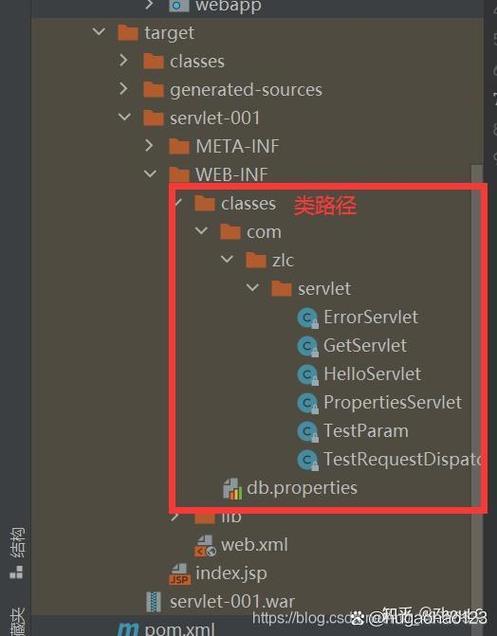
- You had the JDBC driver's JAR file in your classpath.
- You had to explicitly load the driver class using
Class.forName(). - Loading the class would trigger its static initializer block, which in turn would register the driver with the
DriverManager.
Example (JDBC 4.0 and earlier):
import java.sql.Connection;
import java.sql.DriverManager;
import java.sql.SQLException;
public class JdbcExample {
    public static void main(String[] args) {
        // The fully qualified name of the MySQL JDBC driver class
        String driverClassName = "com.mysql.cj.jdbc.Driver";
        Connection connection = null;
        try {
            // 1. Dynamically load the driver class
            // This line was crucial in older JDBC versions.
            Class.forName(driverClassName);
            // 2. Now, get a connection to the database
            // DriverManager looks for the registered driver.
            String url = "jdbc:mysql://localhost:3306/mydatabase";
            String user = "username";
            String password = "password";
            connection = DriverManager.getConnection(url, user, password);
            System.out.println("Successfully connected to the database!");
        } catch (ClassNotFoundException e) {
            System.err.println("Error: Driver class not found. Is the MySQL JDBC driver JAR in your classpath?");
            e.printStackTrace();
        } catch (SQLException e) {
            System.err.println("Error: Could not connect to the database.");
            e.printStackTrace();
        } finally {
            // 3. Close the connection
            if (connection != null) {
                try {
                    connection.close();
                } catch (SQLException e) {
                    e.printStackTrace();
                }
            }
        }
    }
}
Note: Since JDBC 4.0 (introduced with Java 6), this step is largely automatic. The DriverManager uses the Java Service Provider mechanism (via the META-INF/services/java.sql.Driver file in the driver's JAR) to find and load the driver. So, in modern Java, you can often omit the Class.forName() line. However, understanding it is still vital for legacy code and for grasping the concept of class loading.
How it Works: The Role of the Static Initializer
When you call Class.forName("MyClass"), the JVM performs the following steps:
- It looks for the class
MyClassin the classpath. - If found, it loads the class definition into memory.
- Crucially, it then executes the
staticinitializer block ofMyClass(if it exists).
A static initializer block is a block of code defined with the static keyword.
public class MyDriver {
    // This block runs ONLY ONCE when the class is first loaded.
    static {
        System.out.println("MyDriver's static initializer block is running!");
        // Code to register the driver with DriverManager would go here.
        DriverManager.registerDriver(new MyDriver());
    }
}
This is why Class.forName() was so effective for JDBC: it forced the driver to register itself with the DriverManager without you having to new an instance of it.
Syntax and Variations
The method has two main overloads:
Class.forName(String className)
This is the classic version. It uses the class loader of the calling class to load the class.
// Loads the String class using the class loader of the current class
Class<?> stringClass = Class.forName("java.lang.String");
// You can then use this Class object
System.out.println("The class is: " + stringClass.getName());
System.out.println("Is it a primitive? " + stringClass.isPrimitive());
Class.forName(String name, boolean initialize, ClassLoader loader)
This version gives you more control.
name: The fully qualified class name.initialize: A boolean flag.- If
true, the class's static initializer block is executed (just like the first version). - If
false, the class is loaded but not initialized. This is useful for advanced scenarios where you want to inspect the class's structure without running its static code.
- If
loader: The specificClassLoaderto use for loading the class. This is essential in complex applications with multiple classloaders (like in application servers).
// Load the class without running its static initializer block
Class<?> myClass = Class.forName("com.example.MyClass", false, this.getClass().getClassLoader());
Important Exception: ClassNotFoundException
The forName() method throws a ClassNotFoundException if the specified class cannot be found in the classpath. This is a checked exception, so you are required to handle it with a try-catch block or declare it in your method's throws clause.
try {
    Class<?> nonExistentClass = Class.forName("this.class.Does.Not.Exist");
} catch (ClassNotFoundException e) {
    System.out.println("Caught the expected exception: " + e.getMessage());
}
Modern Alternatives and Reflection
While Class.forName() is the traditional way to get a Class object, modern Java offers alternatives:
-
The
.classSyntax: If you have a class available at compile time, this is the simplest and most direct way.// Preferred if you know the class name at compile time Class<?> stringClass = String.class; Class<?> listClass = java.util.List.class;
-
The
.getClass()Method: If you have an instance of an object, you can get itsClassobject.String myString = "hello"; Class<?> stringClass = myString.getClass();
Once you have the Class object (from any of these methods), you can use the full power of Java Reflection:
try {
    // 1. Get the Class object
    Class<?> stringClass = Class.forName("java.lang.String");
    // 2. Get a public constructor
    java.lang.reflect.Constructor<?> constructor = stringClass.getConstructor(byte[].class, String.class);
    // 3. Create a new instance using reflection
    String newString = (String) constructor.newInstance(new byte[]{72, 101, 108, 108, 111}, "UTF-8");
    System.out.println("Newly created string: " + newString); // Output: Newly created string: Hello
} catch (Exception e) {
    e.printStackTrace();
}
Summary: Class.forName() vs. Alternatives
| Method | When to Use | Notes |
|---|---|---|
Class.forName("...") |
When the class name is a string determined at runtime. | The classic method for dynamic loading. Throws ClassNotFoundException. |
MyClass.class |
When the class name is known at compile time. | The simplest, safest, and most efficient way. No exceptions thrown. |
myObject.getClass() |
When you have an instance of the object. | Convenient when working with an existing object. |
Key Takeaways
- Dynamic Loading:
Class.forName()allows you to load a class by its name, which is provided as a string at runtime. - Static Initialization: It triggers the execution of the loaded class's
staticinitializer block. - JDBC History: Its most famous use was in JDBC to manually load database drivers before JDBC 4.0.
- Gateway to Reflection: The
Classobject it returns is the entry point for the Java Reflection API, allowing you to inspect and manipulate classes, methods, fields, and constructors. - Checked Exception: It throws
ClassNotFoundException, which must be handled. - Alternatives Exist: For compile-time known classes, use the
.classsyntax. For instances, use.getClass().