Of course! Let's dive deep into using Python's socket module for Datagram (UDP) communication.
This guide will cover:
- What is UDP/Datagram? (A quick refresher)
- Key Differences: UDP vs. TCP
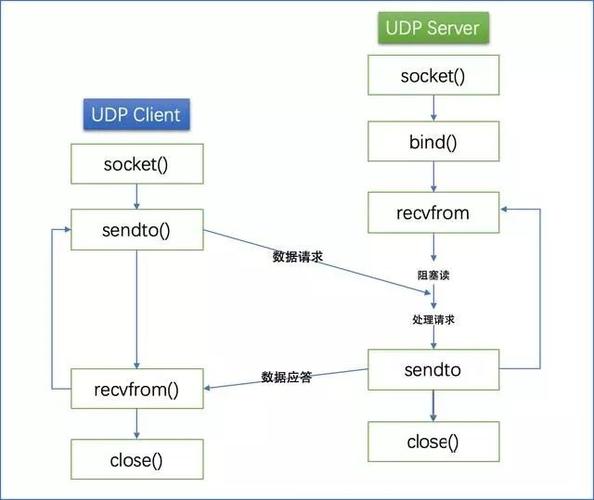
- The Core UDP Sockets API in Python
- Complete Code Examples: A simple "Echo Server" and a corresponding client.
- Handling Real-World Issues: Multiple clients, losing messages, and structuring data.
- Best Practices and Security
What is UDP/Datagram?
UDP (User Datagram Protocol) is a connectionless, "fire-and-forget" network protocol. When you send data with UDP, you package it into a datagram (a self-contained, independent unit of data) and send it to a destination IP address and port.
Think of it like sending a postcard:
- You write your message (the data).
- You put it in an envelope with a destination address (IP:Port).
- You drop it in the mailbox (the network).
- You don't know if or when it will arrive, and you don't get a confirmation.
- The postcards might arrive out of order.
Key Differences: UDP vs. TCP
| Feature | TCP (Stream) | UDP (Datagram) |
|---|---|---|
| Connection | Connection-oriented (Handshake: SYN, SYN-ACK, ACK) |
Connectionless (No handshake) |
| Reliability | Reliable. Guarantees data arrives, in order, without errors. | Unreliable. No guarantee of delivery, order, or integrity. |
| Speed | Slower due to handshaking, acknowledgements, and error correction. | Faster. No overhead for connection management or reliability. |
| Data Flow | Byte stream. Data is a continuous stream of bytes. Boundaries are not preserved. | Message-based. Data is sent and received in discrete packets (datagrams). Boundaries are preserved. |
| Use Cases | Web browsing (HTTP/HTTPS), File Transfer (FTP), Email (SMTP) | Video streaming, VoIP, DNS, Online gaming, Broadcasting |
The Core UDP Sockets API in Python
The socket module makes UDP programming straightforward. Here are the key methods you'll use.
socket.socket(family, type)
Creates a socket object.
family: Typicallysocket.AF_INETfor IPv4.type: For UDP, this issocket.SOCK_DGRAM.
import socket
# Create a UDP socket
sock = socket.socket(socket.AF_INET, socket.SOCK_DGRAM)
socket.bind(address)
Binds the socket to a specific network interface and port. The server must do this to listen for incoming datagrams.
address: A tuple(ip_address, port_number).ip_address: Use'0.0.0.0'to listen on all available network interfaces. Use'127.0.0.1'to listen only on localhost.port_number: A number between 1024 and 65535 (below 1024 are often restricted).
server_address = ('0.0.0.0', 10000)
sock.bind(server_address)
print(f"Server up and listening on {server_address}")
socket.sendto(bytes, address)
Sends data through the socket.
bytes: The data you want to send, must be in bytes. You'll need to encode it (e.g.,message.encode('utf-8')).address: A tuple(ip_address, port_number)of the recipient.
message = b"Hello from the server!"
client_address = ('192.168.1.10', 12345)
sock.sendto(message, client_address)
socket.recvfrom(buffer_size)
Receives data from the socket. This is a blocking call, meaning the program will pause here until a datagram is received.
buffer_size: The maximum amount of data to read in one go (e.g., 4096 bytes).- Returns a tuple:
(data, address)data: The received data as abytesobject.address: A tuple(ip_address, port_number)of the sender.
data, client_address = sock.recvfrom(4096)
print(f"Received {data.decode()} from {client_address}")
socket.close()
Closes the socket, releasing the network resource.
sock.close()
Complete Code Examples: Echo Server & Client
This is the classic "Hello, World!" of socket programming. The server receives a message and sends the exact same message back to the client.
The Server (udp_server.py)
This server will run forever, waiting for messages from any client.
# udp_server.py
import socket
# Create a UDP socket
sock = socket.socket(socket.AF_INET, socket.SOCK_DGRAM)
# Bind the socket to a specific address and port
server_address = ('0.0.0.0', 10000)
print(f"Starting up server on {server_address}")
sock.bind(server_address)
# Loop to receive messages
while True:
    print("\nWaiting to receive message...")
    # recvfrom() is a blocking call
    data, client_address = sock.recvfrom(4096) # 4096 is the buffer size
    print(f"Received {data.decode()} from {client_address}")
    # Echo the message back to the client
    print(f"Sending data back to {client_address}")
    sock.sendto(data, client_address)
The Client (udp_client.py)
This client will send a single message to the server and print the response.
# udp_client.py
import socket
# Create a UDP socket
sock = socket.socket(socket.AF_INET, socket.SOCK_DGRAM)
server_address = ('localhost', 10000) # Use '127.0.0.1' or the server's IP
message = b'This is the message. It will be repeated.'
try:
    print(f"Sending '{message.decode()}' to {server_address}")
    # Send data to the server
    sock.sendto(message, server_address)
    # Wait for the server's response
    print("Waiting for server response...")
    data, server = sock.recvfrom(4096)
    print(f"Received echoed message: '{data.decode()}' from {server}")
finally:
    print("Closing socket")
    sock.close()
How to Run:
- Open two terminal windows.
- In the first terminal, run the server:
python udp_server.py - In the second terminal, run the client:
python udp_client.py
You will see the server receive the message and send it back, and the client will print the echoed response.
Handling Real-World Issues
A. Multiple Clients (Concurrency)
UDP servers are naturally concurrent. The recvfrom call in the server's while True loop doesn't care which client sends data. It simply receives the datagram, gets the sender's address from the datagram itself, and can reply directly to that address. The single-threaded loop handles all clients sequentially as messages arrive.
B. Losing Messages (Unreliability)
The biggest challenge with UDP is that you can't rely on recvfrom to ever get called. What if the client's message is lost? The server will never know, and the client will hang forever waiting for a response that will never come.
Solution on the Client: Implement a Timeout.
You can use sock.settimeout(seconds) to make recvfrom raise a socket.timeout exception if it doesn't receive data within the specified time.
# udp_client_with_timeout.py
import socket
import time
sock = socket.socket(socket.AF_INET, socket.SOCK_DGRAM)
server_address = ('localhost', 10000)
message = b'Test message with timeout'
sock.settimeout(2.0) # Wait a maximum of 2 seconds for a response
try:
    print(f"Sending '{message.decode()}'...")
    sock.sendto(message, server_address)
    print("Waiting for response (with a 2s timeout)...")
    try:
        data, server = sock.recvfrom(4096)
        print(f"Received: '{data.decode()}'")
    except socket.timeout:
        print("ERROR: Server did not respond within the timeout period.")
finally:
    sock.close()
Now, if you stop the server before running the client, the client will print the timeout error instead of hanging indefinitely.
C. Structuring Data (Sending More Than Strings)
You can send any bytes. This is powerful for sending structured data like numbers, lists, or custom objects. You must use a consistent serialization/deserialization format.
Example: Sending a list of numbers.
# On the client
import struct
numbers = [3.14159, 2.71828, 1.41421]
# Pack the list into a binary string using 'd' (double) format
# The format string '3d' means 3 doubles
packed_data = struct.pack('3d', *numbers)
sock.sendto(packed_data, server_address)
# On the server
# Unpack the binary string back into a list of numbers
received_data, _ = sock.recvfrom(4096)
unpacked_numbers = struct.unpack('3d', received_data)
print(f"Received numbers: {unpacked_numbers}")
Other popular formats for serializing complex data are JSON and Pickle.
Best Practices and Security
- Firewalls: UDP traffic can be blocked by firewalls. If your application doesn't work, this is a common culprit.
- Buffer Size: The
recvfrombuffer size is important. If a datagram is larger than your buffer, it will be truncated. For most applications, 4096 or 8192 bytes is a safe start. - Port Conflicts: If you try to
bindto a port that is already in use (by another program or a previous instance of your script), you will get anOSError: [Errno 98] Address already in use. - Security (Validation): Never trust data received from the network. Always validate the content and size of incoming datagrams to prevent buffer overflow attacks or crashes from malformed data.
- Broadcasting: UDP allows you to send a single datagram to all devices on a local network using a broadcast address (e.g.,
168.1.255). To do this, you may need to set the socket option:sock.setsockopt(socket.SOL_SOCKET, socket.SO_BROADCAST, 1). Use this with caution