Of course! Java and JasperReports are a powerful combination for generating dynamic, high-quality reports from Java applications. This guide will cover everything from the basics to advanced concepts, complete with code examples.
What is JasperReports?
JasperReports is an open-source Java library for creating reports. It allows developers to define report layouts (templates) using an XML-based language called JRXML. At runtime, the Java application fills this template with data from various sources (like databases, collections, or POJOs) to generate a final report in various formats, such as:
- PDF (most common)
- HTML
- Excel (XLSX)
- CSV
- XML
- Images (PNG, JPG)
Think of it as a "Swiss Army knife" for reporting in the Java ecosystem.
Core Concepts and Workflow
The process of generating a report with JasperReports follows these main steps:
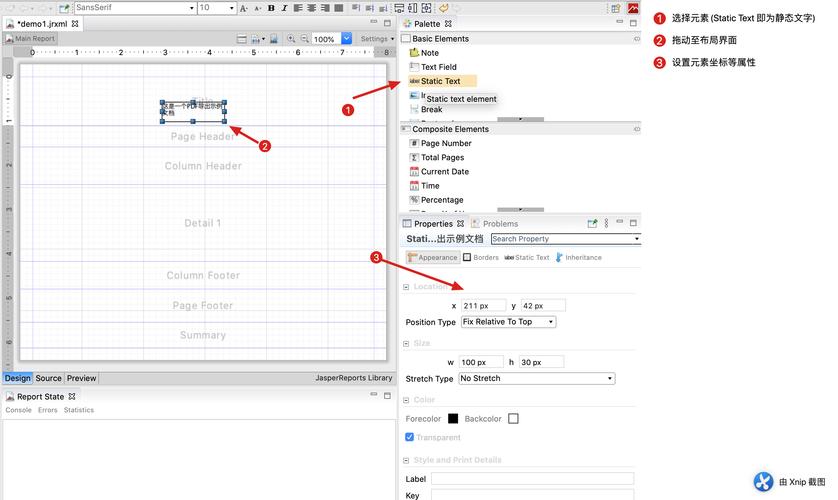
- Design the Report Layout (JRXML): Create an XML file that defines the structure of your report (title, page header, detail bands, columns, etc.). You can create this file manually or, more commonly, using a visual designer like Jaspersoft Studio (a standalone Eclipse-based IDE).
- Compile the JRXML: The
.jrxmlfile is a human-readable template. It must be compiled into a binary, platform-independent.jasperfile. This.jasperfile is what the Java engine uses to generate the report. - Fill the Report with Data: Use Java code to load the
.jasperfile and supply it with data (usually from aDataSourceor aJRBeanCollectionDataSource). - Export the Report: Take the filled report (a
JasperPrintobject) and export it to your desired output format (PDF, HTML, etc.).
Step-by-Step Example: A Simple Report
Let's create a classic "Hello World" style report that lists products from a database.
Step 1: Add Dependencies
You'll need the JasperReports library in your project. If you're using Maven, add this to your pom.xml:
<dependencies>
    <!-- JasperReports Core Library -->
    <dependency>
        <groupId>net.sf.jasperreports</groupId>
        <artifactId>jasperreports</artifactId>
        <version>6.21.3</version> <!-- Use the latest version -->
    </dependency>
    <!-- JDBC Driver for your database (e.g., PostgreSQL) -->
    <dependency>
        <groupId>org.postgresql</groupId>
        <artifactId>postgresql</artifactId>
        <version>42.6.0</version>
    </dependency>
</dependencies>
Step 2: Design the Report Layout (JRXML) with Jaspersoft Studio
- Download and install Jaspersoft Studio.
- Create a new Jasper Report.
- Use the "Report Wizard" to create a simple report with a table.
- Design your report. For a product list, you might have:
- A title band: "Product List"
- A column header band: "ID", "Name", "Price"
- A detail band: Fields for
$F{ID},$F{NAME},$F{PRICE}
- Save the file as
ProductList.jrxml.
Here's what a simplified ProductList.jrxml might look like:
<?xml version="1.0" encoding="UTF-8"?>
<!-- Created with Jaspersoft Studio version 6.21.3.final using JasperReports Library version 6.21.3-0e0f1a3d2a9a8a8a8a8a8a8a8a8a8a8a8a8a8a8a -->
<jasperReport xmlns="http://jasperreports.sourceforge.net/jasperreports" xmlns:xsi="http://www.w3.org/2001/XMLSchema-instance" xsi:schemaLocation="http://jasperreports.sourceforge.net/jasperreports http://jasperreports.sourceforge.net/xsd/jasperreport.xsd" name="ProductList" pageWidth="595" pageHeight="842" columnWidth="555" leftMargin="20" rightMargin="20" topMargin="20" bottomMargin="20">
    <queryString>
        <![CDATA[SELECT id, name, price FROM products]]>
    </queryString>
    <field name="id" class="java.lang.Integer"/>
    <field name="name" class="java.lang.String"/>
    <field name="price" class="java.math.BigDecimal"/>
        <band height="70">
            <staticText>
                <reportElement x="0" y="20" width="555" height="50" forecolor="#000000"/>
                <textElement textAlignment="Center">
                    <font size="24" isBold="true"/>
                </textElement>
                <text><![CDATA[Product List]]></text>
            </staticText>
        </band>
    <columnHeader>
        <band height="30">
            <staticText>
                <reportElement x="0" y="0" width="100" height="30"/>
                <textElement textAlignment="Center">
                    <font isBold="true"/>
                </textElement>
                <text><![CDATA[ID]]></text>
            </staticText>
            <staticText>
                <reportElement x="100" y="0" width="300" height="30"/>
                <textElement textAlignment="Center">
                    <font isBold="true"/>
                </textElement>
                <text><![CDATA[Name]]></text>
            </staticText>
            <staticText>
                <reportElement x="400" y="0" width="155" height="30"/>
                <textElement textAlignment="Center">
                    <font isBold="true"/>
                </textElement>
                <text><![CDATA[Price]]></text>
            </staticText>
        </band>
    </columnHeader>
    <detail>
        <band height="20">
            <textField>
                <reportElement x="0" y="0" width="100" height="20"/>
                <textFieldExpression><![CDATA[$F{id}]]></textFieldExpression>
            </textField>
            <textField>
                <reportElement x="100" y="0" width="300" height="20"/>
                <textFieldExpression><![CDATA[$F{name}]]></textFieldExpression>
            </textField>
            <textField>
                <reportElement x="400" y="0" width="155" height="20"/>
                <textFieldExpression><![CDATA[$F{price}]]></textFieldExpression>
            </textField>
        </band>
    </detail>
</jasperReport>
Step 3: Write the Java Code to Compile and Fill the Report
This Java class will connect to the database, compile the JRXML, fill it with data, and export it to a PDF file.
import net.sf.jasperreports.engine.*;
import net.sf.jasperreports.engine.data.JRBeanCollectionDataSource;
import net.sf.jasperreports.engine.design.JasperDesign;
import net.sf.jasperreports.engine.xml.JRXmlLoader;
import net.sf.jasperreports.engine.export.JRPdfExporter;
import net.sf.jasperreports.export.SimpleExporterInput;
import net.sf.jasperreports.export.SimpleOutputStreamExporterOutput;
import java.sql.Connection;
import java.sql.DriverManager;
import java.sql.PreparedStatement;
import java.sql.ResultSet;
import java.util.ArrayList;
import java.util.HashMap;
import java.util.List;
import java.util.Map;
public class JasperReportGenerator {
    // --- Database Connection Details ---
    private static final String DB_URL = "jdbc:postgresql://localhost:5432/your_database";
    private static final String DB_USER = "your_user";
    private static final String DB_PASSWORD = "your_password";
    public static void main(String[] args) {
        try {
            // 1. Compile the JRXML file into a JasperReport object
            JasperReport jasperReport = compileReport("ProductList.jrxml");
            // 2. Get data from the database
            List<Product> products = getProductsFromDatabase();
            // 3. Fill the report with data
            JasperPrint jasperPrint = fillReport(jasperReport, products);
            // 4. Export the report to a PDF file
            exportToPdf(jasperPrint, "ProductList_Report.pdf");
            System.out.println("Report generated successfully!");
        } catch (JRException e) {
            System.err.println("JasperReports Error: " + e.getMessage());
            e.printStackTrace();
        } catch (Exception e) {
            System.err.println("General Error: " + e.getMessage());
            e.printStackTrace();
        }
    }
    private static JasperReport compileReport(String jrxmlFilePath) throws JRException {
        // Load the JRXML design from file
        JasperDesign jasperDesign = JRXmlLoader.load(jrxmlFilePath);
        // Compile the design into a JasperReport object
        return JasperCompileManager.compileReport(jasperDesign);
    }
    private static List<Product> getProductsFromDatabase() throws Exception {
        List<Product>